





Legal firms can benefit from project management software just as much as any other business, but they also have needs that are unique and specific. In this article, we’ve rounded up some of the top legal project management software that you should consider during your search.
Looking for more industry-specific recommendations? Check out our top picks for the best healthcare project management software, the best project management software for construction and the best project management software for architects.
Top legal project management software compared
Lawyers and law firms must weigh many different factors when choosing legal project management software. This chart captures some of the most important factors to consider when considering legal project management software.
| Document management | Native time tracking | Billing & invoicing | Free trial or free plan | Pricing | |
|---|---|---|---|---|---|
| Asana | Yes | Yes | No | Both | Starts at $10.99 per user per month |
| Trello | No | No | No | Both | Starts at $5 per user per month |
| Smartsheet | No | Yes | No | Both | Starts at $9 per user per month |
| MyCase | Yes | Yes | Yes | Free trial only | Starts at $39 per user per month |
| monday.com | Yes | Yes | Yes | Both | Starts at $9 per user per month |
| Wrike | Yes | Yes | Yes | Both | Starts at $10.00 per user per month |
| Clio | Yes | Yes | Yes | Free trial only | Starts at $39 per user per month |
| ClickUp | Yes | Yes | No | Both | Starts at $7 per user per month |
| MerusCase | Yes | Yes | Yes | Neither | Contact sales for quote |
| CASEpeer | Yes | Yes | Yes | Neither | Starts at $79 per user per month |
Asana: Best for small law firms
Asana is general project management software with a free-forever plan, with no limits on the number of tasks or projects. This makes it a great option for small law firms looking for forever free software that isn’t too difficult to master. Asana’s simple approach to project management can’t match the more robust functionality of monday or ClickUp, but it offers a lower learning curve for beginners — which is why we also named it one of the best marketing project management software.
Asana pricing
- Free: For two users, list, board, calendar views, and 100+ integrations
- Starter: $10.99 per user/month for forms, templates, Gantt view, AI studio, automations, custom fields, workflow builder, project dashboards, and unlimited guests
- Advanced: $24.99 per user/month for goals, proofing, approvals, time tracking, goals, forms branching, and portfolio workload
- Enterprise: Custom pricing for capacity planning, mobile app controls, and admin controls
Features
- Use custom workflows and statuses to track each stage of a case or legal process
- Store legal documents within tasks for easy access and collaboration
- Integrate with email, calendars, and other legal management tools to streamline workflows
- Automate task assignments, reminders, and deadlines for court dates or reviews
Pros
- Free plan supports unlimited tasks
- Generous list of features on the free plan
- User interface is easy to learn
- Highly scalable if your team grows
Cons
- Timeline view limited to the Premium account
- Resource management like time tracking only available on the Business plan
- Tasks can only be assigned to one team member at a time
- Projects with large datasets can experience lags
Why I chose Asana
I chose Asana for its versatility and customization, which makes it easy to build workflows that reflect the stages of a legal case rather than forcing work into a generic template. Managing multiple matters is straightforward since I can organize tasks by case, set priorities, and assign deadlines. What I also find useful is how team members can communicate directly within tasks, reducing the back-and-forth that typically slows case progress.
For more information, read the full Asana review.
Trello: Best for teams on a budget
Trello is known for its intuitive Kanban boards, which use a card-like design to display the status of tasks and projects. While not specifically designed for law firms, Trello offers excellent project management features in a visually appealing interface that is simple to navigate. Its entry-level pricing plans also start at only $5 per person per month, which is one of the most affordable price points out there.
Trello pricing
- Free: For up to 10 users, 10 boards, templates, activity log, assignee, and due dates
- Standard: $6 per user/month for Planner, card mirroring, unlimited boards, custom fields, advanced checklists, and collapsible lists
- Premium: $12.50 per user/month for unlimited workspace runs, admin and security features, and views: calendar, timeline, table, dashboard, and map
- Enterprise: $17.50 per user/month for unlimited workspaces, multi-board guests, attachment restrictions, and org-wide permissions
Features
- Create visual boards to organize legal cases and workflows using lists and cards
- Track case details, client information, documents, and deadlines within individual cards
- Move cases through workflow stages to reflect progress across the legal process
- Collaborate with team members by assigning tasks and sharing updates in real time

Pros
- Highly visual Kanban boards
- Unlimited users on the forever free plan
- Seamless syncing with Atlassian products (Jira, Confluence, etc.)
- Good selection of native integrations
Cons
- Number of projects (boards) is limited to 10 on the free plan
- Need a “power up” add-on for time tracking
- Integrations are somewhat limited
- Reporting tools could be more robust
Why I chose Trello
I chose Trello for its visual approach to project tracking, where Kanban boards make it easy to see the status of ongoing legal cases. Each case becomes a card that moves across columns, so I always have a full picture of active and pending projects. Cards can hold contact details, case descriptions, attached documents, and notes on missing items, keeping everything tied to one place.
For more information, read the full Trello review.
Smartsheet: Best for spreadsheet lovers
If you are currently using Excel to project manage your law firm, then you should definitely check out Smartsheet. This software takes the familiar spreadsheet grid and elevates it with project management functionality. You can assign tasks, set due dates, notify colleagues and more — all within a familiar interface. That being said, Smartsheet’s design can feel a bit dated compared to some other alternatives, so if you’re not set on a spreadsheet-based interface, you might want to check out some other options on this list.
Smartsheet pricing
- Pro: $9 per user/month for unlimited viewers, formulas, sheets, and project views for up to 10 members
- Business: $19 per user/month for free guests, unlimited automations, conditional form logic, timeline view, workload tracking, and admin capabilities
- Enterprise: Custom pricing for work insights, AI formulas, charts, role-based sharing, unlimited attachment storage, and SSO
- Advanced Work Management: Custom pricing for Control Center and Dynamic view
Features
- Manage contracts across departments and organize them by status.
- Receive alerts for new contract requests and upcoming expirations.
- Maintain a centralized view of all contracts with secure access and retrieval.
- Track case phases and understand how changes affect upcoming tasks.

Pros
- Familiar grid-style interface
- Highly customizable dashboards
- Premium plans offer enterprise-grade security
- Over 350 templates to choose from
Cons
- No free plan
- Spreadsheet-based interface can feel outdated
- Pages don’t always update in real time.
Why I chose Smartsheet
I chose Smartsheet because its spreadsheet-style interface makes it easy to get started, especially for anyone already comfortable working in Excel or Google Sheets. It keeps case phases, documents, and hour tracking in one place and supports contract management by letting me organize agreements by department and status, flag expiring contracts, and get notified when new requests are submitted.
For more information, read the full Smartsheet review.
MyCase: Best for reporting and analytics
MyCase is another popular case management software that incorporates project management features. You can assign tasks to users, add workflows to cases, and track the status of each case using the tool. Track billable hours, invoice clients, and review financial reporting within its interface. MyCase also provides case analytics so you get an overview of file status or deep dive into a specific case.
MyCase pricing
- Basic: $39 per user/month for case management and client portal
- Pro: $89 per user/month for AI writing and document assistance, client intake management, eSignature, billing and invoicing, two-way texting, and integrations
- Advanced: $109 per user/month for full text search, case assistant, document automation, split billing, and desktop drive
A 10-day free trial for MyCase is available.
Features
- Log time for each case and automatically generate and send invoices for payment
- Share messages, documents, and upcoming tasks or events with clients in one place
- Create a firm website with client intake forms and portal access
- Sign and manage documents securely from any device

Pros
- Transparent pricing and a free trial
- All-in-one platform means you don’t need multiple software products
- Workflow automation reduces redundant work
- Unlimited storage for document management
Cons
- Accounting function could use improvement
- Fewer integrations than some competitors
- Document management isn’t very user-friendly
Why I chose MyCase
I chose MyCase for how completely it covers the entire case management process from initial client intake to billing. It centralizes case files, documents, and internal templates, with built-in time tracking and automated invoicing. What I find particularly useful is how billing connects directly to case activity, so it’s easy to track hours and generate invoices. The client portal also supports real-time communication for sharing updates and documents.
monday work management: Best for flexibility
monday work management is one of the most flexible and scalable project management solutions out there. While it’s not specifically designed for case management, law firms will find it a versatile tool for managing caseload and office projects. It also offers a separate CRM product that integrates seamlessly with its work management solution, in case you are looking for a way to manage prospective clients.
monday.com pricing
- Free plan: Up to 2 users and includes 200+ templates, Kanban view, embedded documents, and shareable forms
- Basic: $9 per user/month for 5GB storage, custom fields, unlimited documents, and monday AI credits
- Standard: $12 per user/month for Gantt view, 20GB storage, guest access, and automation & integration
- Pro: $19 per user/month for private boards, chart view, time tracking, and formulas
- Enterprise: Custom pricing for portfolio reporting and resource management
Features
- View case progress, earnings, and team performance in custom dashboards
- Set automatic reminders for client follow-ups
- Modify columns to record cases and billable hours
- Add a lawyer, paralegal, or secretary to project boards

Pros
- Advanced reporting and analytics
- Easy-to-navigate user interface
- Robust customization options
- Billing & invoicing tools included
Cons
- Time tracking limited to higher tier pricing plans
- Higher learning curve due to the number of features
- Default notification settings overwhelm users
- Import engine doesn’t always work
Why I chose monday work management
I chose monday for its adaptability, particularly how its customizable boards can be customized around different types of legal processes, from litigation tracking to compliance work. It’s built-in timer lets me log time within each task, and I can attach files, activity logs, and notes to individual items. The tool’s ability to provide multiple views of legal tasks, paired with robust reporting features, made it an easy tool to recommend for the dynamic nature of legal work.
For more information, read the full monday work management review.
Wrike: Best for managing multiple cases
Wrike is one of the most full-featured project management software platforms on the market today. It presents a steep learning curve, but it’s hard to beat when it comes to managing complex cases or many different cases at once. While not specifically designed for case management, Wrike includes a lot of features that law firms will find helpful, including time tracking and invoicing.
Wrike pricing
- Free: Unlimited users with basic task management and folder hierarchy
- Team: $10 per user/month for 2 to 15 users and adds cross-tagging, generative AI, custom fields, dashboards, Gantt charts, and portfolio management
- Business: $25 per user/month for 5 to 200 users and adds AI elite features, request forms, templates, approvals, workload charts, time tracking, and guest approvals
- Pinnacle: Custom pricing for advanced reporting, resource and capacity planning, budgeting, and locked spaces
- Apex: Custom pricing for Wrike Datahub, bi-directional integrations with third-party solutions, and advanced security controls
Features
- Advanced reporting and business intelligence
- Wrike Lock advanced encryption available
- Native time tracking and invoicing
- Legal-specific templates available

Pros
- Over 400 integrations available
- Well laid out and organized user interface
- Lots of training resources available
- Create custom automations and workflows
Cons
- Steep learning curve due to all the features
- Must upgrade to Enterprise plan for advanced security features
- Team plan capped at only 25 users
- Storage is limited per user
Why I chose Wrike
I chose Wrike for its wide range of templates that can be adapted for different workflows, including contract management, incoming requests, and invoice tracking. Its Gantt charts map out deadlines and timelines in a single view, along with task dependencies. Configuring the permission settings provides external collaborators access to specific folders without exposing confidential files.
For more information, read the full Wrike review.
Clio: Best for growing law firms
As one of the most popular case management software platforms, Clio helps lawyers keep cases, contacts, bills, and calendars organized in one place. Its two products, Clio Grow and Clio Manage, feature an intuitive design that is easy to navigate. Clio Grow streamlines the intake process to help you attract and onboard more prospective clients.
Pricing
- EasyStart: $49 per user/month for client billing, time tracking, e-signatures, client communications, and document management
- Essentials: $49 per user/month for document and matter templates, client portal, and 250+ app integrations
- Advanced: $119 per user for automated task assignments and document creation and custom reports on profitability, progress, and productivity
- Expand: $149 per user/month for legal CRM tools and advanced workflow automation
Features
- File and serve court documents electronically
- Use a built-in calculator to assess a client’s eligibility for legal aid
- Track how your team allocates time to grants with detailed reporting
- Manage expenses for liens, damages, and fees in one place

Pros
- Intuitive user interface and mobile app
- Unlimited document management
- Branded invoices and billing available
- Client intake tracking and checklist features
Cons
- Customizing the setup can be time consuming
- Separate logins for Clio Grow and Clio Manage can be confusing
- Learning curve can be intimidating for new users
Why I chose Clio
ClickUp: Best for customization
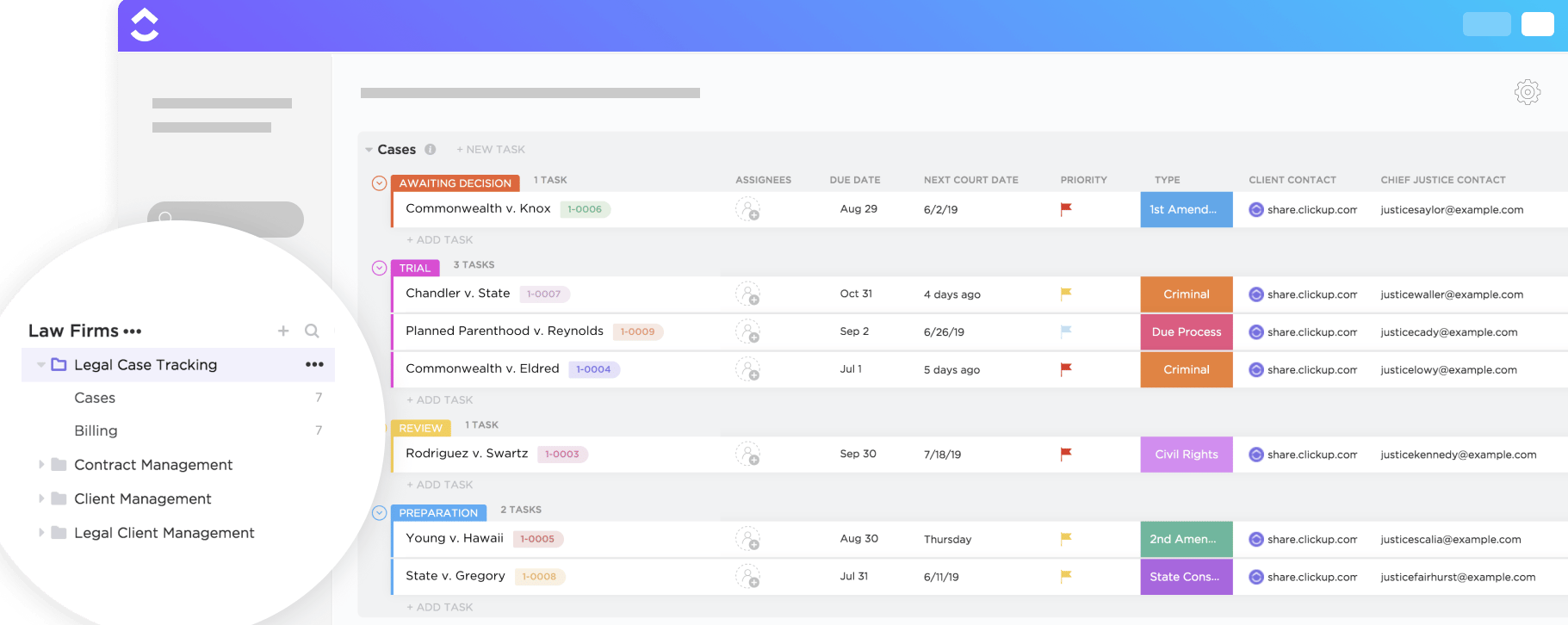
ClickUp offers a great combination of price and project management functionality. This powerful software packages robust features in a colorful, appealing interface, which is also why we named it one of the best creative project management software. The platform is also highly customizable, allowing you to structure projects, tasks, and workflows according to your firm’s needs.
Pricing
- Free Forever: Unlimited users, Kanban view, collaborative docs, 60MB storage, in-app video recording, and sprint management
- Unlimited: $7 per user/month for integrations, Gantt charts, forms, real-time chat, guest permissions, time tracking, portfolios, and resource management
- Business: $12 per user/month for timeline view, workload management, activity views, whiteboards, and sprint reporting
- Enterprise: Custom pricing for conditional logic in forms, custom workload capacity, SSO, advanced permission, enterprise API, and custom roles
Features
- Use custom workflows and statuses to track each stage of a case or legal process
- Store legal documents within tasks for easy access and collaboration
- Integrate with email, calendars, and other legal management tools to streamline workflows
- Automate task assignments, reminders, and deadlines for court dates or reviews
Pros
- Free plan does not limit the number of users
- 24/7 customer support
- More than 1,000 integrations through Zapier
- Interface is colorful and easy to navigate
Cons
- Storage for the free plan is limited to 100MB
- System occasionally lags when moving between pages
- There’s a bit of a learning curve due to the number of features
Why I chose ClickUp
I chose ClickUp for its all-in-one approach to legal project management and broad customization options. The platform’s document management capabilities, including easy note-taking, attachment, and public link sharing for client reviews make case documentation more efficient. Additionally, ClickUp’s form customization and proofing tools further simplify client intake and contract management.
For more information, read the full ClickUp review.
Key features of legal project management software
Security
Security and compliance are especially big concerns for law firms, so this should be one of your top concerns when looking for legal project management software. Keep in mind that many platforms restrict their most advanced features to higher-tier plans, so you might need to pay more to safeguard your case information.
Document management
Lawyers must manage heaps of documents every day — contracts, wills and testaments, NDAs, and more. Ideally, you want legal project management software that will let you upload and organize these documents in a cloud library. More advanced software will provide the ability to markup proofing files and e-sign the final version.
Task management
You should be able to create tasks under a specific case or project, assign them to a specific worker and set deadlines. You should also be able to choose from multiple project views like timeline (Gantt chart), board (Kanban) and grid (spreadsheet). The software should also include legal project management templates.
Team collaboration
All great project management software includes features for collaborating with your team, including task comments, @ mentions, notifications, and sometimes even a native chat function. Many platforms also include integrations for popular email clients and messaging tools like Slack so that your communication is seamless no matter what platform you are using.
Billing & invoicing
The best legal project management software will include a native time tracking module that lets you track billable hours. That data should flow right over to an invoicing tool that makes it easy to create an invoice and bill clients. It should also include its own accounting features or integrate with popular accounting programs such as QuickBooks.
How do I choose the best legal project management software for my business?
When looking for a new legal project management software, the first decision that you need to make is whether you want specialized case management software or more general-purpose project management software. Case management software is specifically designed for lawyers and will include helpful features, such as invoicing, that more general-purpose project management software may not have.
You also need to decide on your budget. Dedicated case management software typically does not offer a free forever plan, which might be an impediment for small firms or solo lawyers. Case management software also typically costs more than more general project management software, as you can see from the chart at the top. Choosing a general-purpose project management software can help you stay on budget while you get a feel for what features you need.
You should also take advantage of free trials as well as demo calls with the sales team to help you narrow down your options. Free plans let you test the software without time limits, but the features are often restricted. If you’re not totally sold on a platform, it might make more sense to pay for a month-to-month subscription at first, so you’re not locked into an annual contract if you decide to switch later on.
Methodology
To identify the best legal project management software, I built a scoring rubric based on the following factors:
Pricing (20%) I looked at whether each platform offers a free plan or only a time-limited trial, then evaluated subscription costs across entry and mid-tier plans. Annual billing discounts and the overall value per pricing tier were also taken into account.
General Features (25%) I evaluated matter management, task assignment, deadline tracking, and document handling as baseline capabilities. I also looked at how well each platform supports internal communication and file sharing.
Advanced Features (20%) I focused on capabilities specific to legal work, including time tracking, billable hour logging, client intake, contract management, and integrations with practice management or legal research platforms.
Ease of Use (15%) I measured how fast a legal team can set up the platform, factoring in interface design, the usefulness of pre-built legal templates, and its accessibility for non-technical staff handling active caseloads.
Customer service (10%) I evaluated support channel availability, hours of coverage, and how well each vendor’s documentation addresses legal-specific workflows.
Expert Score (10%) I applied a hands-on assessment covering real-world performance, pricing relative to capability, and how effectively each tool handles the compliance, confidentiality, and time-sensitivity requirements common in legal environments.
FAQs
Is legal project management software secure enough for confidential client data?
Most platforms built for legal use include encryption, role-based permissions, and audit trails to protect sensitive client information. When evaluating options, check for compliance with data protection regulations relevant to their jurisdiction and confirm whether the vendor has undergone independent security audits.
What is the average cost of legal project management software?
Pricing varies depending on the platform and firm size. Entry-level plans typically start between $10 and $40 per user per month, while more comprehensive platforms with billing, document management, and integrations can cost $50 or more per user per month. Many vendors offer annual billing discounts and free trials so you can test the platform before committing.
What features should legal project management software have?
Key features to look for include task management, deadline tracking, document storage, time and billing tracking, client communication tools, and integrations with legal research platforms. Role-based access controls are also important for maintaining client confidentiality.
Read the full article here