




After thoroughly evaluating eight project management tools, I found Smartsheet to be the best overall alternative to Microsoft Project. TeamGantt excels with its robust Gantt chart functionality, while monday work management impresses with advanced reporting capabilities and highly customizable dashboards.
For project managers who have to handle complex projects, a project management software solution often comes in handy. Among the most widely used is Microsoft Project.
Microsoft Project, along with Microsoft Planner, offers robust project management functionality, including Gantt charts and task dependencies, making it a popular choice among project managers. However, as it is intended for more experienced users, this tool requires a steep learning curve for beginners.
Microsoft Project is also designed to integrate with the Microsoft ecosystem, rather than with other platforms, which makes it harder to incorporate into your workflow if you do not already own other Microsoft products.
According to Wellingtone’s The State of Project Management 2024 report, one of the top 10 challenges projects face is the lack of appropriate software, with 50% of organizations surveyed sharing they spend days manually collating project reports.
To help you find a tool that better fits your needs, we have compiled a list of 8 alternatives to Microsoft Project, along with their best use case.
What are the top alternatives to Microsoft Project?
Below is a detailed comparison of the Microsoft Project alternatives covered in this guide. The table highlights which project management tools provide a free trial, offer easy onboarding, and include advanced integration capabilities.
| Overall score (out of 5) | Starting price | Free trial | Ease of onboarding | Integration with other platforms | |
|---|---|---|---|---|---|
| Microsoft Project | 4.19 | $10 per user, per month, billed annually | Yes | Medium | Medium |
| Smartsheet | 4.81 | $9 per user, per month, billed annually | Yes | Easy | Good |
| TeamGantt | 4.33 | $10 per project, per month, billed annually | Yes | Easy | Good |
| monday work management | 4.72 | $9 per seat, per month, billed annually | Yes | Medium | Good |
| ClickUp | 4.54 | $7 per user, per month, billed annually | Limited | Medium | Good |
| Wrike | 4.53 | $10 per user, per month | Yes | Easy | Good |
| Teamwork | 4.58 | $9.99 per user, per month, billed annually | Yes | Easy | Good |
| Jira | 4.6 | $7.91 per user, per month | Yes | Easy | Good |
| Airtable | 4.28 | $20 per user, per month, billed annually | Yes | Medium | Good |
Why Smartsheet is the top Microsoft Project alternative
Our rating: 4.81 out of 5
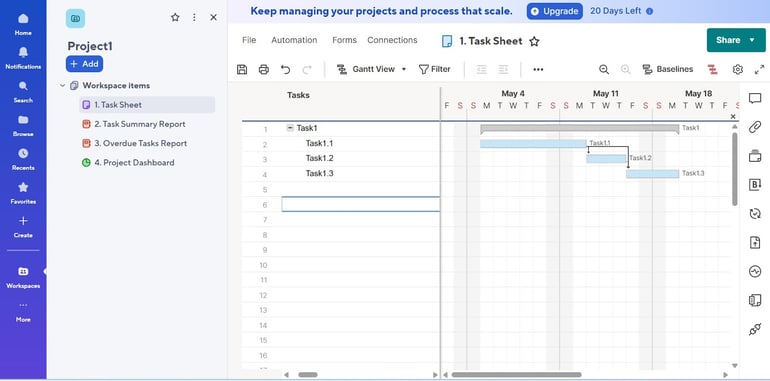
Smartsheet stands out for its multiple work views (Gantt, table, board, timeline), offering more flexibility for your project needs. It also comes with a dashboard that readily informs you of the status of your project.
Smartsheet’s user interface is intuitive, and it has a collection of onboarding resources that first-time users can use to familiarize themselves with the platform. There is a sandbox feature that allows you to preview apps before deployment. Smartsheet also integrates seamlessly with Microsoft 365 and offers integration with over 100 other platforms.
Why I picked Smartsheet: I especially liked its familiar spreadsheet-like interface, which, combined with versatile work views, makes it a highly flexible project management solution.
Pricing
- Pro: $9 per user, per month, billed annually; $12 per month
- Business: $19 per user, per month, billed annually; $24 per month
- Enterprise and Advanced Work Management: Custom pricing
Smartsheet pros and cons
| Users can easily switch between different work views (Gantt charts, table, board, timeline). | Offline support is limited, as full offline editing or syncing sheets is not supported. |
| Dashboards and reports are available in real time. | A free trial is available, but no free plan. |
| Provides sandbox to preview apps before deployment. | The user interface is based on a spreadsheet, as the name suggests, which may look old-fashioned and outdated. |
When to choose Smartsheet over Microsoft Project
Smartsheet offers an intuitive user interface while still providing the standard features of a project management software solution. It enables users to switch between different work views (e.g., Gantt, table, board, timeline, task). Creating reports and dashboards in Smartsheet is also straightforward, allowing you to view the status of your project readily, and it has all the essential project plan elements such as lead and lag time, dependencies, and formulas.
Comparing Microsoft Project vs. Smartsheet, users who are already comfortable with spreadsheets will find the latter more accessible and easier to navigate.
Why TeamGantt is best for Gantt charts

Our rating: 4.33 out of 5
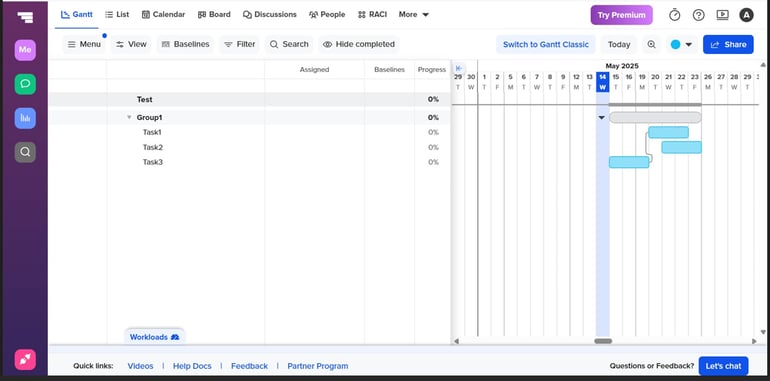
TeamGantt places emphasis on visual timelines, particularly the use of Gantt charts for scheduling, organizing, and tracking tasks. Its drag-and-drop interface allows you to build Gantt charts in minutes so you can start managing tasks right away. And if you wish to view your data a different way, TeamGantt allows switching between multiple views including kanban board, calendar, and list, with just a single click.
Why I picked TeamGantt: I am impressed with TeamGantt’s interactive, drag-and-drop Gantt chart feature, which allows users to adjust timelines, assign tasks, and track dependencies with so much ease.
Pricing
- Free plan: Up to 40 tasks for personal projects
- Basic: $10 per project, per month, billed annually; $12 per month
- Business: $19 per project, per month, billed annually; $24 per month
- Builder Edition: $99 per month
TeamGantt pros and cons
| User-friendly interface | More expensive than competitors that offer the same level of functionality |
| Provides video tutorials and tips that are especially helpful for beginners | Does not support offline access; Internet is required for project access and updates |
| Available in both web app and mobile app, and works on iOS and Android | Does not support single-sign-on (SSO) authentication |
When to choose TeamGantt over Microsoft Project
If you prefer using Gantt charts to present project data, TeamGantt makes an excellent choice. This Microsoft Project alternative makes Gantt chart creation easy and straightforward, with an interface that is clean and simple enough for anyone to use, regardless of technical skill level. TeamGantt also allows importing files from MS Project, ensuring a smooth and quick transition.
Why monday work management excels in reporting and dashboards

Our rating: 4.72 out of 5
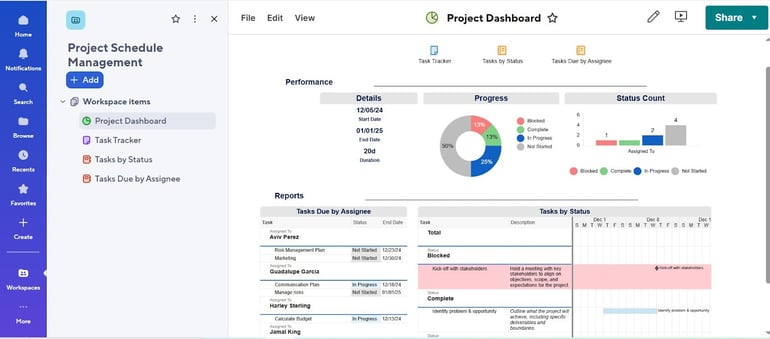
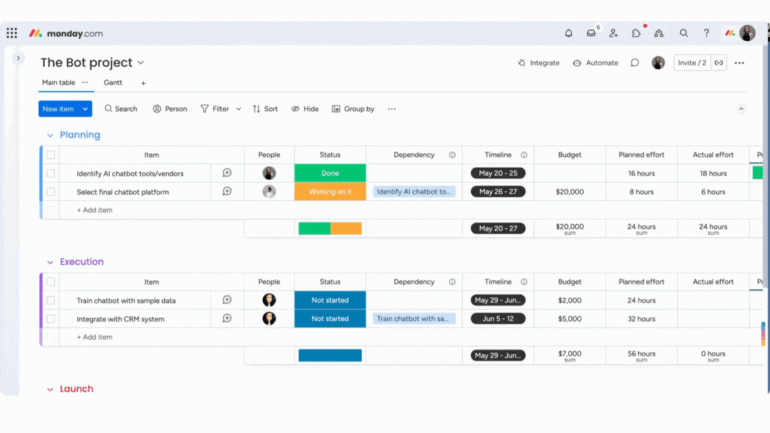
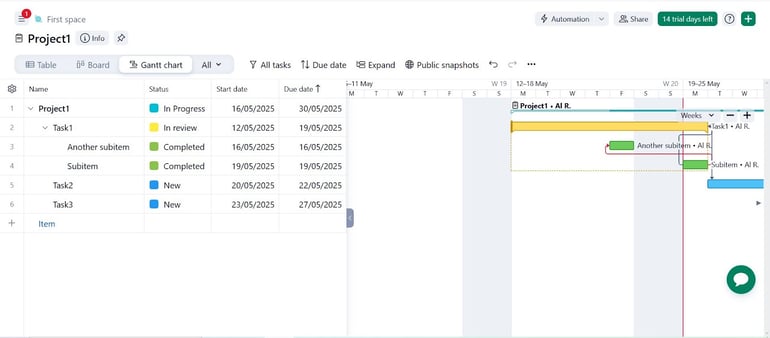
monday work management offers highly customizable reports and dashboards. It can pull real-time data across multiple boards and present them in an integrated dashboard. The tool also provides standard project management functionality, including Gantt charts, project baseline, critical path, and time tracking.
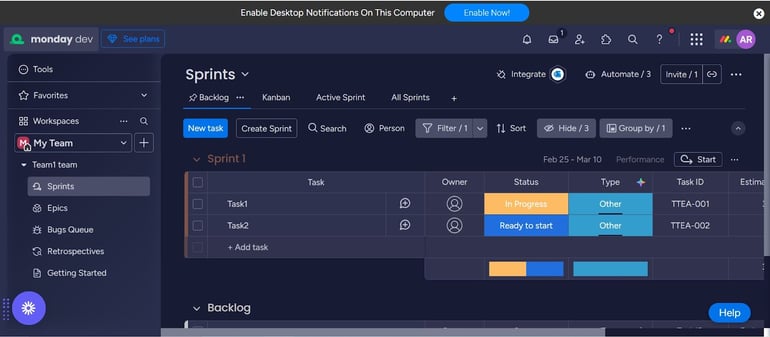
Why I picked monday work management: monday work management’s visually driven, board-based interface that comes with extensive customization options earned itself a spot on this list.
Pricing
There are 5 pricing options: Free, Basic, Standard, Pro, and Enterprise.
- Free: Up to 2 seats
- Basic: $9 per seat, per month, billed annually; $12 per month
- Standard: $12 per seat, per month, billed annually; $14 per month
- Pro: $19 per seat, per month, billed annually; $24 per month
- Enterprise: Quote is available upon request.
monday work management pros and cons
| The dashboards are highly customizable and support widgets for KPIs, charts, timelines, workloads, and more, pulling real-time data across multiple boards | Does not provide a separate sandbox for long-term testing or development |
| Provides many templates for various industries | Limited native tooltips or inline guidance within the p |
| Integrates with many platforms and also supports single sign-on (SSO) |
When to choose monday work management over Microsoft Project
If you often need to present your projects to various stakeholders with different preferences, monday is the tool for you. It provides highly customizable reports and dashboards that allow you to present data in a manner that is visually engaging and easy to digest.
monday also provides many templates for various industries, so whether you are in construction or IT, you can be sure you will find a template that meets your requirements.
Why ClickUp offers the best value

Our rating: 4.54 out of 5
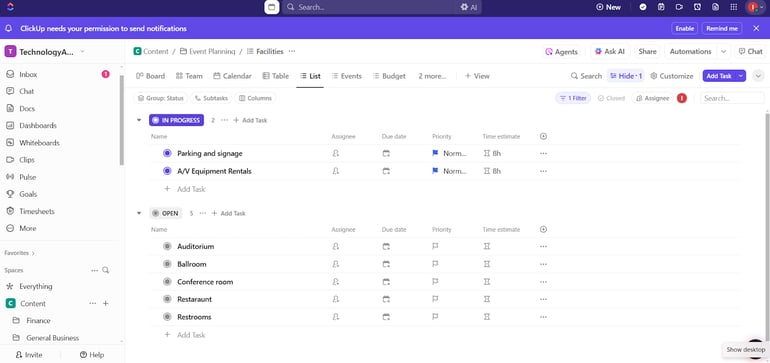
Just like Microsoft Project, which promotes large-scale collaboration through project plan sharing, ClickUp also places value on collaboration by bringing tasks, tools, and teams together in one unified platform.
ClickUp provides features like whiteboards and spreadsheets that team members can use together to exchange ideas and feedback.
ClickUp has a free-forever plan that comes with basic project management features — perfect for small teams on a budget. Its competitive pricing is what sets ClickUp apart from other alternatives to Microsoft Project.
Why I picked ClickUp: I chose ClickUp for its seamless real-time collaboration, with features like Chat, task comments, Whiteboards, and Docs.
Pricing
- Free Forever Plan: Unlimited tasks
- Unlimited: $7 per user, per month, billed annually; $10 per month
- Pro: $12 per user, per month, billed annually; $19 per month
- Enterprise: Contact sales
ClickUp pros and cons
| More affordable plans | Does not provide a sandbox-only testing environment |
| Equipped with various pre-built integrations across collaboration, storage, and developer tools | Less intuitive user interface |
| Offers more than 1,000 templates across various industries |
When to choose ClickUp over Microsoft Project
ClickUp boasts a competitive price while also offering a Free Forever plan, so if budget is a main concern for your team or business, ClickUp is worth a try. And though it is priced lower than most, ClickUp provides standard project management software capabilities, including its free plan, offering features like multiple views and a collection of templates for all sorts of tasks across different industries.
Why Wrike leads in platform integration

Our rating: 4.53 out of 5
Wrike stands out for its seamless integration with other platforms. It features over 400 native and third-party integrations accessible via its app directory and Wrike Integrate, including Salesforce, Zoom, Box, and more.
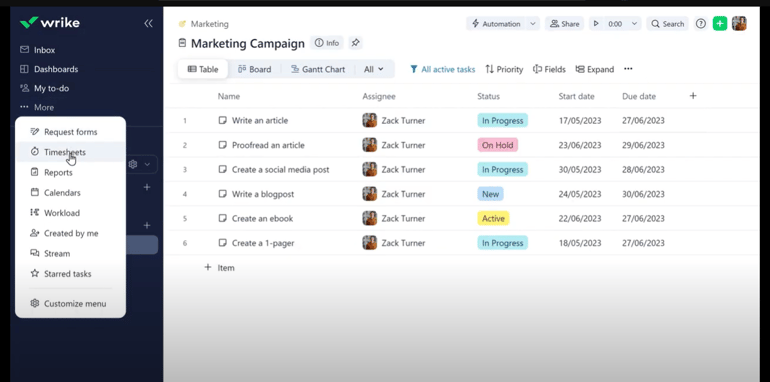
Additionally, Wrike has time-tracking features and timesheets, which aids in workload management. This project management tool makes an excellent choice for those who want to become a project manager and would need to manage the workload of a huge team, including freelancers, closely.
Why I picked Wrike: Its ability to integrate with a number of third-party applications, especially for time-tracking and advanced reporting, made it an easy choice as an MS Project alternative.
Pricing
- Free: Project and task management
- Team: $10 per user, per month
- Business: $25 per user, per month
- Enterprise: Contact sales
- Pinnacle: Contact sales
Wrike pros and cons
| Wrike provides built-in time tracking plus timesheets for reviewing logged hours—ideal for both individual tracking and team level. | Some pricing plans include both maximum and minimum user limits, which restricts flexibility in managing the number of users. |
| Wrike has over 400 native and third-party integrations accessible via its app directory and Wrike Integrate | Sandboxing is not straightforward and needs some adjustment |
| Wrike provides robust mobile applications for both iOS and Android devices. | Wrike has limited built-in tooltips or inline guides; most help is accessed through external articles or the help center |
When to choose Wrike over Microsoft Project
Choose Wrike if you need a tool that integrates with a lot of third-party applications. Unlike Microsoft Project, which does not integrate well beyond the Microsoft ecosystem, Wrike has a vast array of native and third-party integrations that are all meant to make managing projects easier.
These integrations include Jira, Slack, Salesforce, Zoom, as well as Microsoft applications such as Teams, Sheets, Drive, and Outlook. Wrike also provides built-in time tracking plus timesheets for reviewing logged hours, a good feature if you need to closely manage the timesheets of your team members, including freelancers.
Why Teamwork is best for budget management

Our rating: 4.58 out of 5
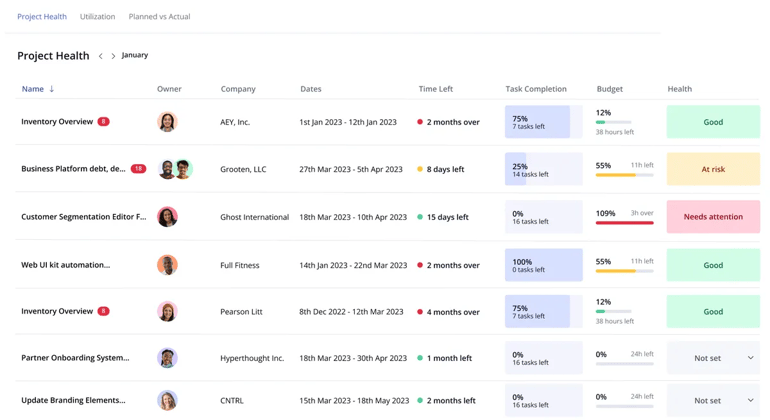
Teamwork provides all-in-one project budget management features, from a project expense tracker (in the form of timesheets) to project revenue monitoring and invoicing. Teamwork is your go-to platform if you need to manage the budget of your project closely. It also features a user-friendly layout, drag-and-drop capability, and critical path viewing.
Why I picked Teamwork: It allows me to create budgets on projects so it’s easy to track hours and money spent, making it easier to prevent cost overruns.
Pricing
- Free: Up to five projects
- Basics: $9.99 per user, per month, billed annually; $13.99 per month
- Accelerate: $24.99 per user, per month, billed annually; $29.99 per month
- Optimize: Contact sales
- Enterprise: Contact sales
Teamwork pros and cons
| Great for managing project budget, with features such as timesheet, billable hours, invoices, etc. | Does not support offline mode |
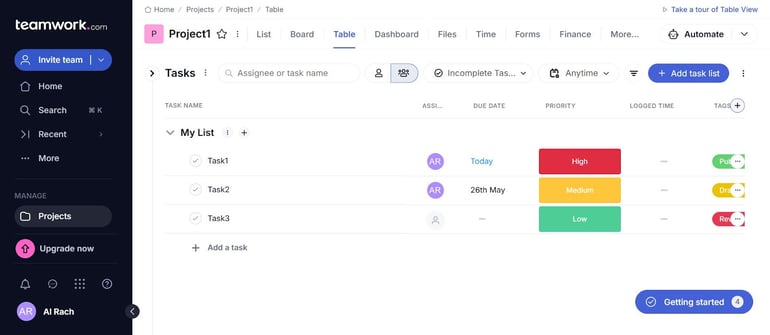
| Provides multiple work views, including Gantt chart, board, list, and table | Certain features, like single sign-on and sandbox, are only available in the Enterprise plan |
| Features drag-and-drop interface and critical path viewing |
When to choose Teamwork over Microsoft Project
Teamwork’s core functionality is to manage resources. It comes with timesheets and a billable hour tracker so it’s easier to calculate total expenses and compare them against revenue and profit. Teamwork is the choice of project management software if you need to closely manage the budget of your project and if the profitability of your project is critical for your organization.
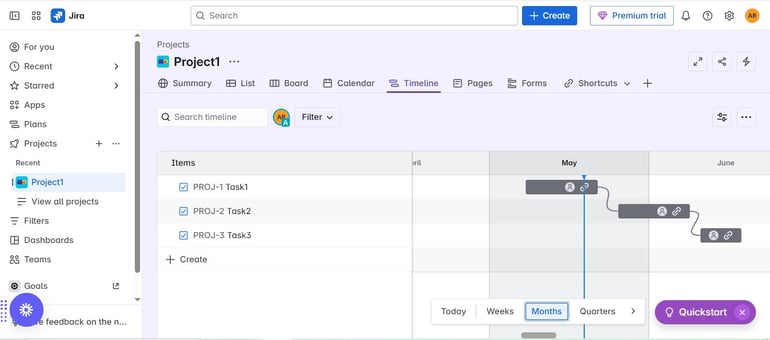
Why Jira is ideal for software teams

Our rating: 4.60 out of 5
Software development remains one of the most in-demand types of projects, and Jira has positioned itself as the leading platform in this space. This MS Project alternative has a range of features specifically designed for software development, including bug tracking and managing the launch of software versions.
Why I picked Jira: Jira’s strong Agile support and robust issue and bug tracking capabilities make it a solid alternative to MS Project, which offers only limited Agile functionality.
Pricing
- Free Forever Plan: Unlimited goals, projects, tasks, and forms
- Standard: $7.91 per user, per month
- Premium: $14.54 per user, per month
- Enterprise: Contact sales
Jira pros and cons
| Provides Agile reports, DevOps reports, issue analysis reports, and forecast management reports | Does not provide offline support |
| Comes with a diverse set of pre-built templates for different use cases | Has limited inline tooltips or in-app resources |
| Scalable, with paid plans accommodating up to 50,000 users and allowing admins to add/remove seats easily | Requires a steep learning curve for beginners |
When to choose Jira over Microsoft Project
Jira is the platform of choice if your team is dealing mostly with software development. Jira has features tailored specifically for software development and Agile projects. It has capabilities for user stories and calculating story points, which are critical to Scrum. If you are a small team of 10 people or fewer, you can benefit from its Free Forever plan.
Why Airtable excels in flexible access

Our rating: 4.28 out of 5
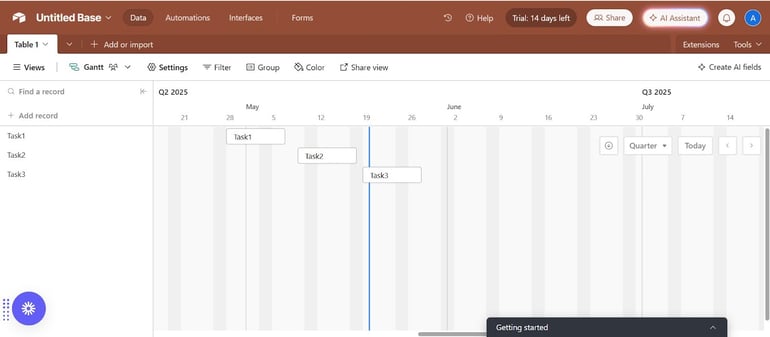
If you need flexible user access, then Airtable should be on your consideration. Airtable only charges users who have editing access, while read-only users and commenters can use the tool for free. The standard functionality of a project management software solution, such as Gantt chart with dependencies, grid, and list view, is included in all plans including the free tier.
Why I picked Airtable: Its pricing structure and flexible user access made Airtable stand out as a strong MS Project alternative.
Pricing
- Free: Up to 500 AI credits per editor each month
- Team: $20 per user, per month, billed annually; $24 per month
- Business: $45 per user, per month, billed annually; $54 per month
- Enterprise: Contact sales
Airtable pros and cons
| Allows flexible user management; billing is based on editor seats only, and read-only users or commenters are free | Does not natively offer project baselines as baseline comparisons require manual workaround |
| Supports SAML 2.0-based single sign-on (SSO) | There are too many pop-up tips coming out, which can distract the users |
| Offers iOS and Android mobile apps with access to bases, tables, and multiple views such as calendar and gallery | The user interface is not as intuitive as others |
When to choose Airtable over Microsoft Project
Choose Airtable if you have many stakeholders viewing and commenting but not directly working on your projects, as you can benefit from its free access for read-only users and commenters.
FAQs
Is Microsoft Project worth it?
There are some conditions under which Microsoft Project might be worth it. First, if you are already working with many Microsoft products. Second, if you are handling large and complex projects, such as in construction. Third, if you are familiar with other heavy-duty Gantt chart platforms such as Primavera. If you tick all those boxes, then Microsoft Project should be considered.
Is there a Google version of Microsoft Project?
Google does not offer comprehensive project management software. However, Google Workspace in itself is an ecosystem of simple and lightweight project management tools. There is a Google Form to create tasks, track progress, and assign responsibilities. Google Calendar can be used to schedule meetings, set deadlines, and manage team availability. And Google Docs can be utilized to create, edit, and share documents.
Can I import Microsoft Project files into these tools?
Yes, you can import Microsoft Project files into these tools. However, there is no direct way to do it, as these alternatives do not offer native support for MPP assets. You need to convert the MS Project file (.mpp or .xml) to another format first (e.g., .xlsx, .csv, or .txt) and import it into your tool of choice.
How I chose the best Microsoft Project alternatives
To choose the best Microsoft Project alternatives, I considered several key factors, including each platform’s project management functionality, user interface, ease of onboarding, pricing, and integrations with other business applications. I also looked at how well each tool could support common project management needs, such as organizing tasks, tracking progress, managing timelines, and helping teams collaborate more efficiently.
Whenever possible, I signed up for each platform and tested it using a sample project scenario. I observed how each tool performed during setup and day-to-day project management tasks, then compared those findings with information from the vendors’ official websites, including product pages, pricing details, and feature documentation.
Read the full article here