


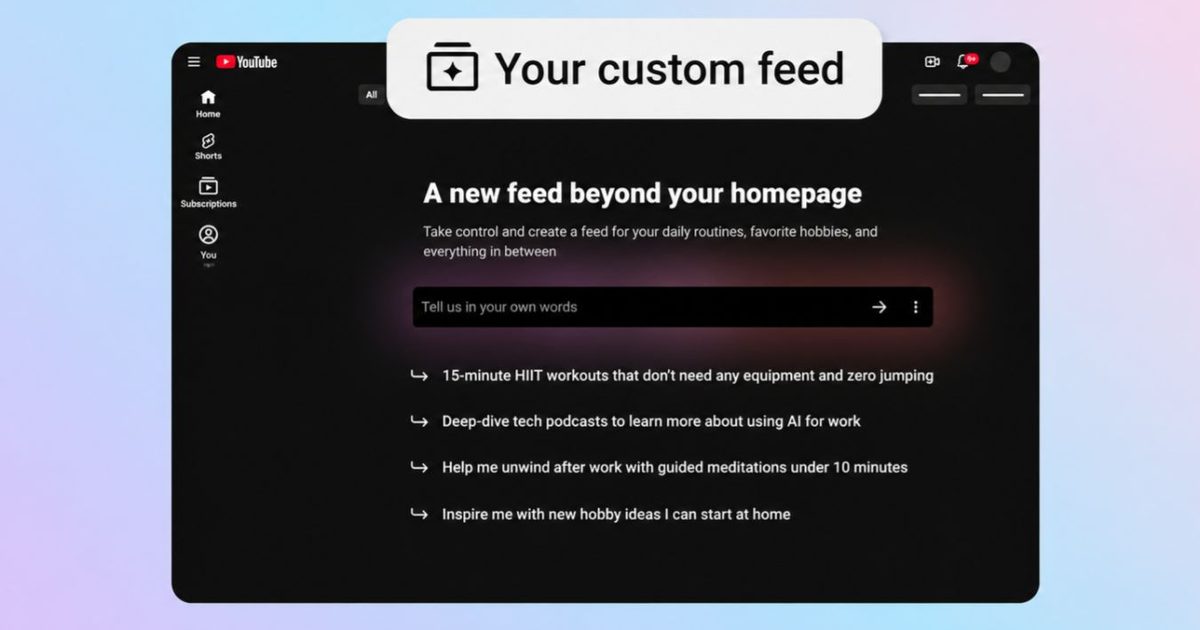

YouTube is adding a new discovery chip to its Home page that turns a typed request into a personalized stream of videos.
The feature, called “Your custom feed,” gives people a more direct way to break out of the usual recommendation mix. A viewer can ask for something outside their normal watch patterns, or narrow the experience around a particular moment, such as short guided meditations after work.
The YouTube Home feed change is rolling out in the US on mobile and desktop for signed-in viewers using English.
How does the chip work
The new option sits at the top of the Home page alongside YouTube’s other quick-access topic chips. Tapping “Your custom feed” opens a text box where viewers can describe what they want, or choose from suggested prompts.
Once YouTube builds the results, the request becomes a saved chip. Viewers can reopen it later instead of retyping the same prompt, which makes the feature feel closer to a reusable discovery lane than a search query.
People can also revise the prompt inside the custom feed. Changing the text generates a new space, giving the feature flexibility for shifting interests, routines, or viewing moods.
Why does this change recommendations
YouTube recommendations can feel oddly fixed once the platform decides what a viewer wants. This chip gives users a more active role when they want a temporary detour without changing their broader viewing habits.
The Home page is where many people start watching before they know exactly what they want. Letting users steer that surface with plain-language requests could make discovery feel less passive, especially for moments when the usual feed feels stale.
There’s still a limit. YouTube doesn’t say how much a prompt can override existing history, so the feature looks more like a nudge on top of the recommendation system than a full reset button.
Who gets it first
The rollout is limited to signed-in viewers in the US who use YouTube in English. It works on the YouTube mobile app and desktop.
There’s one important catch, search and watch history need to be turned on. If the chip doesn’t appear, those settings are the first place to check.
YouTube is asking for feedback through the chip’s three-dot menu when the results miss the mark. For anyone stuck in the same recommendation loops, the practical move is simple, start with a narrow prompt, then edit it until the feed feels useful.
Read the full article here