


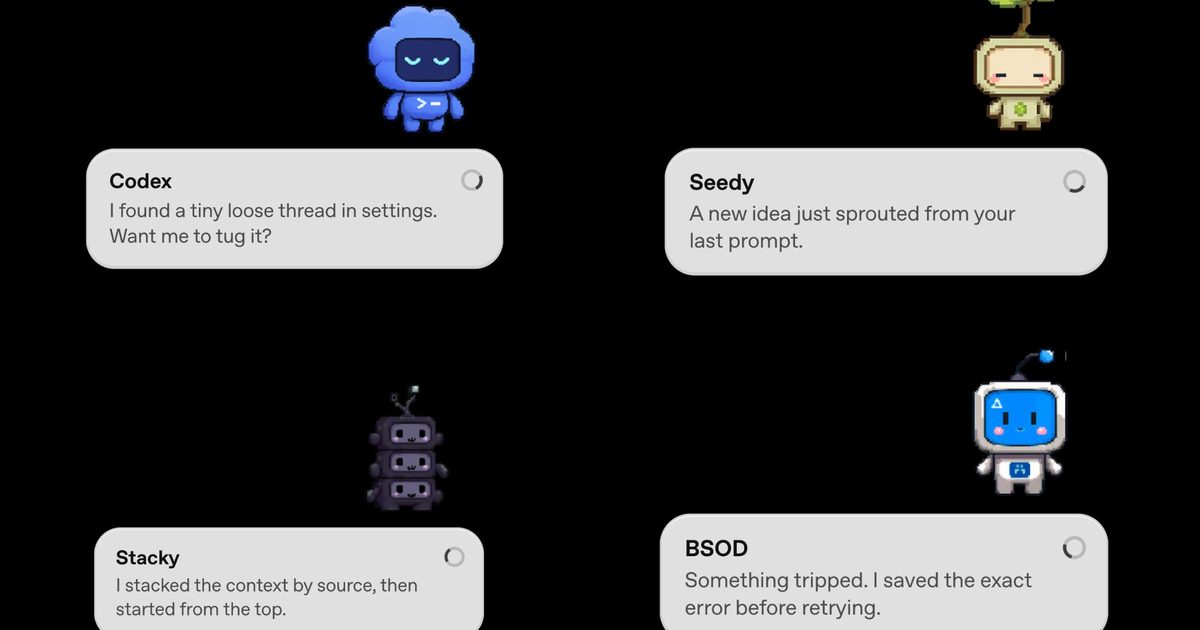

If you’re into vibe coding, OpenAI just made it a lot more adorable. The company has rolled out Codex Pets, a brand-new feature for its Codex desktop app that adds animated companions to your screen while you work. Codex is OpenAI’s agentic coding tool that handles tasks on your behalf. It runs in the background and gets things done, and now it has a tiny mascot to go with it.
So, what exactly is a Codex Pet?
A Codex Pet is an optional animated companion that floats as an overlay on top of your screen, even when the Codex app itself is minimized. It shows you what Codex is currently working on through small message bubbles and alerts you when a task wraps up or when it needs your input.
If your pet pops up mid-task, you can click on it to send a reply directly to the agent. It is a passive status indicator that doubles as a lightweight two-way channel. Eight built-in pets are available right out of the box, all designed in a cute pixel-art style.
How to get a Codex Pet?
Getting a Codex Pet is simple. Just open the Codex app and type “/pet” to summon or dismiss your companion. If you want something more personal, use the “/hatch” command. Hatch is a bundled tool that takes any image you upload and turns it into a fully animated pet, saved locally in your Codex home folder so you can share it with others.
The community has already taken to it, and fan-made sharing sites have appeared online within hours of the launch. OpenAI is even running a limited-time contest where 10 of their favorite custom pets win their creators 30 days of ChatGPT Pro.
Beyond the pets, the same update also introduced config auto-import, which allows Codex to detect and pull in settings from other coding agents, such as Claude Code. There is also a new dictation dictionary in Settings, where you can save abbreviations and phrases so voice input stops getting them wrong.
Read the full article here