




I come here to celebrate Apple delivering. It’s not overshooting the mark with the new Siri AI, which it unveiled at WWDC 2026, but it is finally delivering on the promises it made at WWDC 2024.
Sure, it’s beta (again), and there’s a wait list (again), but I’ve now seen it at work, in person, in live and potentially unpredictable demos. Siri AI, as it’s now called, works across platforms, and it has the potential to change how you use your iPhone, iPad, and Mac.
While I waited for my access to the new Siri on my iPhone 17 Pro, I visited one of the countless rooms in Apple’s massive Apple Park headquarters, where I round-robined through a series of stations at which I could see Siri AI in action on iOS 27 Dev Beta, iPadOS 27 Dev Beta, and macOS Golden Gate Dev Beta. This is all a work in progress.

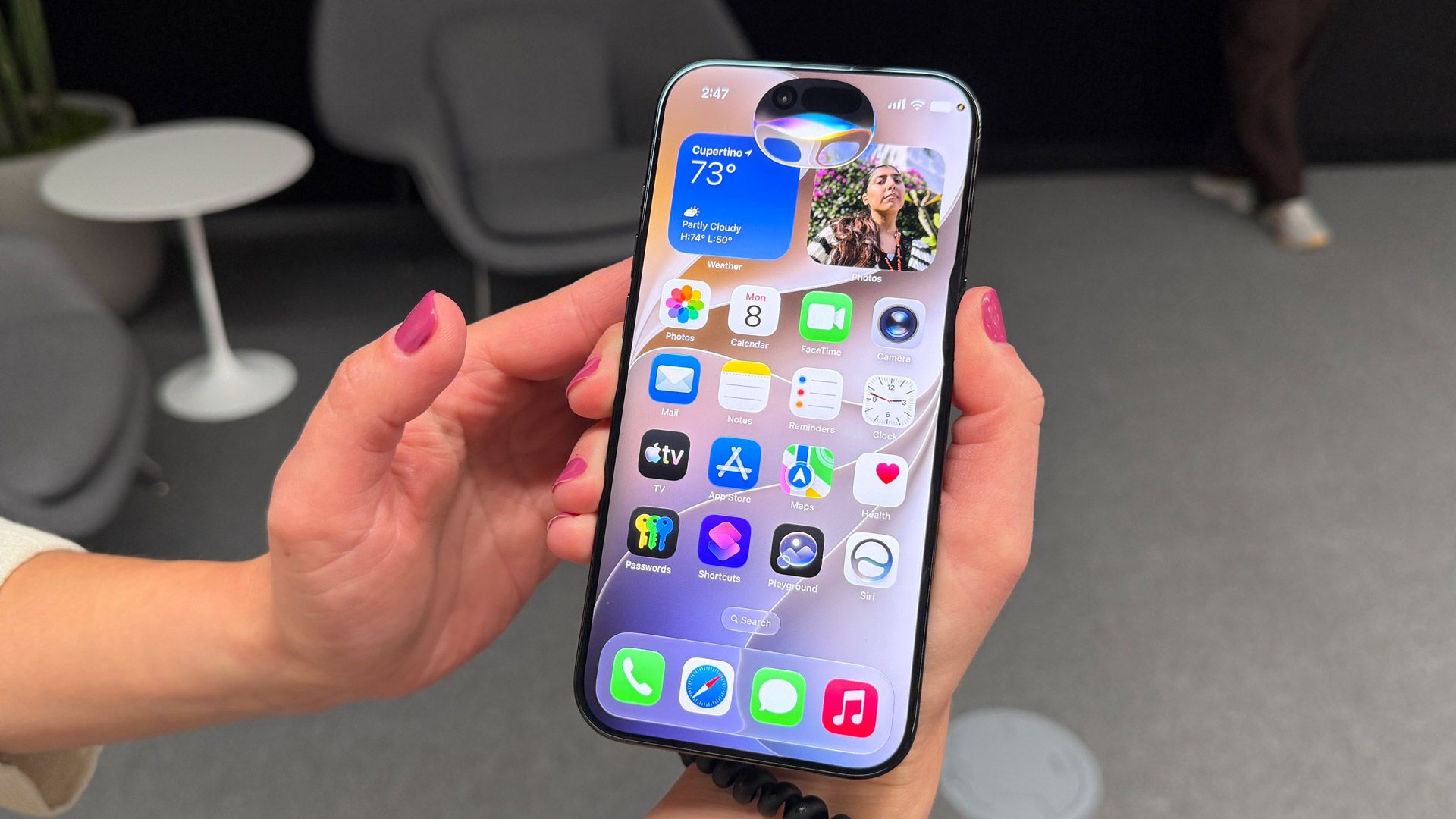
I’ll admit that while I was probably most interested in the new Siri on the iPhone, I was most surprised by how it works on the iPad. On every platform, this smarter, more aware, and more personable Siri looks different than before. It’s bigger, brighter, floatier (I made that a word), and it has a new sense of confidence.
On the iPad, you can summon Siri with your voice, but you can also swipe down from the top of the screen, and a sort of black teardrop will form until it releases from the top of the screen and is displayed as the small Siri AI window. It’s a nice, classy touch.
Of course, you can type into Siri, and I watched as we searched for top PGA golfers, and I noticed how anxious new Siri was to get to work, auto-filling answers before we’d even finished our query. Since it initially had just ‘Top PGA Golfers’, it quickly spit out Jack Nicklaus before refining on the fly to more contemporary players like Scottie Scheffler.
I also noticed during this process a new ‘working’ iconography that looks unlike any previous form of Apple’s ‘Please wait for an answer’ spinner. Sometimes Siri AI seems whip-fast; other times, you can watch that icon spin as it works. There’s no obvious sense of, “Oh, it’s heading out to the Private Cloud Compute for that.”
I watched here and on other platforms as Siri AI effortlessly kept context, without demanding a restate or telling us it couldn’t answer that, and “did we want to check the web?” or “Use ChatGPT?” In fact, ChatGPT appears to have been almost fully deprecated here. It does not show up as an option, though I believe you can still request it.
As we dug in on Scheffler’s career, Apple was quick to show me how Siri AI always shows its sources. I appreciate the care.
The little Siri AI window that appears in a session can be easily expanded, and then you’re suddenly in the new Siri app. Apple takes a slightly different approach here than, say, Gemini or ChatGPT: the chat window is familiar-looking, but the conversation history is card-based, with almost headlines for your query topic, and either a brief summary or image. I did not see an option for a tighter list form, which I might prefer.
iPhone, meet the new Siri
On the iPhone 17 Pro Max, we summoned Siri with a long press of the power button, which launched that new, large, almost alien spaceship-like floating blob. I say ‘floating’ because throughout the demo I noticed that Apple had made the effort to put very subtle shading under the new Siri interface so that it looks like it’s floating just above the screen. It’s a neat little effect.
Siri AI’s superpower is not that it’s smarter or more chatty (in fact, Siri will steer you away from conversations that might be better had with humans or, say, mental health support professionals); it’s that it understands you through the data on your phone.
This is where the fulfillment of a promise comes in. Siri AI really does appear to know the contents of your phone in a way that could be truly helpful. Its needle-in-the-haystack approach means that, if you have a thread of memory about a bit of data, something someone mentioned to you in an email or message, Siri can dig it out for you.
In the demo I saw, we asked about a “podcast our sister recommended recently,” and Siri searched across first-party apps (developers will have to build hooks into Siri AI in future versions of their apps) and pulled up a casual mention of a Sherlock Holmes podcast in Messages. Again, once we had that detail, we only had to say, “Play it,” and Siri launched the podcast app.
The obvious benefit is the end of endless searching and then backing out and finding the right app. I could imagine a lot of your daily interactions with your iPhone getting done through Siri AI. Of course, much of this will depend on developers of apps like WhatsApp, Gmail, and others building in those Siri connections.
Still, the power here is exciting. Taking someone’s lengthy emails full of useful but disorganized details and turning them into, say, a useful Camping Gear list in Notes is a significant leap from the current and endlessly disappointing “Sorry, I can’t do that” Siri.
Over the course of my demo, I watched as Siri pulled up random references relating to queries about travel and meteor showers. It’s sort of a de-randomizer. Like all good AI, Siri AI can see the patterns in your endless reams of data, and make sense of it.
I also got a look at Siri in the Camera app. That’s right, it now has a menu item right next to ‘Photo,’ and once launched it works a bit like Visual Intelligence. Choosing it does mean that Siri can ‘see what you see,’ which may or may not comfort you, but if you’re wondering what you’re looking at or, say, want Siri to help you make a choice, it’s ready. I did notice that the Camera app takes a photo of whatever Siri is analyzing.
At one point, we mispoke in the demo, but Siri sussed out the proper prompt and results without any intervention from us. Kind of impressive.
In a demo where it helped me decide which book to read next, I listened as Siri’s new ‘expressive’ voice told me why I should read Blindsight next. I noticed, though, that the new voice sounded a bit odd. I don’t know if the emotion sounded forced or missing, but I’m assuming this is an element that’s still being tweaked in iOS 27 Dev Beta.
Spotlight on the Mac
Most of my Mac demo revolved around how Siri AI transforms Spotlight, the Mac’s system-wide search engine. You can, it turns out, still use it to launch apps like Preview, but the new interface almost compels you to go further with the words, ‘Search or Ask’.
Ask basically transforms Spotlight into a generative search box where almost any general knowledge question is welcomed. We asked about the Hawaiian islands for families. If the system deems the question as ‘complex,’ it will default to Siri and Apple’s world Knowledge Engine. That’s right, even though the new Siri is using, in part, Gemini Foundation models, Apple is not using Google’s Search knowledge graph.
Once you launch a search, you’re inside Siri, and you can keep that window open while you multitask on other desktop chores.
In Apple Intelligence, you select text and right-click to access AI-powered writing tools, but the new Siri is embedded in more subtle ways that still give you full access to its new power. We selected a bunch of text in Notes and, while we could still have Siri rewrite it, Writing Tools-style, we can also use this as a launch point to weave together other Apple first-party app capabilities. In this case, we asked it to use the notes to draft a structured email in Mail.
Again, this is a pair of first-party Apple apps working together, and Apple is well aware that your email client may not be Apple’s Mail.
Overall, it’s still just a glimpse of what Siri AI can do, but I find it a promising one, especially for beta software. The plumbing clearly works, and if you allow it, Siri can finally see across your iPhone, iPad, and Mac to understand you and your needs. It’s been a long time coming, but I think Apple finally got this right.
Follow TechRadar on Google News and add us as a preferred source to get our expert news, reviews, and opinion in your feeds.
Read the full article here