



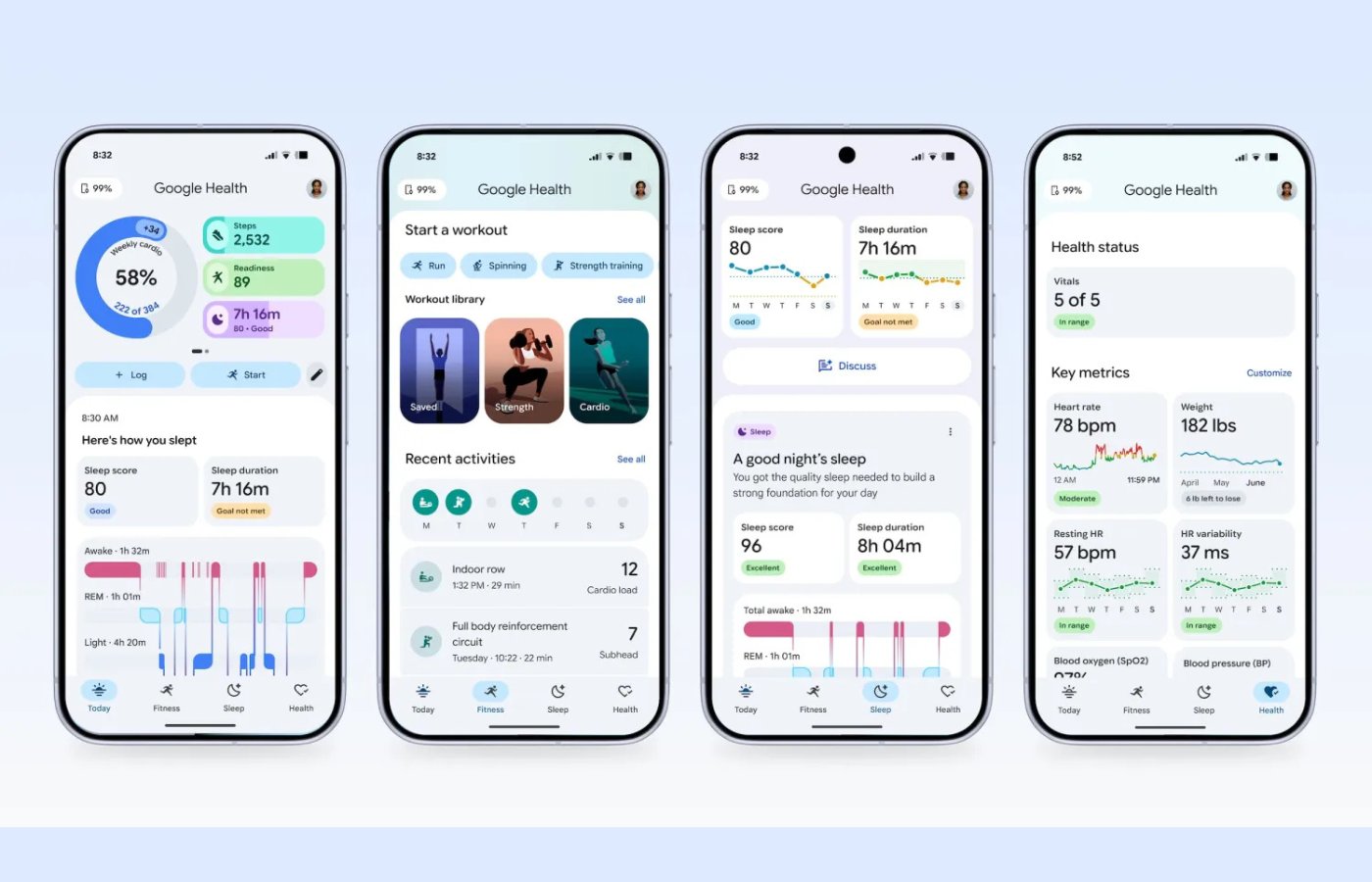

Fitbit’s app is no longer just getting a Google coat of paint. It is becoming Google Health… and longtime users will feel the change.
Starting May 19, Google began rolling out version 5.0 of the Fitbit app under the Google Health name, with full availability expected by May 26. The update reorganizes the app, adds Gemini-powered coaching for Premium subscribers, introduces a more flexible weekly cardio target, and removes several familiar Fitbit features.
For users, this is less a cosmetic rebrand than a reset of how Google wants health tracking to work across Fitbit, Pixel Watch, AI coaching, and Android.
A new look and an AI coach
The update alters the core architecture of the app. According to Google Support, users with a connected Fitbit or Pixel Watch will see the interface streamlined into four distinct tabs: Today, Fitness, Sleep, and Health.
For users who pay for the newly renamed Google Health Premium subscription, the update introduces the Google Health Coach.
Built using Google’s Gemini AI, the coach is designed “to deliver proactive, personal, and adaptive guidance for the whole you,” according to Google Support. Premium subscribers can chat with the AI to co-create flexible, weekly fitness plans.
The underlying metrics are also shifting away from Fitbit’s traditional daily targets.
Google is replacing daily goals with a “personalized weekly cardio target” to allow for a more flexible routine. Additionally, the app’s Cardio Fitness Score has been renamed to VO2 max, and its tracking algorithm will no longer calculate scores based on demographics such as height and weight.
For Android users, the most immediate visual change comes right on the home screen. As reported by 9to5Google, Google Health 5.0 introduces a new Quick Access Widget that replaces the old, solitary circular Steps widget.
This new widget can expand to a 5×3 grid layout and display up to six health metrics simultaneously, including heart activity, sleep info, and calories burned. For users who prefer a minimal look, the widget can also be shrunk down to display just a single stat.
The widget serves as an active dashboard, featuring a heart icon that launches the full app, a timestamp showing the last data sync, and a refresh button to update stats on the fly. Tapping any individual metric within the widget takes the user directly to that specific stats page inside the app.
Some Fitbit features are disappearing
As Google steers the software toward a more data-driven hub, several long-standing Fitbit features are being retired. According to Google Support, the following features have been permanently removed or altered:
- Badges and celebrations: Historical badges will be deleted, and no new ones will be generated.
- Sleep profile and animals: Monthly sleep animals are no longer available; Premium users must now ask the AI Coach about their sleep type.
- Social features: The Community Feed and Groups have been removed, and users can no longer send or receive direct messages.
- Diet and stress tracking: Food Plans with calorie targets and recipes are no longer supported, and stress-check graphs have been removed from the mobile app.
Rollout and requirements
The software update is a prerequisite for anyone looking to buy Google’s upcoming hardware, as version 5.0 is required to set up the new Fitbit Air wearable launching next week, 9to5Google reports.
The update is rolling out automatically on the Google Play Store and iOS App Store, with Google expecting full availability by May 26, 2026.
For users whose accounts are still tied to an old Fitbit login, Google Support states that you will be required to officially move your Fitbit account to a Google account to use the new app. Data from the discontinued features will remain available for download until July 15th, after which Google will begin purging it from its systems.
Also read: Huawei’s Watch GT 6 Pro includes diabetes-risk alerts and expanded wearable health tracking features.
Read the full article here