


Apple devices are learning new ways to respond when touch is not the easiest option.
A new set of features coming later this year will add AI assistance to some of the company’s core assistive tools. Users will be able to get more help from what their devices can see and hear without needing as many exact commands.
The updates will use Apple Intelligence to make core accessibility features more descriptive and easier to control across its platforms. Sarah Herrlinger, Apple’s senior director of Global Accessibility Policy and Initiatives, said the features bring “new, intuitive options for input, exploration, and personalization” while protecting user privacy.
VoiceOver gets a better read on the world
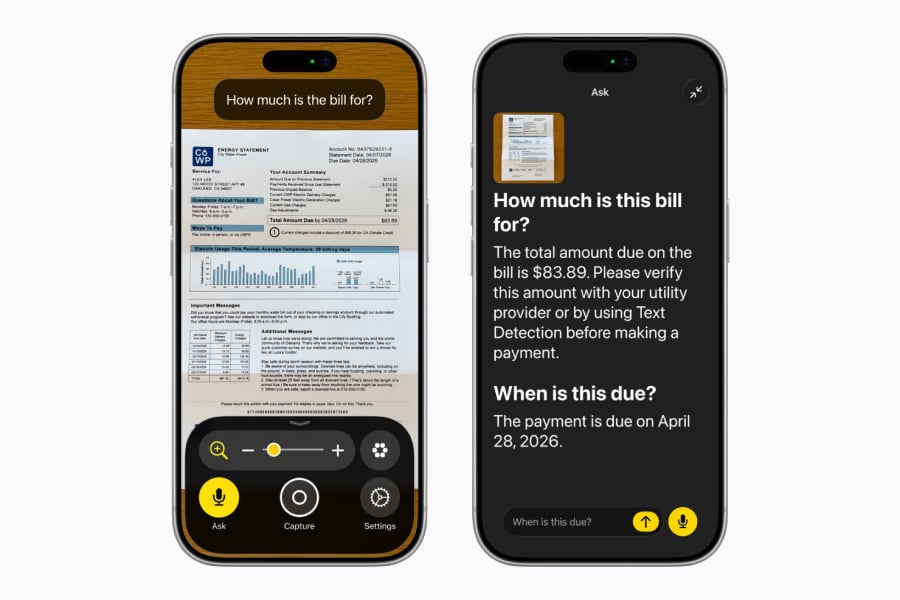
VoiceOver has long helped users navigate what is on an Apple screen. With Apple Intelligence, the feature is expected to describe more of what lies beyond it.
Soon, VoiceOver will use a device camera to provide fuller descriptions of a user’s surroundings or a scanned document. Users will be able to press the Action button on iPhone to ask what is in the camera viewfinder, then ask follow-up questions in their own words.
Voice Control is due for a similar upgrade. Users will not have to depend as heavily on memorized commands. A person could say “tap the purple folder” or “tap the guide about best restaurants,” and the device would understand the request as a voice command on iPhone or iPad.
Must-read Apple coverage
Personal videos get captions of their own
Captions are also coming to videos that people record themselves, not just the shows and clips they stream.
Generated subtitles will appear automatically for uncaptioned videos, including clips recorded on iPhone, videos received from friends and family, and streamed content. Subtitles will be generated privately using on-device speech recognition and will work on iPhone, iPad, Mac, Apple TV, and Apple Vision Pro.
Accessibility Reader is being upgraded to handle harder layouts, including scientific articles with multiple columns, images, and tables. The feature will add on-demand summaries and built-in translation while retaining custom formatting, fonts, and colors.
Other additions include:
- Magnifier voice controls, so users can ask the tool to perform actions such as zooming in or turning on the flashlight.
- Better MFi hearing aid pairing and handoff across Apple devices.
- Larger Text support in tvOS for users who need bigger on-screen type.
- Name Recognition in more than 50 languages.
- A FaceTime API for human sign language interpreters.
- Sony Access controller support on iOS, iPadOS, and macOS.
- The Hikawa Grip & Stand for iPhone, an adaptive MagSafe accessory now available through Apple’s online store in three new colors.
A lot of the update lives in ordinary places, where friction tends to pile up.
Vision Pro turns eye tracking toward wheelchair control
Vision Pro gets the most striking demo in the rollout.
Apple is working with TOLT Technologies and LUCI to let users maneuver a motorized wheelchair by looking at controls inside the headset. Eye tracking already drives much of the Vision Pro interface, and the company is applying the same input method to mobility.
A user would not need to tap a screen or reach for a separate controller in the demo. Gaze becomes the control layer.
Plenty still depends on how the system performs outside a controlled preview, from safety safeguards to reliability during real-world movement. The Vision Pro wheelchair feature is intended for controlled environments, and wired connections require the Apple Vision Pro Developer Strap.
Apple’s reported Siri revamp could turn auto-deleting chats into a privacy feature for its AI assistant.
Read the full article here