



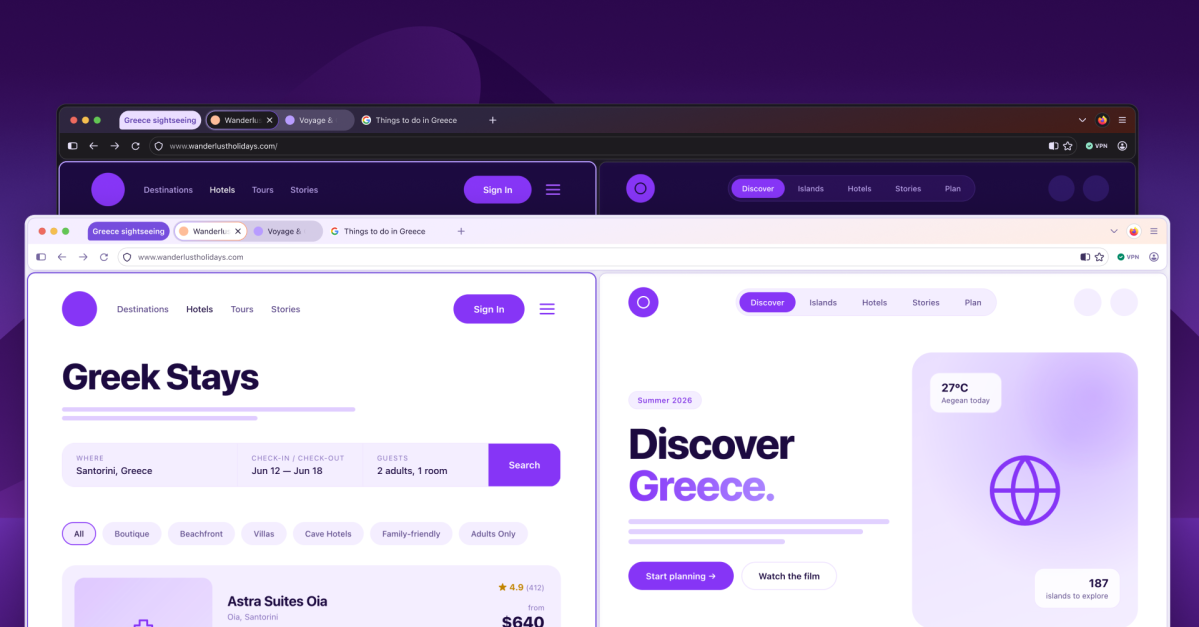

Firefox is getting a drastic visual overhaul with a redesigned Settings section that will make it easier to find and use privacy settings, including the switch for turning off all present and future AI features. Mozilla calls the redesign “Project Nova” and plans to begin rolling it out later this year. It features rounded UI elements throughout, including bubble-like tabs, along with a refreshed, fire-inspired color palette. Mozilla says it’s also updating icons so they’re more visually consistent across light and dark themes.
Firefox’s AI features and models aren’t downloaded to your computer unless you choose to use them, even if you haven’t turned on the complete block in the settings. But if you do have any installed, it’s already easier to see which ones, and how much space they’re taking up, compared to Google Chrome’s contentious 4GB download.
While the redesign isn’t coming until later this year, Mozilla also announced a new feature on Thursday that’s available now: support for the Web Serial API. As Mozilla notes: “For example, websites can control devices or deliver firmware without requiring native applications or installers.” The new API is part of Firefox 151, which was released this week and also includes an updated design for the Firefox Home page, new wallpapers, and the option to merge multiple PDFs together in the browser’s PDF viewer.
On the productivity side, the new design will bring back Firefox’s compact mode, which condenses browser controls like the forward and backward buttons. The redesign will also make it easier to access tab groups, split view, and vertical tabs.
Project Nova will also include more customization, starting with new wallpapers and themes. The new color themes will apply to the whole browser window and have light and dark modes, similar to Chrome’s color themes. Mozilla’s blog post says it’s also “exploring” controls for the shape of tabs and other UI elements.
Read the full article here