
Why you can trust TechRadar
We spend hours testing every product or service we review, so you can be sure you’re buying the best. Find out more about how we test.
Dyson HushJet Compact Air Purifier: two-minute review
The Dyson HushJet Compact Air Purifier is Dyson’s first dedicated small-format air purifier, and it’s a notable departure from what’s come before. Unlike the imposing, bulky tower fan-purifiers of old, the HushJet has been engineered to better fit into your home — or at least, that’s the idea.
There are few controls on the device itself and Dyson is relying on people using the MyDyson app to monitor air quality and adjust settings. Thankfully this isn’t a chore because the app is super intuitive and simple. Plus you also have the option to control everything with you voice, via Alexa, Google Assistant or Siri, if you’d rather not pick up your phone.

Also, in day-to-day use, the Auto mode does most of the heavy lifting anyway. Intelligent sensors monitor air quality in real time and ramp the fan speed up or down as needed, which in practice means the HushJet spends most of its time running almost silently in the background, only surging when something pollutes the air.
Inside the purifier, the electrostatic filter captures 99.97% of particles as small as 0.3 microns. This includes dust, pollen, pet dander, and mold spores. The activated carbon filter then takes care of gases and odors, including cooking smells and NO2 from gas hobs. Both filters come pre-installed, which makes setup refreshingly painless, and they have long shelf lives. The electrostatic filter lasts up to five years, while the carbon filter should only need to be replaced once a year, keeping the running costs down.
The jet engine design isn’t just an aesthetic choice, it means that the HushJet can channel purified air into a “focused, high-velocity stream” that covers rooms up to 100m2 / 1,076 sq ft. Most homes won’t need this, but it’s reassuring to know that you can place this purifier anywhere in your home and it’s got you covered. These numbers would be impressive for any air purifier, let alone one this size.
At $349.99 / £349.99 / AU$549 the HushJet is a significant investment, especially when you consider that it’s a purifier only, with no fan or heating function to justify the spend. However, if clean air is a priority and you want the best compact air purifier on the market right now, it’s hard to argue with what Dyson has built here. It sits at the top of its category, and in my tests it earned its place, but if that’s beyond your budget check out our guide to the best air purifiers.
Dyson HushJet Compact air purifier review: price and availability
- List price: $349.99 / £349.99 / AU$549
- Available in the US and UK
Dyson’s HushJet is available in the US, UK and Australia direct from Dyson, as well as Best Buy and Walmart in the US, AO and Very in the UK, and JB Hi-Fi and The Good Guys in Australia.
At $349.99 / £349.99 / AU$549, this is an expensive purifier by any measure. To put that into context, the Blueair Blue Max 3250i – our pick for best air purifier overall – is less than half the price, at $169 / £169. Even the Dyson Purifier Cool PC1, a larger purifier-fan combo from Dyson’s own range, is only $100 / £100 more, and it adds fan functionality on top.
What you’re paying for with the HushJet is essentially the miniaturisation of Dyson’s purification technology, combined with the new HushJet nozzle and its impressively quiet operation. I believe its performance justifies a large part of this premium but there are very capable, significantly cheaper rivals that tick just as many boxes.
- Value for money score: 3 out of 5
Dyson HushJet Compact air purifier specs
|
List price |
$349.99 / £349.99 / AU$549 |
|
Fan speeds |
10 |
|
Oscillation |
120 degrees |
|
Filtration |
99.97% of 0.3 microns (PM2.5, PM10, VOC, NO2, HCHO) |
|
Filters |
360° Electrostatic + Activated Carbon |
|
Control |
Physical button, MyDyson app, Amazon Alexa, Google Assistant, Siri |
|
Fan modes |
Auto, Sleep, Manual |
|
Noise levels |
24dB-42dB |
|
Height |
18.5″ / 47cm |
|
Base diameter |
9″ / 23cm |
|
Weight |
6.9lbs / 3.15kg |
Dyson HushJet Compact air purifier review: design
- Smaller than previous Dyson purifiers, but not truly compact
- Minimal on-device controls
- Industrial aesthetic
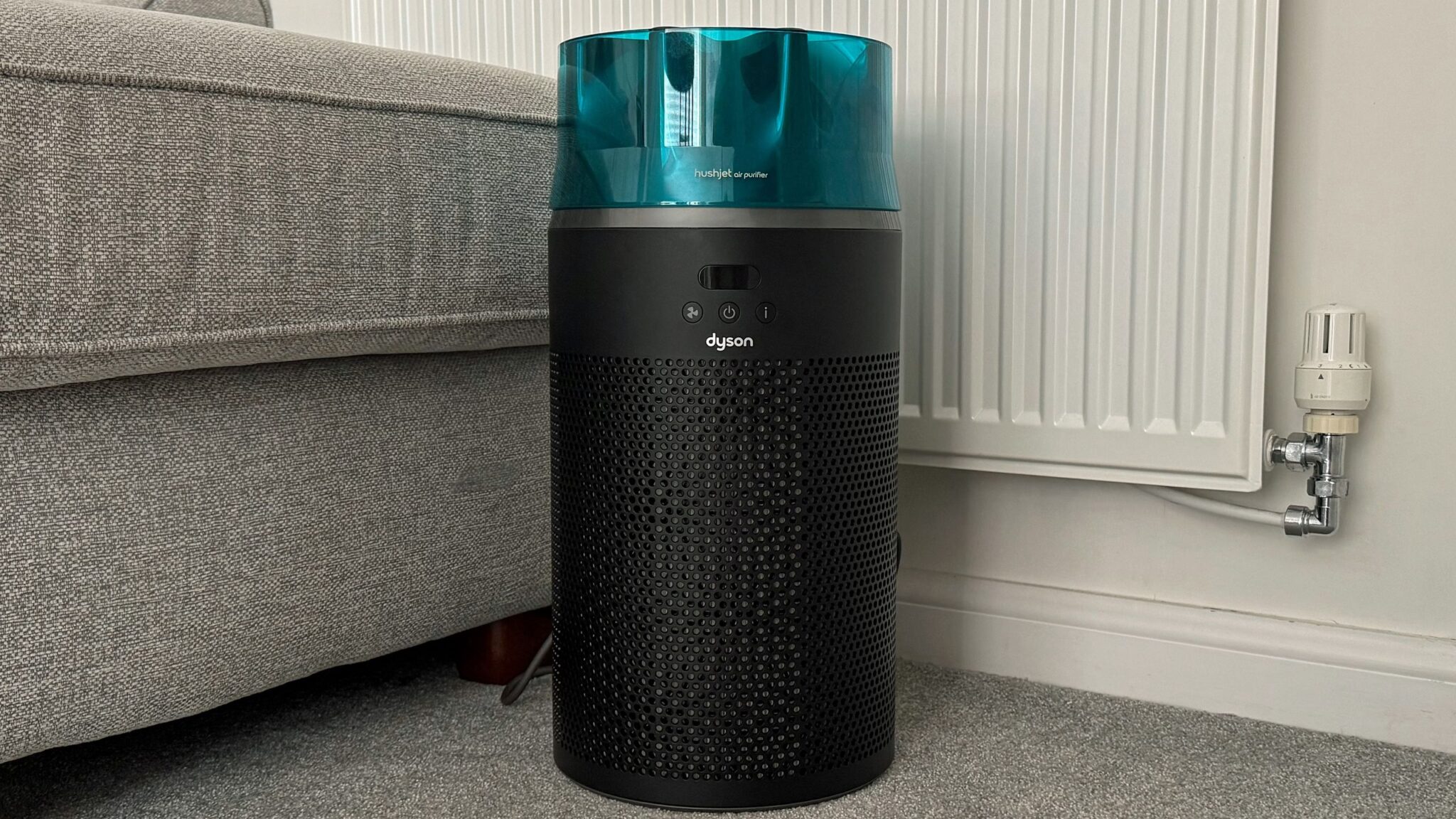
Dyson has become famous for its distinctive, often divisive, design choices, and the HushJet is no exception. Like most Dyson products, it’s sleek, cylindrical and well-built, but also striking and bold — especially its star-shaped HushJet nozzle top, which is inspired by the aerodynamic principles of jet engines, and doesn’t look like anything I’ve ever tested.
Whether that’s a good thing will depend on your taste. In my house, it divided opinion: my partner loved the look of the black and teal colors, but I didn’t. I found it too much for an appliance that’s supposed to sit quietly in the background.
That tension between form and function runs through the whole design. Dyson calls this purifier ‘compact’, and relative to the brand’s own range – which includes the towering TP09 or the enormous Big+Quiet – it is. But in absolute terms, at 18.5in / 47cm tall with a 9in / 23cm diameter, it’s larger than the name implies. I tried it on my desk, on a bedside table and on my kitchen counter, and it felt imposing on all three. It ended up on the floor in most rooms, which undermines the compact pitch somewhat. For context, the Levoit Core 300S is half the height and is more subtle.
I typically like to move my purifier into different rooms, depending on my needs (for example, I put it in the kitchen when I’m cooking steak, or I put it in my son’s room at night when the pollen count is high) and while the HushJet is technically portable, its missing carry handle makes moving it a little awkward.
On-device controls are minimal by design. There’s a small LCD screen that shows air quality data — using a color-coded line graph — and current settings above a row of three physical buttons. These buttons cover most of the day-to-day changes you’ll need:
- The fan button on the left lets you cycle between Night mode, the three on-board fan speeds, and Auto mode.
- The power button in the center turns the purifier on and off.
- The information button on the right cycles through the current PM2.5 levels, current PM10 levels, the state of the on-board filters, and the Wi-Fi details.
If you want to set schedules, change Auto mode’s target particulate level, access the seven other fans speed, or access any other more detailed settings, you’ll need to download the MyDyson app. You can also control the purifier using your voice and the HushJet works with Amazon Alexa, Google Assistant or Siri.
This is also where you can learn what each of the air quality colors mean:
- Good (green): very low level of microscopic particles
- Fair (yellow): moderate level of microscopic particles
- Poor (orange): high level of microscopic particles
- Very poor (red): very high level of microscopic particles
- Extremely poor (pink): extremely high level of microscopic particles
- Severe (purple): severe level of microscopic particles
Setup across the board with the HushJet is painless. Both filters come pre-installed, and connecting to the MyDyson app took me less than 30 seconds. It’s one of the easier Dyson products I’ve set up, and it starts purifying the air immediately.
Dyson HushJet Compact air purifier review: performance
- Auto mode reaction times are unmatched
- Whisper-quiet on lower settings
- Limited app granularity
- Less impressive on smoke than VOCs
Given its price, and the fact it only covers purifying, the HushJet’s performance needed to blow me away (excuse the pun) and thankfully it did.
I have a large open-plan kitchen-diner, as well as a substantial loft room, and even when the HushJet was placed on the opposite side of the room to where I was cooking, or spraying deodorant, its fans captured and cleared the particulates with ease.
During my aerosol tests, in which I sprayed deodorant at the purifier for five seconds while it was in different purification modes, the fan consistently took the air quality from as high as Severe to Good in less than a minute and a half. The low fan setting, unsurprisingly, took the longest at 1 minute 23 seconds (on average); the medium fan setting handled the particulates in 1 minute 2 seconds; and the high fan cleared the air in just 50 seconds. These speeds are unheard of in all my years of testing.
I also lit a match and let it burn out directly in front of the unit. Within three seconds, the HushJet had detected the drop in air quality and increased its fan speed. The app showed levels spike to purple before the purifier cleared the air entirely in four minutes. For comparison, the Blueair Blue Max 3250i, our top-rated overall pick, took 20 seconds to register the same drop, although it cleared the air slightly faster at two and a half minutes. Both are fast; the HushJet’s sensing is simply quicker.
The one test where the HushJet was less convincing was dust. Emptying a vacuum cleaner’s dust canister next to the unit hardly moved the dial at all. Granted, the vacuum in question was the Dyson Cyclone V10, which has its own filtration system, which may have captured most of the harmful particles before they reached the HushJet’s sensors. But it was a less emphatic result than the smoke and VOC tests.
In terms of noise, Dyson advertises the HushJet at ranging between 24dB and 42dB. During my own tests using the DecibelX app, the lowest I recorded was 29dB on Night mode, with 55dB at the top end, on high. This is still whisper-quiet at the lower end, while the higher end is roughly the volume of a light conversation. What’s more, the sound is soft rather than sharp ,which makes the HushJet sound even quieter in real-world use. So much so, I could have the HushJet on in the bedroom at night, with Night mode enabled or without.
Other good news is that the Auto mode’s quick reaction times mean the unit rarely stays at full power for more than a few minutes.
When it comes to air purification, the HushJet uses a two-filter system: a 360-degree Electrostatic filter that captures 99.97% of particles as small as 0.3 microns, and an Activated Carbon filter for gases and odors including cooking smells, pet odors and NO2 from gas appliances.
I suffer from hayfever and during my review period I noticed a difference in my symptoms on days when I had the HushJet running. I can’t say it got rid of them entirely, but on days when the pollen count was high and the HushJet had been running in my bedroom overnight, I woke up feeling better than I’d expected.
I didn’t run the HushJet constantly during my review period. My typical pattern was to run it overnight in the bedroom on Auto mode, and then move it to the living room during the day when the pollen count was high or when I was doing anything likely to kick up dust. Over the course of testing, the electrostatic filter didn’t register any degradation. Even after four weeks, it’s still showing 100%.
The activated carbon filter, which promises a one-year lifespan, dropped to 96% so this will need replacing much sooner. A replacement electrostatic filter costs $64.99 / £50 while the carbon filter costs $44.99 / £35. This is worth factoring in but you won’t need to spend extra for a while after purchase.
Overall, the HushJet does exactly what it promises. Its Auto mode is smart, its filtration is fast and its the quietest purifier I’ve ever tested. It’s not perfect but in terms of performance, it comes incredibly close.
- Performance score: 5 out of 5
Dyson HushJet Compact air purifier review: voice control
- Easy to set up
- Works with Alexa, Google Assistant and Siri
Once the purifier is connected to your home Wi-Fi, it can connect to any Amazon Echo, Google Home or Apple Siri device on the same network at the press of a button through the MyDyson app. This app doesn’t give you voice command prompts to get you started – like the Dreo app does – instead you’ll need to go to the dedicated assistant app to learn how to speak to the HushJet.
That said, as soon as I got the hang of it, voice control quickly became my preferred way to control the HushJet day-to-day. I have an Amazon Echo in my bedroom and being able to ask Alexa to turn the purifier on or off, adjust the fan speed or check the air quality without reaching for my phone made a difference to how often I interacted with it.
On mornings when the purifier was downstairs, I could ask Alexa to kick the purifier up a level to remove the smell of my son cooking toast even while I was in the loft. Elsewhere, you can ask Google, Alexa or Siri to turn the purifier on and off, ask for a specific speed, set the purifier to a certain mode and check levels.
Dyson HushJet Compact air purifier review: app
- Offers a range of control options
- Color-coded design is intuitive and simple to use
- Near-live air quality data
The MyDyson app is one of my favorite things about the HushJet, and is one of the better companion apps I’ve used for home appliances. It’s clean, well-labelled and easy to navigate from the first time you open it.
The home screen shows an image of your HushJet above the main menu, which includes Controls, Data and Insights, How To, and Product Settings.
Below the image are the quick-access controls for Auto mode and fan speed, plus an on/off toggle, a Night mode that dims the LCD screen on the device and quietens the fan, and a Timer option.
Your current air quality reading displayed in Dyson’s color-coded system sit below this panel, followed by the Schedule option. This scheduling function lets you set the HushJet to run at specific times. I set it to run on Auto every morning before I got up, so the bedroom air was already clean by the time I woke up.
In the Data and Insights section you can see the air quality graphs broken down by PM2.5 and PM10 readings, all presented in the same color-coded scale. The current reading updates every 30 seconds, but the graph only shows average readings in 15-minute intervals. You can swipe back to see historical data but it doesn’t reveal very much and lacks the granularity I’d like.
Elsewhere, the app doubles as a support hub, with how-to videos, filter life tracking, and the option to buy replacement filters directly. It’s a small touch but a useful one, and you’re unlikely to forget to replace the filters when the app is actively telling you when it’s due. In Product Settings, you can connect the purifier to Alexa, Google Assistant or Siri, set the time, data and location data and manage the Wi-Fi connection. There’s also the option to enable/disable continuous monitoring which is what’s needed for the Auto mode to work effectively.
If there’s one criticism, it’s that the app is essentially non-optional. Anyone who prefers physical controls may find the HushJet frustrating to live with but for those comfortable with app-based control — and I’d argue that’s most people buying a £350 / $350 / AU$549 smart purifier — it’s an excellent companion.
Should you buy the Dyson HushJet Compact air purifier?
|
Attribute |
Notes |
Score |
|---|---|---|
|
Value |
Expensive for a purifier-only but the technology and filter life go some way to justifyi.ng the cost |
4/5 |
|
Design |
Striking and well-built, but larger than the “compact” name implies and divisive in its look. |
3/5 |
|
Performance |
Brilliant Auto mode reaction times, super fast and effective filtration. |
5/5 |
|
App |
One of the best companion apps in this category — intuitive and useful albeit not as detailed as rival apps. |
5/5 |
Buy it if…
Don’t buy it if…
How I tested the Dyson HushJet Compact air purifier
- I used the Dyson HushJet Compact air purifier and its partner app for four weeks
- I stress-tested it using different substances
- I experimented with different speeds, modes, and settings
I tested the Dyson HushJet Compact in my home over four weeks, during peak hayfever season. I used it primarily in my bedroom overnight on Auto mode, and moved it to the living room and kitchen during the day to test its response to different real-world air quality changes.
To test purification, I carried out a range of specific tests: lighting a match to create smoke, spraying deodorant to introduce VOCs, cooking on a gas hob to generate cooking fumes and PM10 particles, and emptying a vacuum cleaner dust canister to test dust response. For each, I monitored the HushJet’s reaction time – how quickly it detected the change in air quality – and its clearance time – how long it took to return readings to normal. I tracked all air quality data via the MyDyson app.
Noise levels were measured using the DecibelX app across all fan settings. I also tested the voice controls by connecting the HushJet to an Amazon Echo while using with the MyDyson app daily.
Read more about how we test.
First reviewed May 2026
Read the full article here