


External SSDs can promise wildly different speeds while looking almost identical in a laptop bag.
The catch is the port: a fast drive connected to the wrong USB-C or Thunderbolt interface can lose much of the performance you paid for.
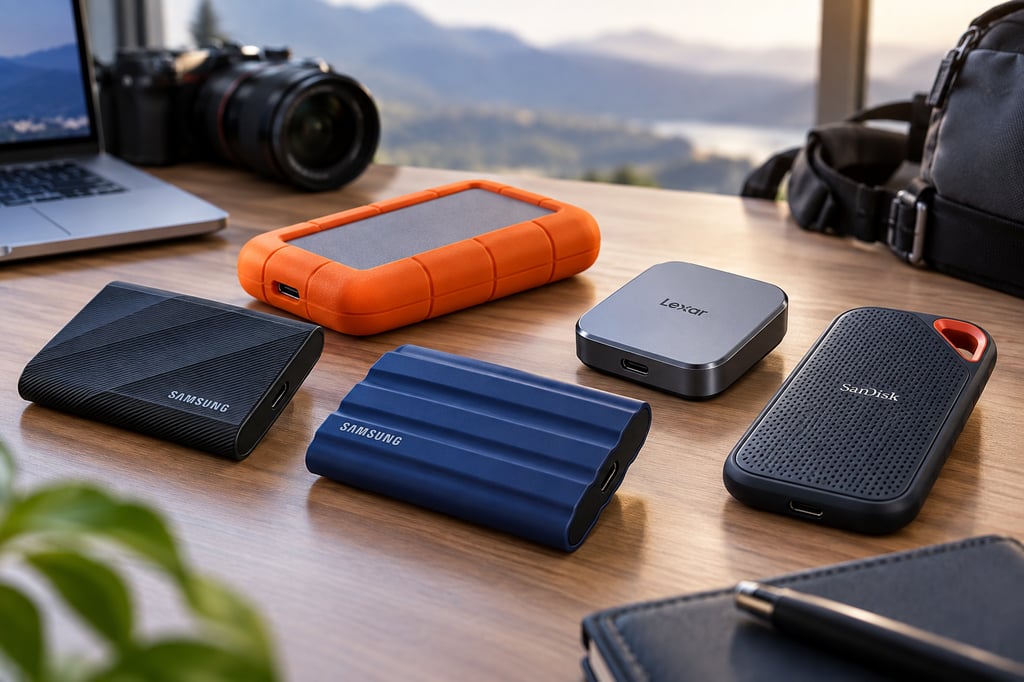
These five drives cover different priorities, from everyday file transfers and rugged field work to Thunderbolt 5, phone-based video, and fast USB4 storage.
Best external SSDs at a glance
| Model | Interface | Capacities | Official price |
|---|---|---|---|
| Samsung T9 | USB 3.2 Gen 2×2 | 1TB, 2TB, 4TB | $219.99 for 2TB |
| LaCie Rugged SSD Pro5 | Thunderbolt 5 | 2TB, 4TB | $399.99 MSRP for 2TB |
| Samsung T7 Shield | USB 3.2 Gen 2 | 1TB, 2TB, 4TB | $287.99 for 1TB |
| Lexar ES5 Magnetic | USB 3.2 Gen 2×2 | 1TB, 2TB, 4TB | $199.99 MSRP for 1TB |
| SanDisk Extreme PRO with USB4 | USB4 Gen 3×2 | 2TB, 4TB | $279.99 MSRP for 2TB |
Prices were accurate at the time of publication and may change with promotions or supply conditions.
How we chose these external SSDs
We compared current US availability, manufacturer specifications, warranty coverage, and independent testing from outlets including StorageReview and Tom’s Hardware.
Peak sequential speed was only part of the evaluation. Portable SSD performance depends heavily on the host computer, interface, workload, and how well a drive sustains writes after its faster cache fills.
We prioritized:
- Independent performance: Lab-tested transfer speeds and sustained-write behavior carried more weight than manufacturer maximums.
- Host compatibility: USB 10Gbps, USB 20Gbps, USB4, Thunderbolt 4, and Thunderbolt 5 can produce very different results from the same drive.
- Portability: Size, weight, cable requirements, and designs suited to laptops, phones, and travel.
- Durability: IP ratings, drop protection, construction, and warranties were considered for drives likely to leave the desk.
- Capacity: We favored useful capacity ranges rather than treating maximum speed as the only differentiator.
- Workload fit: Everyday backup, large-file transfers, field production, direct-to-phone recording, and high-speed creative work have different requirements.
Check the computer’s port before paying for extra bandwidth. For example, the current M6 Mac mini uses Thunderbolt 4 while the M5 Pro model adds Thunderbolt 5, which can materially change the performance available from the fastest drives.
Samsung’s newer P9 and P7 were not selected because independent testing has not yet verified their USB4 performance. Samsung rates the P9 at up to 4,000MB/s, but that figure remains a manufacturer claim for now.
Samsung T9
The Samsung T9 is the most balanced pick here for users with a USB 3.2 Gen 2×2 port. It offers capacities up to 4TB, hardware AES 256-bit encryption, a five-year warranty, and Samsung Magician software for firmware, health monitoring, and security.
In its 4TB test, StorageReview measured about 1,566MB/s read and 1,582MB/s write in Blackmagic testing, below Samsung’s 2,000MB/s maximum but still strong for a 20Gbps portable SSD.
The limitation is the interface. On systems without Gen 2×2 support, the T9 falls back to slower speeds, so Mac users in particular should check their port before buying. TechRepublic has also covered the 4TB Samsung T9 for buyers who need more capacity.
LaCie Rugged SSD Pro5
The LaCie Rugged SSD Pro5 is the specialist option for buyers who actually have Thunderbolt 5.
LaCie rates it at up to 6,700MB/s read and 5,300MB/s write, with an IP68 enclosure, three-meter drop resistance, a five-year warranty, and Rescue Data Recovery Services.
Independent testing confirms that the drive can be exceptionally fast on the right hardware, but performance drops substantially when the host becomes the bottleneck. That makes it a better match for current Thunderbolt 5 workstations such as the latest Mac Studio configurations than for an older laptop where its bandwidth would go unused.
Samsung T7 Shield
The Samsung T7 Shield trades headline speed for broader compatibility and tougher construction.
Its USB 3.2 Gen 2 interface is rated for up to 1,050MB/s read and 1,000MB/s write, while the IP65 enclosure and three-meter drop protection make it better suited to field use than the T9.
In its 4TB test, StorageReview measured roughly 894MB/s read and 937MB/s write. That is far behind USB4 or Thunderbolt 5 drives, but enough for backups, project files, photography, and routine laptop transfers without requiring a less-common 20Gbps port.
Lexar ES5 Magnetic
The Lexar ES5 Magnetic Portable SSD is built around smartphone workflows. Its magnetic design attaches to compatible phones, while USB 3.2 Gen 2×2 supports rated read and write speeds up to 2,000MB/s.
In its 2TB test, StorageReview measured about 1,824MB/s read and 1,797MB/s write, making it one of the stronger 20Gbps drives in its phone-focused category.
It also carries an IP65 rating, three-meter drop resistance, and a five-year warranty. The combination makes the ES5 particularly useful for creators recording high-resolution video directly to external storage, provided the phone supports the required recording mode and USB bandwidth.
SanDisk Extreme PRO with USB4
The SanDisk Extreme PRO with USB4 provides a faster USB4 option without requiring Thunderbolt 5.
SanDisk rates the drive at up to 3,800MB/s read and 3,700MB/s write. It is available in 2TB and 4TB capacities and includes an IP65-rated enclosure, two-meter drop protection, backward compatibility with older USB standards, Thunderbolt 4 support, and a five-year warranty.
StorageReview measured about 3,172MB/s read and 2,864MB/s write from the 2TB model. Tom’s Hardware found strong burst performance but also reported that sustained writes fell considerably after several minutes, making the drive better suited to fast everyday transfers than prolonged drive-filling workloads.
Which external SSD should you buy?
| Best for | Pick | Reason |
|---|---|---|
| Best overall | Samsung T9 | Strong performance, useful software, encryption, and broad device support |
| Thunderbolt 5 | LaCie Rugged SSD Pro5 | Highest performance here with serious field durability |
| Rugged everyday use | Samsung T7 Shield | IP65 protection and broad 10Gbps compatibility |
| Phone video | Lexar ES5 Magnetic | Magnetic mounting, fast tested transfers, and IP65 protection |
| USB4 performance | SanDisk Extreme PRO with USB4 | Fast USB4 reads, rugged construction, and broad backward compatibility |
The Samsung T9 offers the strongest all-around package if the host supports USB 3.2 Gen 2×2. Buyers with Thunderbolt 5 hardware can get considerably more performance from the LaCie, while the T7 Shield prioritizes durability over speed.
The Lexar ES5 makes the most sense for phone-based production, while the SanDisk gives USB4 buyers substantially more bandwidth without requiring Thunderbolt 5. Whichever drive you choose, keep irreplaceable files in a second location rather than treating a portable SSD as the only copy.
Also read: Our guide to the best portable monitors for laptops covers five second screens for work and travel setups.
Read the full article here