



Key takeaway: Smartsheet is my top Gantt chart software for teams that need detailed schedule reporting across several projects. ClickUp works well for teams seeking greater control over schedule changes, while GanttPRO is better for workload-based planning because it connects assignments to resource capacity.
Ready-made templates can be a quick way to create Gantt charts, but they are difficult to manage once a project gets more complex and more people update the same plan. Gantt chart software offers a set of tools that help me manage dependencies, adjust timelines, and coordinate work from a shared workspace.
I’ve had the chance to try many of these tools firsthand while managing projects of different sizes, and here are the best Gantt chart software I’d recommend.
| Smartsheet | |||
| ClickUp | |||
| GanttPRO | |||
| Wrike | |||
| monday | |||
| TeamGantt | |||
| Asana | |||
| Microsoft Planner |
Why you can trust TechRepublic
I’ve spent the past four years testing nearly 20 project management platforms, and some of them have become part of my workflow. Writing dozens of PM software guides for businesses of all sizes taught me what individuals and teams need from these tools beyond the marketing pitch. I also build custom scoring rubrics for each review to ensure fairness and that selected platforms get evaluated on the same criteria.
Marianne Sison
Senior Staff Writer for Project Management
How I evaluated the best Gantt chart software
I evaluated the best Gantt chart software using a weighted rubric based on each provider’s project scheduling capabilities. Each tool was scored across six categories, with higher weight given to areas that affect cost, advanced planning, usability, support, and overall value.
General features (25%): General features carried the highest weight because they define the core Gantt chart experience. I evaluated timeline creation, task dependencies, milestones, collaboration tools, and project visibility. Platforms scored higher when they made it easy to build and maintain project schedules.
Pricing (20%): I evaluated free plan availability, starting price, feature access on entry-level plans, and total cost of ownership. I gave higher points to tools that publish per-user pricing and include Gantt chart functionality without requiring immediate upgrades.
Advanced and niche features (20%): For advanced features, I assessed capabilities that support more complex project planning. This included critical path analysis, baselines, workload management, automation, portfolio views, and reporting. Higher scores went to tools that help teams manage complex schedules beyond a basic timeline view.
Expert score (15%): My expert score reflected the overall quality of each product as Gantt chart software. I considered feature depth, value for money, third-party reviews, and how easy it was to verify each product through official documentation.
Ease of use (10%): Ease of use focused on how quickly a team can create, update, and understand a Gantt chart. I considered setup effort, navigation, and timeline editing as projects become more complex.
Support (10%): For support, I reviewed available channels, help documentation, training resources, community forums, and security policies. I gave higher scores to vendors with diverse support options and learning materials for both new users and administrators.

1. Smartsheet: Best for portfolio schedule reporting
My rating: 4.94 out of 5
Why I chose Smartsheet
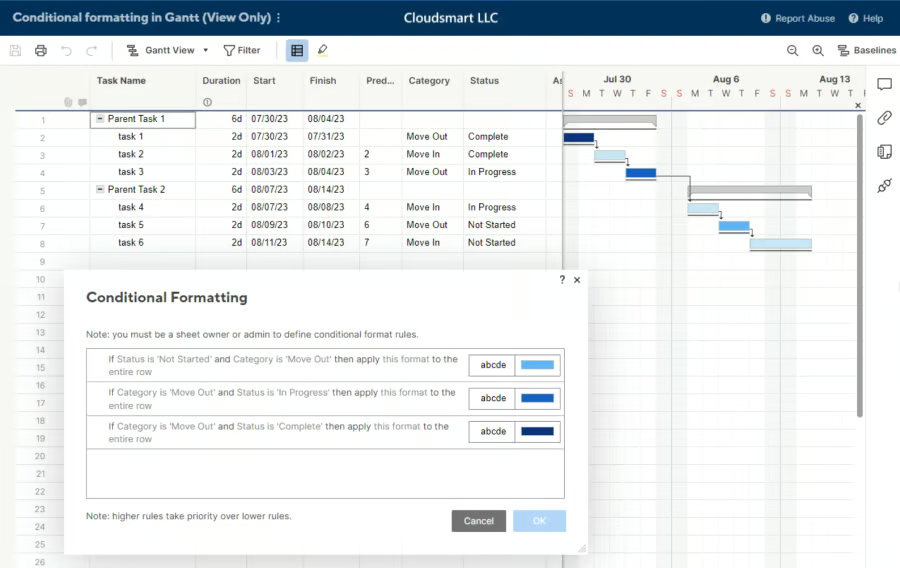
Smartsheet’s portfolio dashboards benefit project managers who need a single place to review schedules across several projects. If you’re conducting a status review, reports can combine milestone dates, project health, budget data, and resource availability.
I also like how Smartsheet uses its spreadsheet-style workspace as the main source for schedules, reports, and dashboards. Project managers can update dates or ownership in each project sheet, and those changes appear in summary reports used for portfolio reviews. Executives can then monitor progress and issues without opening every project plan or reviewing each task.
One downside is that Smartsheet’s reporting tools can take time to set up because teams must build the sheets, reports, and dashboards. GanttPRO is a better alternative for teams that want scheduling and workload tools in a focused workspace.
Pros
|
Cons
|
Pricing
- Free plan: Not available.
- Free trial for paid plans: 30 days.
- Pro: $9/member/mo. Includes project tracking, Gantt views, reports, automation, and AI tools.
- Business: $19/member/mo. Includes workload tracking, portfolio reporting, administration controls, and unlimited automation.
- Enterprise: Custom pricing. Includes portfolio management, SAML SSO, user administration, and security controls.
- Advanced Work Management: Custom pricing. Includes premium apps, data connections, portfolio oversight, and support services.
The prices above are based on annual billing.
AI pricing note: AI tools are included in paid plans.
Standout features
- Control Center: Standardize project setup and apply approved changes across active programs.
- Dynamic View: Share selected project data without exposing the source sheet.
- Resource Management: Review workloads and forecast staffing needs before assigning work.
- Data Shuttle: Transfer project data between Smartsheet and business systems on a schedule.

2. ClickUp: Best for automated dependency scheduling
My rating: 4.89 out of 5
Why I chose ClickUp
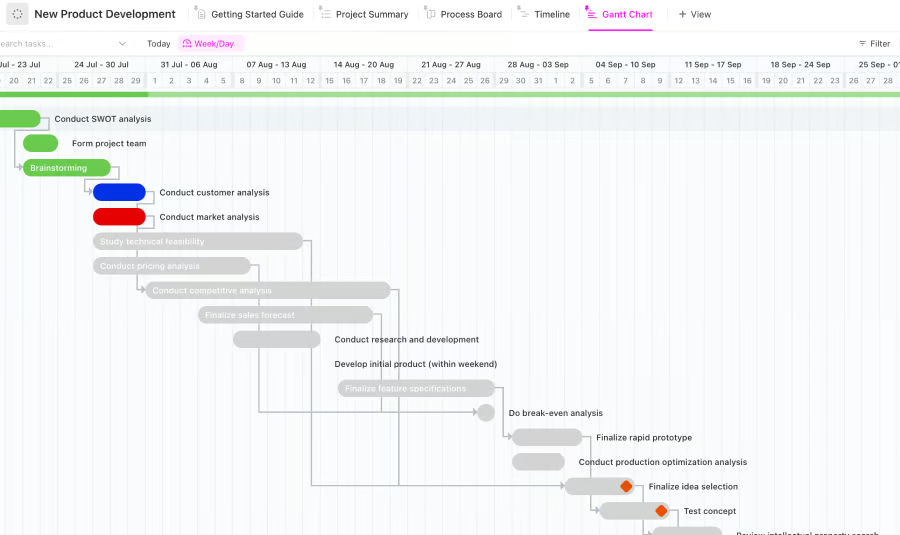
Automatic rescheduling is one of ClickUp’s main strengths for projects where task dates change often. When a dependent task moves, ClickUp can update connected dates based on task duration, working days, and the dependency setup. This reduces the need to revise each task manually after a delay.
I find this useful for software launches, product rollouts, and other projects where one missed date can affect subsequent tasks. Critical path and risk tools also help project managers see which delays may affect the final deadline, so they can adjust the plan before the schedule falls further behind.
On the downside, ClickUp requires significant time to configure because scheduling depends on several workspace settings. TeamGantt is a better alternative for teams that want a simpler way to create and share project schedules.
Pros
|
Cons
|
Pricing
- Free plan: Includes task management, documents, Kanban boards, calendar views, and sprint management.
- Unlimited: $7/user/mo. Includes Gantt charts, storage, integrations, time tracking, resource management, and portfolios.
- Business: $12/user/mo. Includes dashboards, workload reporting, automation, timesheets, and Google SSO.
- Enterprise: Custom pricing. Includes SAML SSO, audit logs, data residency, permissions, and account administration.
The prices above are based on annual billing.
AI pricing note: Brain AI costs $9/user/mo, while Everything AI costs $28/user/month.
Standout features
- ClickUp Brain: Generate tasks and answer questions using workspace information.
- Docs: Connect project documents with tasks and control who can edit them.
- Goals: Track measurable targets against company goals and project work.
- Automations: Update task statuses and assignments when specified conditions are met.

3. GanttPRO: Best for workload-based schedule planning
My rating: 4.54 out of 5
Why I chose GanttPRO
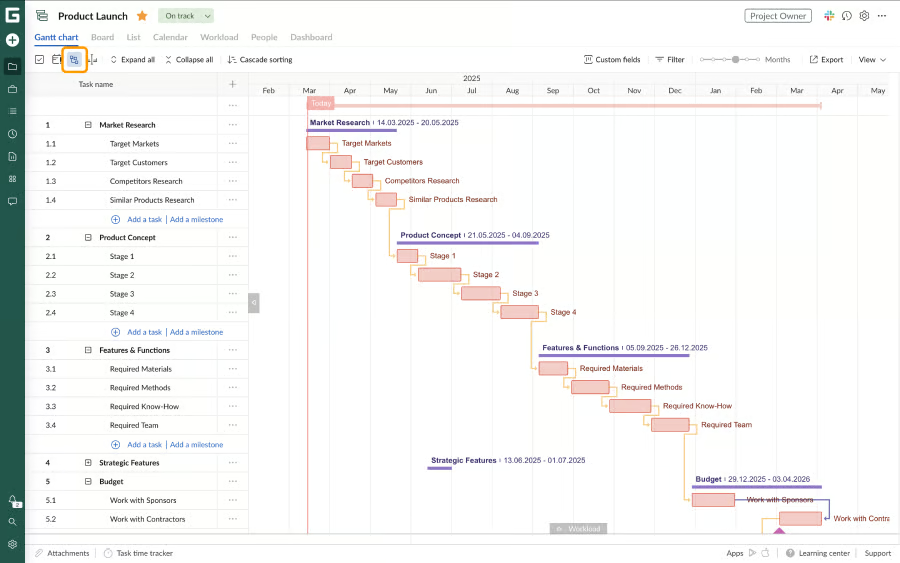
GanttPRO is one of the few Gantt chart software programs where resource workload sits directly below the project timeline, making staffing decisions part of schedule planning. Project managers can review daily assignments and move tasks when one person has too much work.
The product also connects timeline changes with labor costs and recorded time. I would use it when a project manager needs to balance availability against budget before confirming delivery dates.
However, when it comes to automated workflows, GanttPRO offers fewer options for custom business processes outside schedule and resource management. monday.com is a better alternative when teams need Gantt planning connected to configurable boards and automations.
Pros
|
Cons
|
Pricing
- Free plan: Not available.
- Free trial for paid plans: 14 days.
- Core: $8/user/mo. Includes Gantt scheduling, project calendars, automatic scheduling, and virtual resources.
- Advanced: $12/user/mo. Includes custom fields, filters, project templates, and overdue task tracking.
- Business: $19/user/mo. Includes workload management, portfolios, reports, budget planning, and time tracking.
- Enterprise: $25/user/mo. Includes SAML SSO, custom roles, onboarding assistance, and priority support. Requires at least five users.
The prices above are based on annual billing for 10 members.
AI pricing note: The AI Gantt Chart Maker is included in all plans.
Standout features
- Workload: Review team assignments and move work to avoid overloading staffing resources.
- Project portfolios: Group projects to monitor progress across active work.
- Budget planning: Calculate project costs from task estimates and resource rates.
- Time tracking: Compare recorded hours with project estimates and costs.

4. Wrike: Best for resource-based rescheduling
My rating: 4.51 out of 5
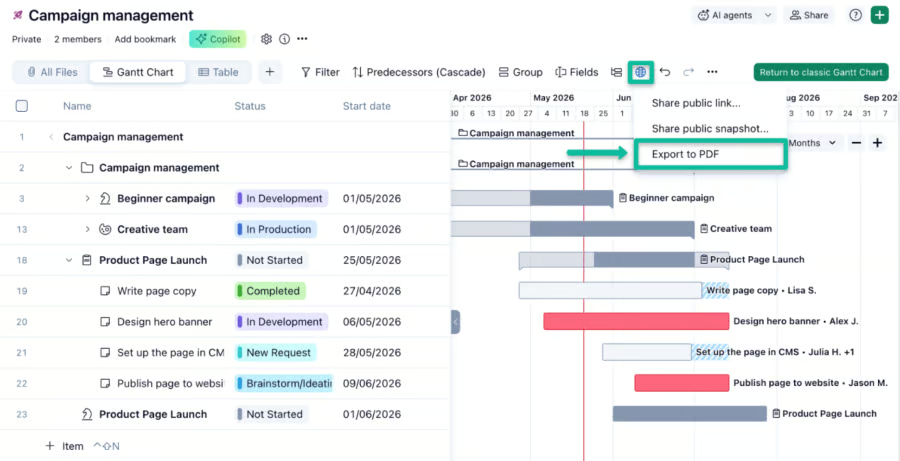
Why I chose Wrike
Like GanttPRO, Wrike connects workload planning with schedule changes, which is useful when staffing levels affect delivery dates. Managers can review effort over time and reassign work within the resource view.
I would consider it for agencies or departments that manage several projects with shared specialists. Work schedules can account for non-working days, while automated rescheduling moves affected tasks without changing their duration.
Note that Resource and capacity planning are reserved for Wrike’s Pinnacle plan, which uses custom pricing. Asana is a better alternative for organizations that want to manage portfolio workload and capacity planning within a connected workspace.
Pros
|
Cons
|
Pricing
- Free plan: Includes task management, project collaboration, and board or table views.
- Free trial for paid plans: 14 days.
- Team: $10/user/mo. Includes Gantt charts, dashboards, project tracking, and AI Essentials.
- Business: $25/user/mo. Includes workflows, workspace templates, reporting, resource planning, and AI agent actions.
- Pinnacle: Custom pricing. Includes resource planning, budgeting, forecasting, and business intelligence.
- Apex: Custom pricing. Includes AI agents, integrations, workflow automation, and enterprise administration.
The prices above are based on annual billing.
AI pricing note: AI Essentials is included in Team. Business plans include an AI Elite action allowance.
Standout features
- Request Forms: Collect project requests and convert responses into assigned work.
- Custom Item Types: Create work records that match specific business processes.
- Resource Management: Review capacity and reassign work across active projects.
- Proofing: Review files with visual comments and manage approval decisions.

5. monday work management: Best for customizable schedule workflows
My rating: 4.48 out of 5
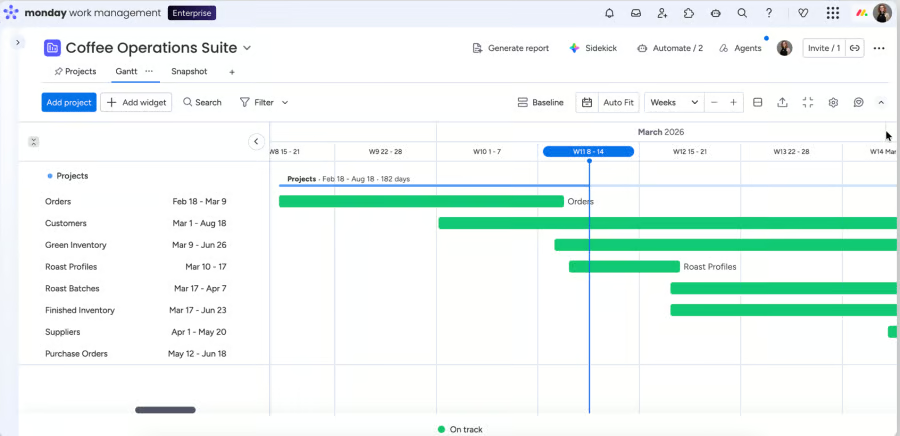
Why I chose monday work management
As a visual project tool, monday.com lets me decide which project details appear beside the Gantt schedule, so the timeline reflects how each department manages work. A marketing team might track campaign stages and approvals, while an operations team can show ownership or delivery status without using the same board setup.
I see the main benefit in how schedule changes connect with the rest of the workflow. When dates change, automations can update statuses or assign follow-up work, while dashboards provide managers with a summary of progress across multiple boards. This keeps the Gantt view connected to day-to-day project activity instead of treating it as a separate planning tool.
However, this level of flexibility can create problems when teams build boards with different fields or naming rules, so monday.com may need stricter workspace standards. Smartsheet is a better alternative when leaders need consistent portfolio reports built from standardized project sheets and dashboards.
Pros
|
Cons
|
Pricing
- Free plan: Includes up to two seats, three boards, three documents, and task tracking.
- Free trial for paid plans: 14 days.
- Basic: $9/seat/mo. Includes unlimited work items, viewers, file storage, dashboards, and AI credits.
- Standard: $12/seat/mo. Includes Gantt views, guest access, integrations, automation, and calendar planning.
- Pro: $19/seat/mo. Includes private boards, time tracking, dashboards, formulas, and automation allowances.
- Enterprise: Custom pricing. Includes permissions, analytics, security controls, governance, and account administration.
The prices above are based on annual billing.
AI pricing note: Paid plans include monthly AI credits. Additional credits can be purchased.
Standout features
- WorkForms: Collect project requests and send responses directly into boards.
- Dashboards: Combine board data to report progress across projects.
- Workdocs: Turn project notes into board items and connected workflows.
- Automations: Trigger updates and notifications when board conditions change.

6. TeamGantt: Best for shared client schedules
My rating: 4.22 out of 5
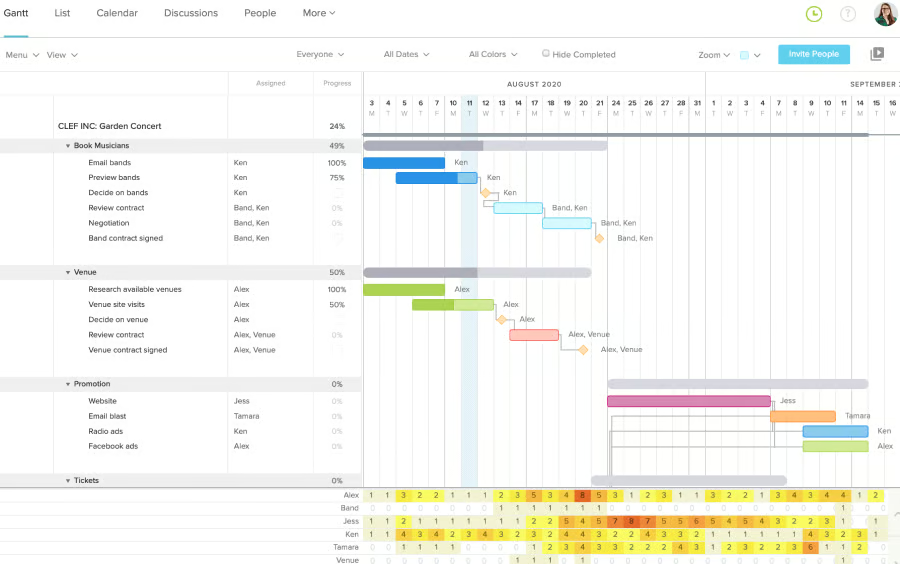
Why I chose TeamGantt
TeamGantt is a dedicated Gantt chart tool with client sharing built around the project schedule. Teams can send a view-only link or export the chart as a PDF, allowing clients to review dates and progress without granting access to the full workspace.
This is useful for agencies, consultants, or contractors that need to keep clients informed without giving them editing rights. As the internal team updates the schedule, the shared view reflects those changes, so stakeholders can follow the latest plan instead of waiting for a separate status report.
TeamGantt may be less suitable for organizations that need portfolio governance across several departments. Smartsheet is a better alternative when leaders need centralized reports and controlled access to project data.
Pros
|
Cons
|
Pricing
- Free plan: Includes one project with up to 40 tasks.
- Free trial for paid plans: 14 days.
- Basic: $24/project/mo. Includes Gantt planning, project collaboration, calendar views, and file management.
- Business: $120/project/mo. Includes workload management, portfolio oversight, project health reporting, and time tracking.
- Builder Edition: $59.70/year, equivalent to $159/mo. Includes 10 projects, construction scheduling, training sessions, and unlimited users.
- Enterprise: Custom pricing. Includes unlimited projects, reporting, forecasting, account support, and access to all platform functions.
The prices above are monthly billing rates. TeamGantt offers a 20% discount on annual billing.
Standout features
- Workloads: Review team capacity across projects before assigning new work.
- Time tracking: Record project hours and compare time across people.
- Project health reports: Review schedule status and project risks from a single report.
- Custom API: Connect TeamGantt project data with other business tools.

7. Asana: Best for cross-project capacity planning
My rating: 4.15 out of 5
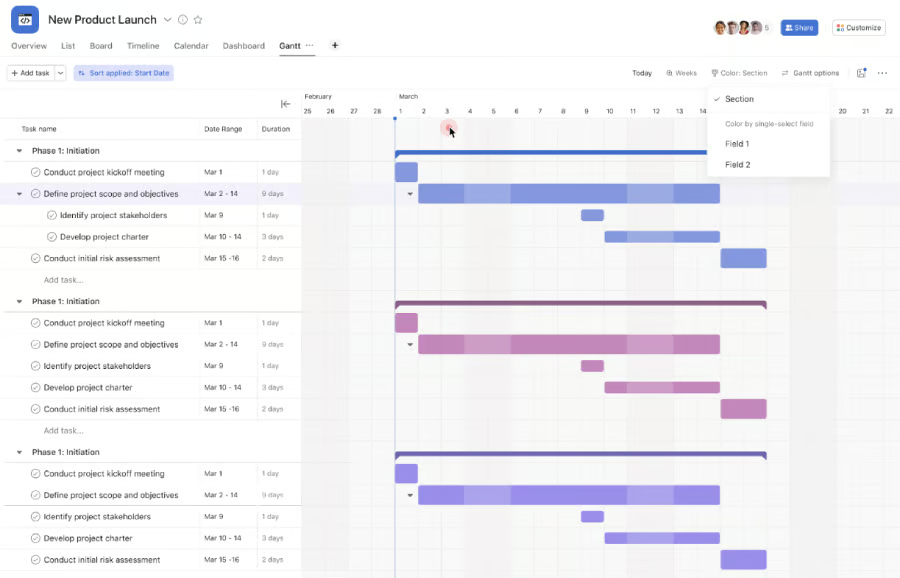
Why I chose Asana
In Asana, portfolio workload connects project schedules with team capacity across several initiatives. Managers can review assignments by person and move tasks when planned work exceeds available time.
I would use Asana when cross-functional work requires staffing decisions that span multiple project timelines. Capacity plans show future allocations before projects begin, which gives managers time to adjust staffing, delay lower-priority work, or change project dates.
Note that Asana’s capacity planning is available only on Enterprise plans, making it less practical for teams on a budget. GanttPRO is a better alternative for teams that want workload planning within a lower-priced scheduling platform.
Pros
|
Cons
|
Pricing
- Free plan: Includes up to two users, task management, projects, and standard project views.
- Starter: $10.99/user/mo. Includes Gantt planning, dashboards, workflow automation, forms, and AI Studio credits.
- Advanced: $24.99/user/mo. Includes portfolios, goals, workload planning, approvals, and reporting.
- Enterprise: Custom pricing. Includes SAML, SCIM, capacity planning, administration controls, and AI Studio credits.
- Enterprise+: Custom pricing. Includes audit logs, data controls, compliance support, and governance tools.
The prices above are based on annual billing.
AI pricing note: AI Studio Basic is included with usage limits. AI Studio Plus and AI Teammates are paid options.
Standout features
- Portfolios: Group related projects and monitor progress across business initiatives.
- Goals: Connect project work to company targets and track results.
- Workflow Bundles: Apply the same process across multiple projects and manage updates from one place.
- AI Studio: Build AI workflows that review project data and take assigned actions.
8. Microsoft Planner: Best for Microsoft-based schedule planning
My rating: 3.68 out of 5
Why I chose Microsoft Planner
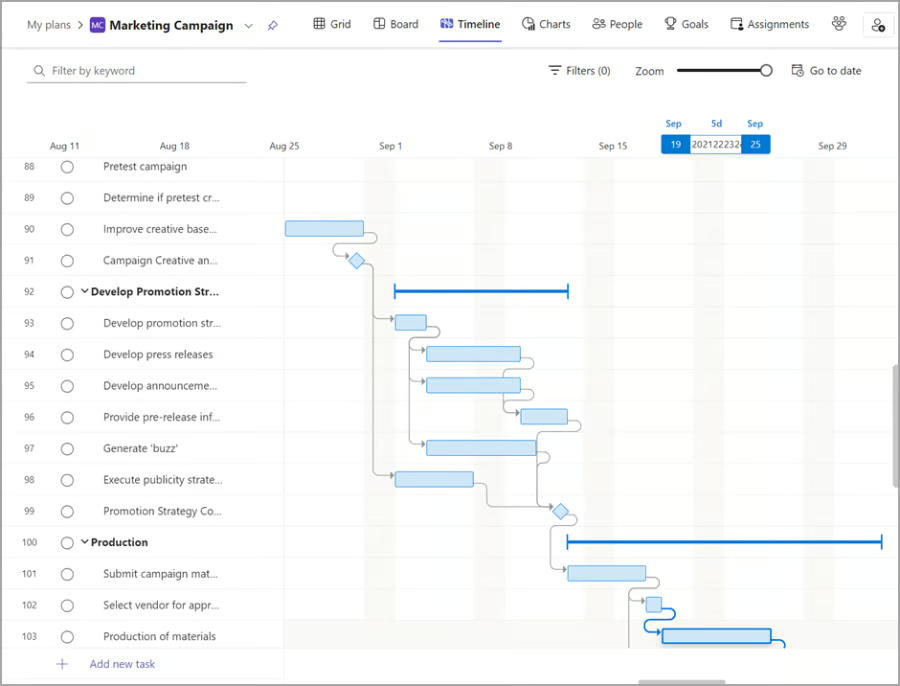
Planner works best for organizations that already use Microsoft 365 for daily work. Instead of managing schedules in a separate system, teams can keep project tasks close to Teams conversations and other Microsoft apps. Premium plans also give managers a clearer view of goals and progress across active work.
Multiple dependency types give project managers more control over task sequencing. When one linked task changes, Planner can adjust the related project dates. Planner Agent can create tasks from a project goal, then prepare status reports from the current plan.
The main drawback is cost. Planner has no standalone free plan, while timeline views and dependency scheduling require a premium subscription. ClickUp is a better alternative for teams that want dependency management across all plans and more control over automatic schedule changes.
Pros
|
Cons
|
Pricing
- Free plan: Planner is included with qualifying Microsoft 365 subscriptions.
- Free trial for paid plans: 30 days
- Planner Plan 1: $10/user/mo. Includes Gantt timelines, dependencies, project goals, sprints, and premium templates.
- Planner and Project Plan 3: $30/user/mo. Includes portfolios, baselines, critical-path analysis, resource management, and the Project desktop application.
The prices above are based on annual billing.
AI pricing note: Microsoft 365 Copilot is required for Planner Agent and Copilot functions in Planner. It costs $30/user/mo with annual billing.
Standout features
- Portfolios: Track status and completion across several premium plans.
- Planner Agent: Generate tasks from goals and prepare project status reports.
- Microsoft Teams integration: Manage Planner tasks within team channels and conversations.
- Power Automate connector: Create workflows that connect Planner with other Microsoft services.
Best Project Management Software
How to choose the best Gantt chart software
The right Gantt chart software depends on how complex your projects are and how much control and detail you need when managing project schedules. Compare each tool based on how well it supports planning, staffing decisions, and day-to-day schedule changes.
- Scheduling capabilities: Check how the software handles dependencies, milestones, baselines, critical path, and automatic rescheduling. These tools should make it easier to understand how one delay affects the rest of the project.
- Resource planning: Review whether the platform shows workloads, availability, and assignment conflicts. This is especially useful when project dates depend on whether the right people have enough capacity.
- Reporting and visibility: Look at how the software reports progress across individual projects and portfolios. Dashboards should help managers spot delays, overdue work, and schedule changes without opening every plan.
- Ease of use and collaboration: Consider how quickly users can build schedules, update team members, and share project plans. A tool may include various scheduling options, but it can still slow adoption if routine updates take time.
- Pricing and scalability: Compare user fees, plan restrictions, automation quotas, and governance controls. The lowest starting price may not reflect the actual cost once the team needs more functionalities, such as reporting, resource planning, or security features.
FAQs
How much does Gantt chart software cost?
Pricing varies by provider, plan, and billing model. Paid plans in this guide start at about $7 per user per month on an annual plan, while TeamGantt starts at $10 per project per month. Costs often rise when teams need portfolio reporting, resource planning, automation, security controls, or access to AI.
What is the best Gantt chart software?
Smartsheet is the best overall choice for teams that need to track timelines across several projects and combine them into executive reports. ClickUp suits teams that want automated schedule updates, while monday.com suits organizations that prefer visual planning and customizable workflows.
What is the easiest way to make a Gantt chart?
The easiest way is to use dedicated Gantt chart software with a ready-made template. Add your tasks, enter start and end dates, then connect related work with dependencies. The software automatically builds the timeline and makes it easier to manage schedule adjustments.
Read the full article here