



The best cheap payroll providers combine a great price point with essential features to remain compliant with state and federal laws while paying employees accurately and on time. Most also include complementary tools, such as time tracking, a human resources information system (HRIS), and benefits administration tools alongside an intuitive user interface and automation tools to save your company time and money.
After evaluating and testing dozens of payroll software, I narrowed down my list of the cheapest payroll service providers to the top seven. To do so, I scored each on value for the money, features, ease of use, customer support, and user reviews. Here are my top picks.
| Providers | ||
|---|---|---|
| Gusto | ||
| Justworks | ||
| Homebase Payroll | ||
| Patriot Payroll | ||
| OnPay | ||
| QuickBooks Workforce (formerly QuickBooks Payroll) | ||
| Square Payroll |
*Payroll is an add-on to Homebase’s main time tracking platform, which comes with a free plan for one-location businesses with up to 10 employees.
Top cheap payroll services comparison
| Our rating (out of 5) | Starting monthly price | Separate contractor only payroll ($/month)* | Automated pay runs | HR tools | |
|---|---|---|---|---|---|
| Gusto | 4.6 | $49 base fee plus $6 per employee | $35 base fee plus $6 per worker | Yes | Yes |
| Justworks | 4.5 | $79 per employee | No | Yes | Yes |
| Homebase Payroll | 4.2 | $39 base fee plus $6 per employee** | No | Yes | Yes |
| Patriot Payroll | 4.1 | $17 base fee plus $4 per employee | No | No | Yes |
| OnPay | 4.1 | $49 base fee plus $6 per employee | No | No | Yes |
| QuickBooks Workforce | 3.9 | $50 base fee plus $6.50 per employee | $25 for up to 20 workers plus $2 per additional worker | Yes | Yes |
| Square Payroll | 3.7 | $35 base fee plus $6 per employee | $6 per worker | Yes | Yes, but mostly via add-on plans |
*All the providers in this guide can handle both employee and contractor payroll, but some also offer a contractor-only package for businesses that only pay contractors.
**Payroll is an add-on to Homebase’s main time tracking platform, which comes with a free plan for one-location businesses with up to 10 employees.
1. Gusto: Best overall
Our rating: 4.6 out of 5
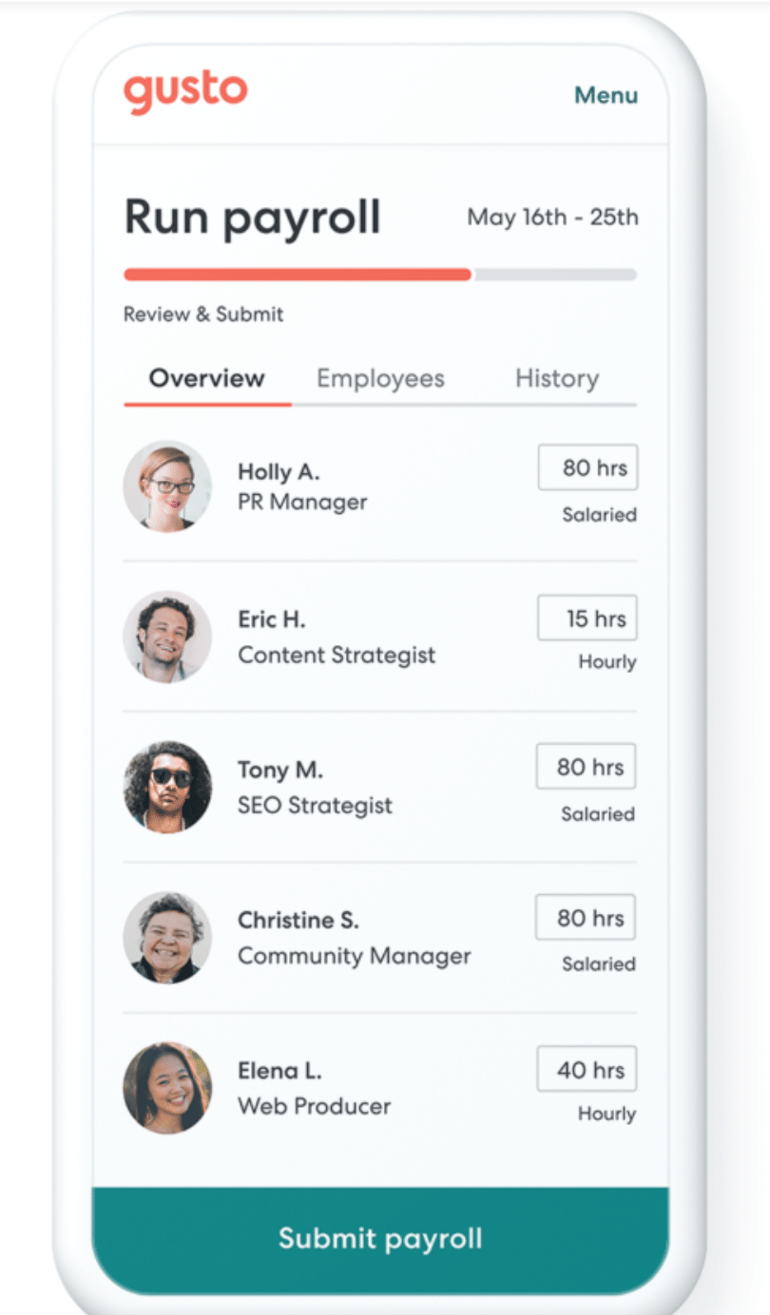
Gusto doesn’t just offer payroll tools but benefits and HR tools as well—all in one platform. Its plans start at a reasonable rate and include full-service payroll with tax filing services, basic hiring and onboarding, access to employee benefits, and employee self-service tools.
It’s a strong option for small businesses looking for an all-in-one platform to manage payroll and core HR tasks. It may not be the absolute cheapest payroll service provider on my list, but it offers the best value for money given the ease of use, automation, and HR functionalities offered.
Pricing
Gusto offers four plans. Here’s a brief overview of each:
- Simple: Starting at $49 per month, plus $6 per employee per month, you get basic payroll tools. It includes full-service payroll services for a single state, basic hiring and onboarding tools, reporting, employee profiles, and an employee self-service portal.
- Plus: This plan is regularly $89 per month, plus $14 per person per month, though it often runs promotional pricing. It adds multi-state payroll to the Simple plan features, in addition to time-tracking, scheduling, job postings, org charts, and employee performance review tools.
- Premium: Starting at $180 per month, plus $22 per employee per month (with promotional pricing regularly available), this plan adds dedicated support and HR management tools to the Plus features.
- Contractor Only: This plan allows you to pay only contractors, and is ideal for those without any W-2 employees. It is $35 per month, plus $6 per employee per month for unlimited contractor payments across all 50 U.S. states.
Gusto pros and cons
| Pros | Cons |
|---|---|
|
|
Why I chose Gusto
Gusto is a one-stop shop for everything you need to run payroll. I chose it as the best overall cheap payroll service because it gives small businesses room to grow without switching systems after the first few hires. It includes the payroll basics most employers need, such as tax filing, direct deposit, employee self-service, and payroll reports. It also offers HR, benefits, time tracking, and contractor payment tools, which makes it more complete than many lower-cost payroll-only platforms.
Learn more about Gusto
2. Justworks: Best for outsourced payroll and HR support
Our rating: 4.5 out of 5
In addition to offering payroll tools, Justworks offers HR software and access to employee benefits. It stands out by providing robust human support for small businesses, even those looking to expand with a global workforce. Its Professional Employer Organization (PEO) and Employer of Record (EOR) services give businesses access to certified professionals and even whole teams for outsourced hiring and payroll.
Pricing
Justworks offers three paid plans, including its Payroll, PEO Basic, and PEO Plus plans. Here is a brief overview of each:
- Payroll: This plan is $50 per month, plus $8 per employee per month. It provides basic features, such as payroll for all employees across multiple states, multiple pay rates, and contractor payments.
- PEO Basic: This plan is $79 per employee per month and offers compliance, support, and HR tools.
- PEO Plus: At $109 per employee per month, this plan adds HR and benefits solutions to the PEO Basic plan.
Justworks pros and cons
| Pros | Cons |
|---|---|
|
|
Why I chose Justworks
I chose Justworks because it offers small businesses ample support for scaling their operations and promoting growth. Its PEO plans offer 24/7 customer support via Slack, email, phone, and chat. In these plans, you can access certified HR consultants, harassment prevention and inclusion training, an HR resource center, compliance support, and benefits administration support. And, if you plan to hire abroad, you can even hire Justworks to handle all hiring and payroll processing for you via its EOR services. This is especially helpful if you’re handling a startup and need more hand-holding with your first payroll or if your payroll is too complex that you need professionals to advise on best practices.
Learn more about Justworks
3. Homebase Payroll: Best for very small hourly teams
Our rating: 4.2 out of 5

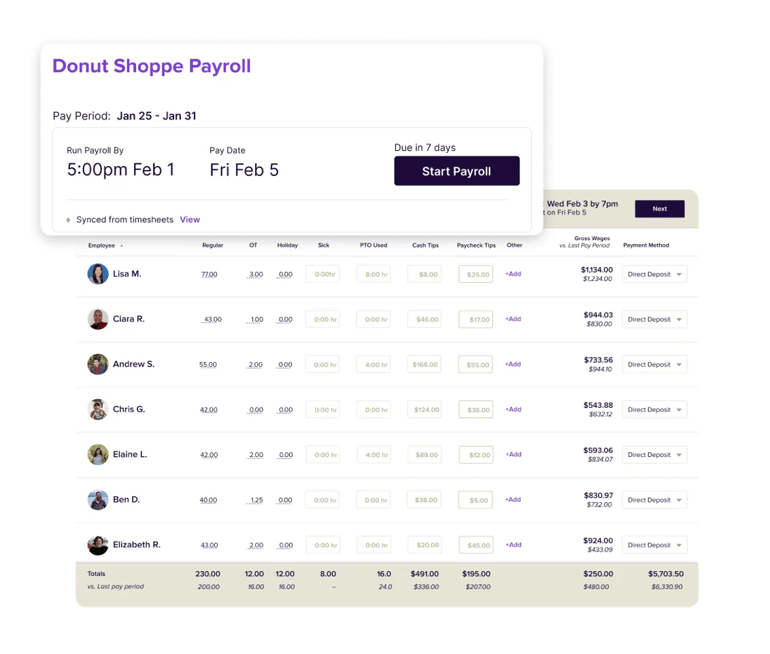
Homebase is primarily a workforce management tool. It allows you to onboard employees, schedule shifts, manage labor costs and tasks, communicate with their team, and track employee attendance. In addition to these HR tools, it comes with payroll software that can be added onto its workforce management plans.
Homebase Payroll is most affordable for very small teams that qualify for its free Basic plan. That plan is designed for one-location businesses with up to 10 employees. If your business fits that profile, adding payroll can create an affordable scheduling, time tracking, and payroll workflow in one system.
Pricing
Homebase offers four plans ranging from free to $80 per month, plus some add-on plans. Here is an overview of each:
- Basic: As Homebase’s free plan, you get basic scheduling and time tracking tools, employee management tools, integrations, and help center and email support. You can also add payroll tools to this plan. However, this is limited to businesses with one location and up to 10 employees.
- Essentials: For $30 per location, per month, this comes with all the tools of the free plan plus live chat and phone support, more advanced time tracking and scheduling tools, payroll integration, and team communication tools.
- Plus: This plan is $70 per location, per month and it comes with everything in the Essentials plan plus additional tools like hiring, retention and performance, time off, employee onboarding, department management, and personnel permissions.
- All-in-one: At $120 per location, per month, this plan gives you everything in the Plus plan with added tools for employee onboarding, HR, compliance, labor cost management, and business insights tools.
- Payroll add-on: This add-on plan costs $39 per month, plus $6 per employee per month. It allows you to calculate employees’ wages, make direct deposit payroll payments, and automatically file your payroll taxes.
Homebase Payroll pros and cons
| Pros | Cons |
|---|---|
|
|
Why I chose Homebase Payroll
I chose Homebase because it solves a payroll problem that many very small businesses actually have: getting accurate hours into payroll without extra spreadsheets. For those with hourly teams, payroll accuracy often depends on clean scheduling, time clock, break, and overtime data.
Homebase is cheapest when you use its free Basic plan and add payroll. That makes it a strong fit for businesses with one location and up to 10 workers. If you have more than 10 employees or multiple locations, Homebase can still be useful, but the total price will rise once you combine a paid workforce management plan with the payroll add-on.
Learn more about Homebase Payroll
4. Patriot Payroll: Best for DIY payroll tax filing
Our rating: 4.1 out of 5

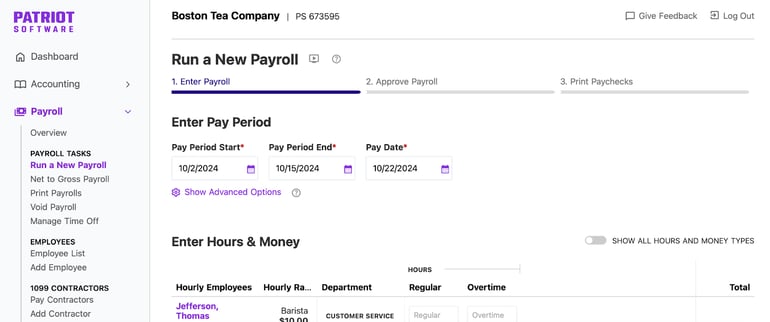
Patriot offers a straightforward payroll processing software that starts at a very affordable $17 per month, plus $4 per user per month. This comes with core payroll tools to process employees and contractor payments, calculate federal and state taxes, and generate year-end payroll tax filings. Plus, you can add on Patriot’s time and attendance and HR software tools to enhance the platform’s features.
While its basic plan can keep costs low, you have to handle payroll tax filings yourself. This makes it ideal for cost-conscious small business owners who prefer this setup and only have a small team. However, a Full Service plan is also available that includes payroll tax filing services.
Pricing
Patriot Payroll offers two plans:
- Basic Payroll: Starts at $17 per month, plus $4 per contractor or employee for its basic payroll software plan. It includes robust payroll processing tools.
- Full Service Payroll: Patriot’s Full Services payroll plan is $37 per month, plus $5 per contractor per month. It provides all Basic Payroll plan tools, plus tax management and filing tools and services.
Patriot Payroll pros and cons
| Pros | Cons |
|---|---|
|
|
Why I chose Patriot Payroll
I chose Patriot Payroll because it gives small businesses control over how much payroll support they want to pay for. If you are comfortable filing payroll taxes yourself, the Basic Payroll plan keeps costs low while still giving you tools to calculate payroll, pay workers, generate reports, and manage employee access. That said, DIY payroll tax filing is not for every business. If you operate in multiple states, have complicated pay rules, or do not want to track payroll tax deadlines yourself, the Full Service Payroll plan is the safer option.
Learn more about Patriot Payroll
5. OnPay: Best for multi-state payroll
Our rating: 4.1 out of 5

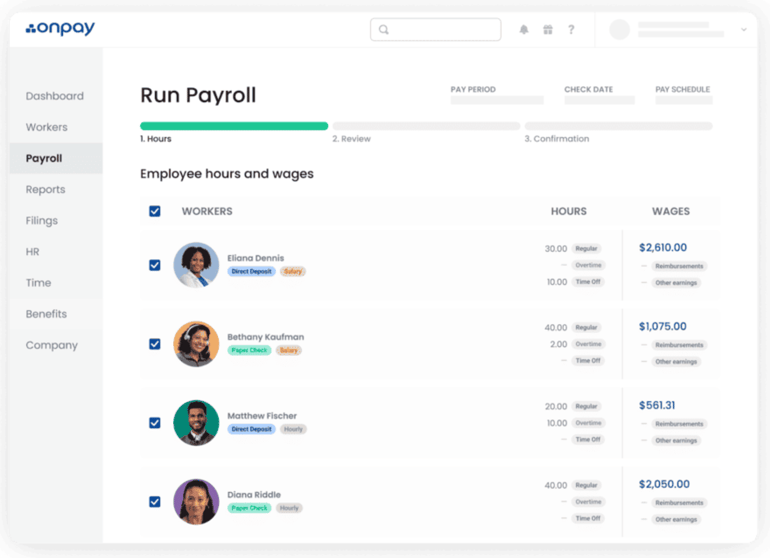
In addition to payroll software, OnPay offers HR and benefits administration tools. It stands out by providing robust payroll features for U.S.-based businesses, even offering unlimited pay runs in all 50 U.S. states in every plan.
Pricing
OnPay offers its base Payroll Essentials plan for $49 per month, plus $6 per employee per month. The plan includes:
- Unlimited pay runs and schedules
- Federal, state, and local tax filings
- The ability to pay workers in all 50 U.S. states
- Phone, chat, and email support
- A small selection of integration options, such as time-tracking tools
- The ability to pay contractors
- Direct deposit
- Industry-specific solutions
- Basic hiring and onboarding tools
- Benefits administration tools.
It also has an HR add-on priced at $15 per month, plus $2 per employee per month. This includes PTO management, onboarding workflows, org charts, document management, equipment and software provisioning, and HR insight tools to OnPay’s base platform.
OnPay pros and cons
| Pros | Cons |
|---|---|
|
|
Why I chose OnPay
I chose OnPay because it offers affordable and transparent payroll for businesses with workers in more than one state. While some providers request additional fees or require you to upgrade to a higher tier for multi-state payroll, OnPay’s single plan is all-inclusive at just $49 per month, plus $6 per employee per month. Plus, its base plan includes most features that other cheap payroll service providers either don’t have or charge extra for, such as free data migration support, compliance audit tools, and guidance from licensed experts.
Learn more about OnPay
6. QuickBooks Workforce: Best for QuickBooks accounting users
Our rating: 3.9 out of 5
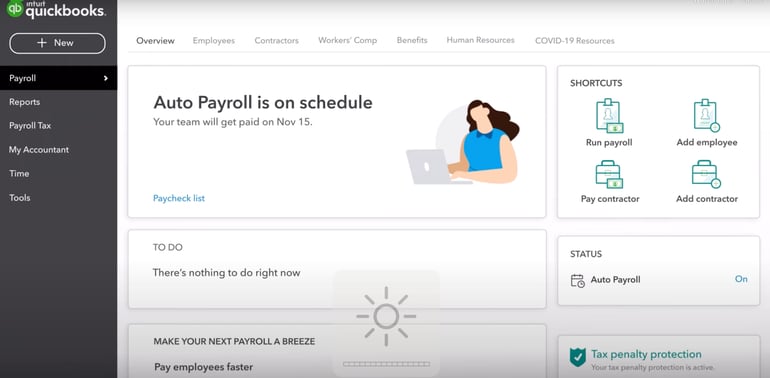
Historically, QuickBooks was primarily an accounting and bookkeeping tool. However, it has added bundled payroll plans that include its more traditional bookkeeping features in addition to health benefits, and some accounting features. Overall, best for those that already use QuickBooks Online or want payroll data to flow directly into their accounting system. It is not the lowest-cost payroll option, but it can make sense for small businesses that want payroll, bookkeeping, taxes, and labor costs connected in one familiar platform.
Pricing
QuickBooks Workforce offers three payroll and HR plans. Here is an overview of each:
- Workforce Payroll: For $50 per month, plus $6.50 per employee per month, you get access to tools for managing your payroll taxes and paying your employees automatically.
- Workforce Premium: This plan is $88 per month, plus $10 per employee per month. In addition to Workforce Payroll plan features, it comes with time off management, recruiting tools, onboarding, and up to five automated HR workflows.
- Workforce Elite: Starting at $134 per month, plus $12 per person per month, you get all the tools in the Workforce Premium plan plus a personal HR advisor, performance review tools, expert setup, and tax penalty protection.
QuickBooks Workforce pros and cons
| Pros | Cons |
|---|---|
|
|
Why I chose QuickBooks Workforce
I chose QuickBooks Workforce because it works best when payroll and accounting need to stay tightly connected. For very small businesses, payroll is not just an HR task. It affects cash flow, job costing, tax planning, and bookkeeping accuracy.
If you already use the QuickBooks accounting software, QuickBooks Workforce can reduce duplicate data entry and give you a clearer view of labor costs. That is especially useful for businesses that track billable hours, project costs, payroll taxes, and employee payments inside the same financial system.
Learn more about QuickBooks Workforce
7. Square Payroll: Best for small restaurant and retail businesses
Our rating: 3.7 out of 5

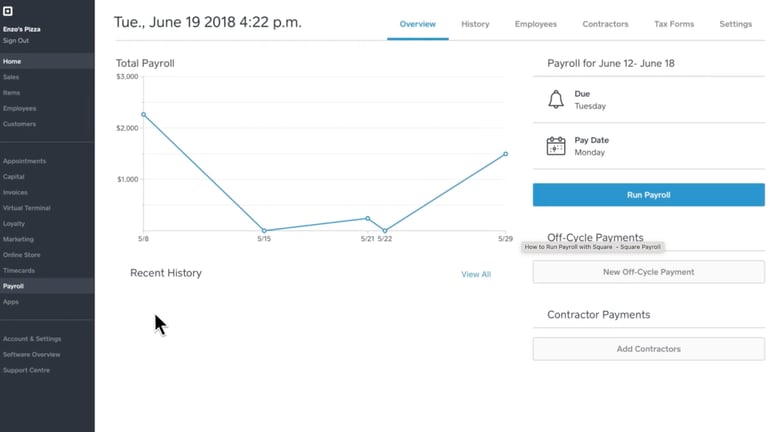
Square Payroll allows you to automate payroll for both employees and contractors. Because it also lets you connect your in-store point-of-sale (POS) system and sync your employee timecard data, it is a great option for restaurants or retail stores.
Pricing
Square Payroll starts at $35 per month, plus $6 per employee or contractor. Seasonal companies that aren’t paying employees regularly also don’t have to pay the monthly price. Its payroll plan offers all key features, including:
- Unlimited pay runs per month
- Check, direct deposit, or Cash App payments
- Auto payroll
- Off-cycle payments
- Multistate payroll
- Multiple pay rates
- A Square team app
- Employee self-onboarding
- Time tracking tools
- Scheduling tools
- Automated management tools
- Compliance alerts
If you only pay contractors, Square Payroll has a contractor-only payroll plan that costs $6 per worker, per month. It also includes unlimited pay runs, automated salary and tax calculations, simple onboarding tools, and multiple payment options.
Square Payroll pros and cons
| Pros | Cons |
|---|---|
|
|
Why I chose Square Payroll
I chose Square Payroll because it uniquely offers tools to help small brick-and-mortar businesses, like restaurants and retail businesses, manage their payroll. For example, it helps you manage tips and employee time cards as it automatically syncs to payroll for accuracy and compliance. It also allows you to connect your Square Payroll software to your Square POS products to manage payroll from your POS dashboard easily.
Learn more about Square Payroll
Best business software
Cheap Payroll Software FAQs
What is the cheapest payroll service for small businesses?
Of the reputable payroll software on the market, Patriot Payroll is one of the cheapest. With plans starting at $17 per month, plus $4 per person per month, it offers all the tools you need to manage payroll for a single-state business, including unlimited payroll runs per month, the ability to pay employees and contractors, payroll reporting, and direct deposit. However, for a tool that also manages your payroll taxes, you’d have to upgrade to its more expensive plan.
What is the average cost of payroll software?
The average cost of payroll software starts with a base price of between $35 and $45 per month, plus a per-person rate of $4 to $9 per employee or contractor paid per month. However, prices can range dramatically depending on the company and features offered. For example, a software that also manages your payroll tax filings can be double the price of one that does not. And, some companies offer plans with a no-frill feature set for as low as $17 per month.
What is the difference between payroll software and payroll services?
Payroll software gives you tools to calculate pay, run payroll, manage employee records, and generate reports. Payroll services usually include more hands-on support, such as payroll tax filing, tax deposits, year-end forms, compliance assistance, or outsourced HR help.
For example, Patriot’s Basic Payroll plan is closer to DIY payroll software because you handle tax filing yourself. Justworks’ PEO plans are closer to outsourced payroll and HR support because they can help with payroll, compliance, HR administration, and benefits.
Methodology
I reviewed and tested dozens of payroll software to land on the top seven for this list. To do so, I evaluated each on pricing, features, customer support, user reviews, and ease of use. I also tested each provider to ensure a positive user experience. From there, I compiled a rubric score based on dozens of factors. I then ranked them according to where they landed on the list based on my evaluation process.
Read the full article here