



VPNs, or virtual private networks, help protect your online activity by encrypting your internet traffic and masking your IP address. They also let you connect through servers in different countries, which can help unlock region-restricted content and reduce third-party tracking.
For users in Australia, a VPN can support faster private browsing, safer file sharing, and more secure connections on public Wi-Fi. For users outside Australia, connecting to an Australian VPN server can also help access Aussie-based streaming content and local websites. This guide compares the six best VPNs for Australia based on speed, Australian server availability, security features, ease of use, and price.
The best VPNs for Australia at a glance
| VPN | Server pool | Simultaneous connections | Streaming sites unblocked | Supported platforms | Annual Pricing |
|---|---|---|---|---|---|
| NordVPN | 190+ servers in 5 Australian cities; 6,000+ worldwide servers | 10 | Netflix, Amazon, Disney+, BBC iPlayer, ITVX, Channel 4, 9Now, 10 Play | Windows, Mac, iOS, Android, Linux (CLI), routers and more | A$7.49 per month |
| Proton VPN | 148 servers in 5 Australian cities; 20,000+ worldwide servers | 10 | Netflix, Amazon, Disney+, BBC iPlayer, Hulu, ITVX, Channel 4, 9Now, 10 Play | Windows, Mac, iOS, Android, Linux (GUI), routers and more | Free plan with unlimited bandwidth; A$6.39 per month |
| ExpressVPN | 7 servers in 5 Australian cities; 3,000+ worldwide servers | 10-14 | Netflix, Amazon, Disney+, BBC iPlayer, HBO Max, Hulu, ITVX, Channel 4, 9Now, 10 Play | Windows, Mac, iOS, Android, Linux (CLI), routers and more | A$3.99 per month |
| Surfshark | Unknown number of servers in 5 Australian cities; 4,500+ worldwide servers | Unlimited | Netflix, Amazon, Disney+, BBC iPlayer, Hulu, ITVX, Channel 4, 9Now, 10 Play | Windows, Mac, iOS, Android, Linux (GUI), routers and more | A$4.79 per month |
| Cyberghost VPN | 200+ servers in 3 Australian cities; 11,500+ worldwide servers | 7 | Netflix, Amazon, Disney+, BBC iPlayer, HBO Max, Hulu, ITVX, Channel 4, 9Now | Windows, Mac, iOS, Android, Linux (CLI), routers and more | A$2.49 per month for a two-year subscription |
| Private Internet Access | Unknown number of servers in 5 Australian cities; 30,000+ worldwide servers | Unlimited | Netflix, Amazon, Disney+, BBC iPlayer, HBO Max, Hulu, ITVX, Channel 4, 9Now, 10 play | Windows, Mac, iOS, Android, Linux (CLI), routers, Chrome, Firefox, Opera, gaming consoles, smart TVs and more | A$5.42 per month |
NordVPN: Best overall VPN for Australia
NordVPN is a popular, premium VPN service with a strong track record for privacy, speed and reliability. It has more than 190 Australian servers across five cities, helping users access Aussie-restricted content, plus a large server network in at least 110 countries for region-specific streaming and browsing.
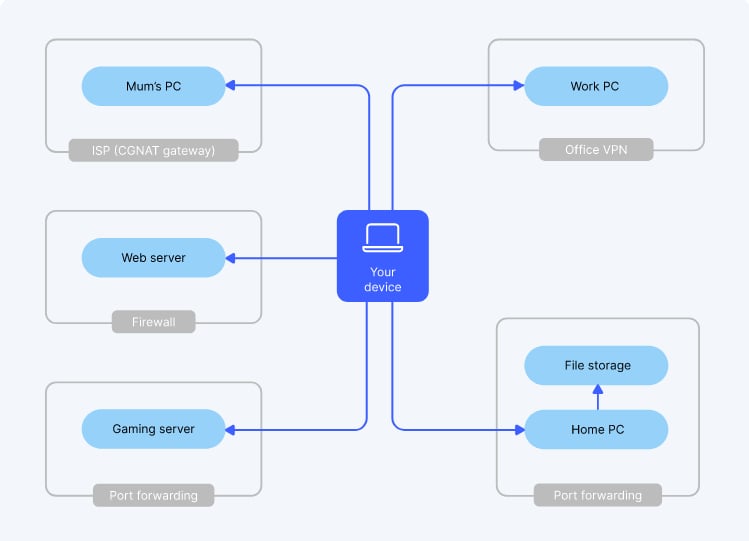
NordVPN’s WireGuard-based NordLynx protocol delivers fast connection speeds without sacrificing security. It also includes Meshnet for private encrypted connections across up to 60 devices, Onion over VPN for accessing .onion sites without a special browser, threat protection, DNS leak protection, a kill switch, split tunneling and double VPN. While its map-style interface can be difficult to navigate, especially on mobile, NordVPN remains a strong choice for users who want fast speeds and advanced security features.
Why I chose NordVPN
NordVPN provides the industry-best Australia VPN speeds and reliability for an affordable price. Features like Meshnet and Onion over VPN provide enhanced protection for journalists, activists, and anyone else worried about censorship or surveillance. NordVPN also provides security capabilities like private DNS, tracker blocking and dark web monitoring, making it the best overall option for anyone looking to browse privately and securely.
For more information, read our full NordVPN Review.
Figure A
Pricing
- Basic: A$7.49 per month, billed annually; A$4.79 per month, billed every two years
- Complete: A$8.89 per month, billed annually; A$6.09 per month, billed every two years
- Complete Max: A$11.59 per month, billed annually; A$8.89 per month, billed every two years
Features
- VPN kill switch: Disables internet access if the VPN connection drops.
- Split tunneling: Allows you to enable the VPN only for specific applications.
- Double VPN: Adds a second layer of encryption for added privacy and security.
- Dedicated IP: Enables access to IP-restricted applications and networks.
- Private DNS: Protects traffic from DNS hijacking, blocking or filtering.
- Meshnet: Connects up to 60 devices on a private, encrypted network.
- Onion over VPN: Reroutes traffic over the Tor network for anonymity.
- Threat protection: Blocks malicious URLs, web trackers and ads.
- Dark web monitor: Continuously scans dark websites for your credentials.
Pros
- Unblocks all Netflix regions.
- Large server pool for Australia and Oceania.
- Proprietary NordLynx protocol delivers industry-best speeds.
- Provides robust security features for the price.
Cons
- Cluttered interface can be difficult to navigate on mobile.
- Kill switch doesn’t activate for all iOS apps.
Visit NordVPN
Proton VPN: Best free VPN for Australia

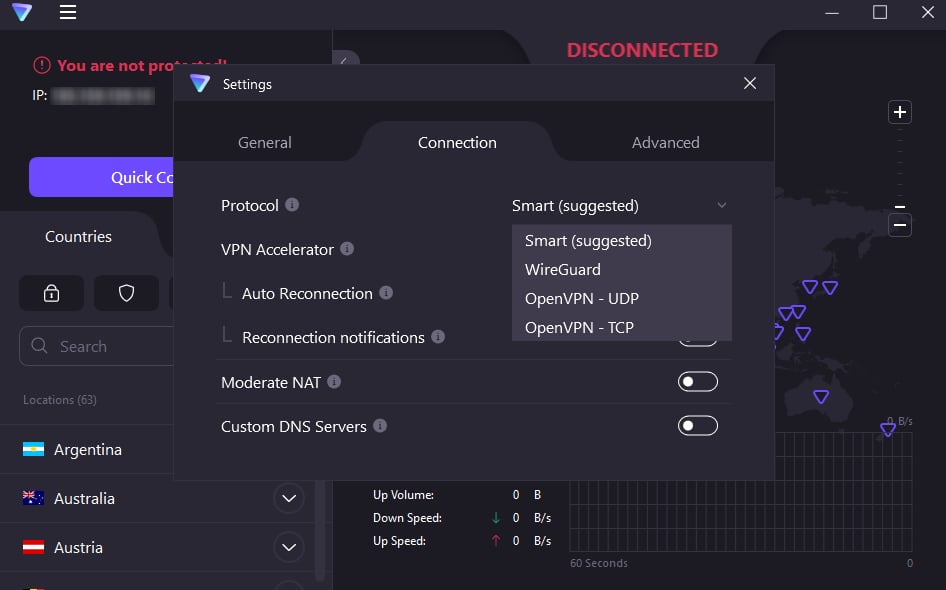
Proton VPN is a well-known VPN service with strong security and privacy features at an affordable price. It has 80 Australian VPN servers across five cities, along with features like a VPN kill switch, DNS leak protection, Tor over VPN, double VPN and Smart Protocol, which automatically chooses the best VPN protocol configuration for performance or censorship bypass.
Proton is based in Switzerland, known for strong privacy laws, and has defended its no-logs policy in court. It also offers a custom WireGuard-based Stealth protocol, open-source apps and regular independent audits. Proton’s free VPN apps include unlimited bandwidth and access to many premium features, but free users cannot choose their server location, which limits access to Australia-specific content.
Why I chose Proton VPN
Proton VPN offers a free plan with unlimited bandwidth, making it a great choice for users who need temporary or ad hoc VPN capabilities but can’t afford a paid subscription. Even free users are protected by Proton’s proven no-logs policy, though upgrading to a paid plan unlocks some of the most robust security features on this list. In addition to DNS leak protection, Tor over VPN and a secure-core double VPN, Proton helps users avoid censorship with features like Smart Protocol, auto-refreshing encryption keys and alternative third-party routing.
For more information, read our full Proton VPN review.
Figure B
Pricing
- Proton Free: Provides VPN access for one device with unlimited bandwidth.
- VPN Plus: A$6.39 per month, billed annually; A$15.99 per month
- Proton Unlimited: A$15.99 per month, billed annually; A$20.79 per month
Features
- Kill switch & always-on VPN: Disables internet access if the VPN connection drops and automatically reconnects the VPN when available.
- Secure Core: Protects traffic with a double VPN implementation where the first server is always located in a privacy-friendly country (e.g., Switzerland).
- DNS leak protection: Protects your browsing history from ISPs and other parties.
- Smart Protocol: Intelligently selects the best VPN protocol configuration for performance or to bypass censorship.
- Tor over VPN: Provides secure access to .onion sites from your regular browser.
- Forward secrecy: Generates new encryption keys for each session to prevent compromise.
- NetShield Ad-blocker: Blocks ads, trackers and malicious scripts.
- Alternative routing: Uses third-party networks like AWS to route your connection when access to Proton’s servers is blocked by censorship.
- Full disk encryption: Protects data on bare-metal servers to prevent third-party access even if systems are breached.
Pros
- Open-source and independently audited.
- Free plan offers unlimited bandwidth.
- Robust security & privacy feature set.
- Offers a graphical user interface for Linux devices.
Cons
- Not as fast as other options.
- The free plan doesn’t let you choose server locations.
Visit Proton VPN
ExpressVPN: Most user-friendly Australia VPN

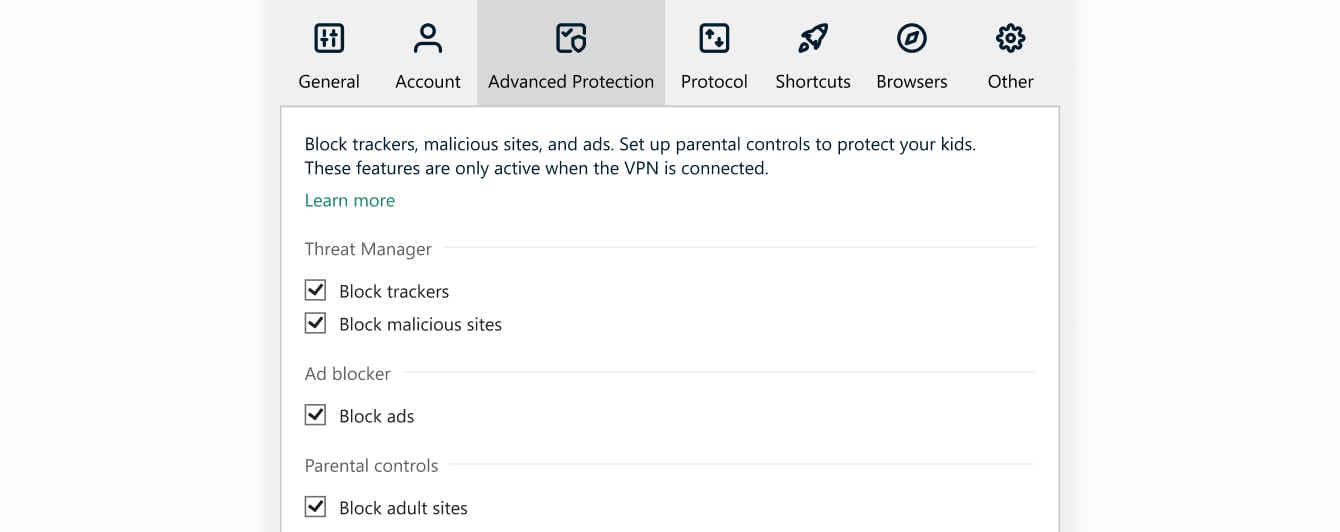
ExpressVPN is a streamlined Australian VPN service with an intuitive interface that even non-techy users can master. Like Nord and Proton, ExpressVPN has its own WireGuard-based VPN protocol called Lightway that offers improved security and performance. The ExpressVPN app includes all the usual capabilities, like a kill switch, private DNS, and split tunneling. It also has a Threat Manager feature that blocks trackers, ads, and malicious sites.
ExpressVPN has an impressive worldwide server pool across 105 countries, including six cities in Australia. However, there are only seven total Aussie servers listed, so you may run into capacity issues. ExpressVPN is also the priciest service on our list, even for a one-year subscription.
Why I chose ExpressVPN
ExpressVPN offers all the most important VPN features, such as a kill switch and split tunneling, in a user-friendly package. An exceptionally helpful and responsive customer support team ensures that even first-time VPN users can get up and running with minimal hassle. Overall, ExpressVPN makes privacy and security accessible to a less technical audience.
For more information, read our full ExpressVPN review.
Figure C
Pricing
- Basic: A$3.99 per month, billed annually; A$15.99 per month
- Advanced: A$4.99 per month, billed annually; A$16.99 per month
- Express Pro: $6.99 per month, billed annually; A$22.99 per month
Features
- Network Lock: A VPN kill switch that disables internet access when the VPN connection drops.
- Private DNS: Available on every ExpressVPN server, improving speed and security.
- VPN split tunneling: Allows you to specify which applications to protect.
- ExpressVPN Keys: A password manager included with all VPN plans.
- Threat Manager: Blocks trackers, ads and malicious sites.
Pros
- User-friendly interface and menu navigation.
- Offers servers in six Australian cities.
- Provides helpful and responsive customer support.
- Works on just about any platform.
Cons
- Only seven Australian servers.
- Steep pricing compared to competitors.
Visit ExpressVPN
Surfshark: Best budget VPN for Australia

Surfshark is an affordable Australian VPN service that offers a strong mix of security, privacy and value. It is powered by Surfshark Nexus, a software-defined networking technology that connects its VPN servers into a single global network and supports features like Dynamic MultiHop for custom double VPN configurations and IP Rotator for changing your IP address during long sessions.
All Surfshark VPN plans include CleanWeb, which blocks ads and cookie pop-ups in Chrome, Firefox, Edge, and other browsers, as well as Alternative ID, a personal detail and masked email generator for signing up to online services more privately. Surfshark also supports unlimited simultaneous device connections, making it useful for households or small teams, though monthly plans are much more expensive and some features, including Dynamic MultiHop, may not be available for Australian servers.
Why I chose Surfshark
Surfshark’s VPN packs a lot of added security features into very affordable one- or two-year pricing plans. It allows unlimited simultaneous connections to protect every device in an office or household for a single subscription price. Surfshark is also one of only two VPN providers — the other being Proton — offering a graphical user interface for Linux-based devices.
For more information, read our full Surfshark VPN review.
Figure D
Pricing
- Starter: A$4.79 per month, billed annually; A$23.19 per month
- One: A$5.09 per month, billed annually; A$26.69 per month
- One+: A$10.59 per month, billed annually; A$30.79 per month
Features
- VPN kill switch: Prevents unprotected browsing.
- Dedicated IP: Allows access to IP-sensitive services and bypasses CAPTCHA requests.
- Bypasser: Offers split-tunneling capabilities.
- IP rotator: Cycles IP addresses over a long connection section to maintain anonymity.
- Alternative ID: Masks personal information in sign-up forms.
- Dynamic MultiHop: Provides double VPN connectivity.
- Surfshark Nexus: Uses software-defined networking to connect VPN servers to a single, global network.
- CleanWeb: Blocks ads and cookie pop-ups in Chrome, Firefox, Edge and other apps.
- RAM-only servers: Don’t store your traffic logs, preventing compromise.
Pros
- Provides a well-rounded feature set for the price.
- Allows unlimited simultaneous connections.
- Offers speeds comparable to those of more expensive services.
- Quick-connect option is easy for beginners.
Cons
- Very high month-to-month pricing.
- Some features, like static IP addresses and Dynamic MultiHop, may not be available for Australian servers.
Visit Surfshark
CyberGhost VPN: Best Australia VPN for torrenting

CyberGhost VPN is another affordable option with all the standard features you’d expect, including split tunneling, a kill switch, DNS leak protection and static IP addresses. It also provides ad and tracker blocking, as well as the ability to automatically activate the VPN when you connect to an unprotected Wi-Fi network. For an extra $1 per month, you can also get the CyberGhost Security Suite for Windows, which provides antivirus protection and lets you modify or disable intrusive OS features.
CyberGhost’s biggest selling point is its large, distributed network of servers that are optimized for streaming, P2P torrenting or gaming, including 212 in Australia alone. However, these are limited to three Aussie cities — plus, it only allows seven simultaneous connections, the fewest on our list.
Why I chose CyberGhost VPN
CyberGhost offers an impressively large and distributed pool of VPN servers optimized for P2P torrenting, media streaming, gaming or a combination of these, allowing users to get the best experience for their particular use case. It has 212 Aussie VPN servers, all of them P2P-optimized, making CyberGhost the best VPN for torrenting in Australia.
For more information, read our full CyberGhost VPN review.
Figure E

Pricing
- One-month subscription: A$18.79
- Six-months subscription: A$10.45 per month
- Two-year subscription: A$2.49 per month
Features
- VPN kill switch: Prevents unprotected browsing.
- Dedicated IP: Allows you to access IP-sensitive information and avoid blocklists.
- VPN split tunneling: Lets trusted programs bypass the VPN.
- DNS leak protection: Keeps your DNS requests private.
- Wi-Fi protection: Automatically activates the VPN when you connect to a public network.
- Content blocker: Keeps ads and trackers from compromising your security.
- RAM-only servers: Wipe your logs with every reboot to ensure anonymity.
Pros
- Offers more than 200 P2P-optimized servers in Australia.
- Has specialized servers optimized for streaming and gaming.
- Pricing is very competitive.
- Large and distributed server pool.
Cons
- Only allows seven simultaneous device connections.
- Aussie servers are limited to three cities.
Visit CyberGhost VPN
Private Internet Access: Most customizable Australia VPN

Private Internet Access, or PIA, is a highly customizable Australian VPN with a massive network of more than 10,000 servers. It offers advanced features such as an always-on kill switch, DNS leak protection using its DNS servers or your own, and port forwarding rules to help prevent P2P file sharing issues.
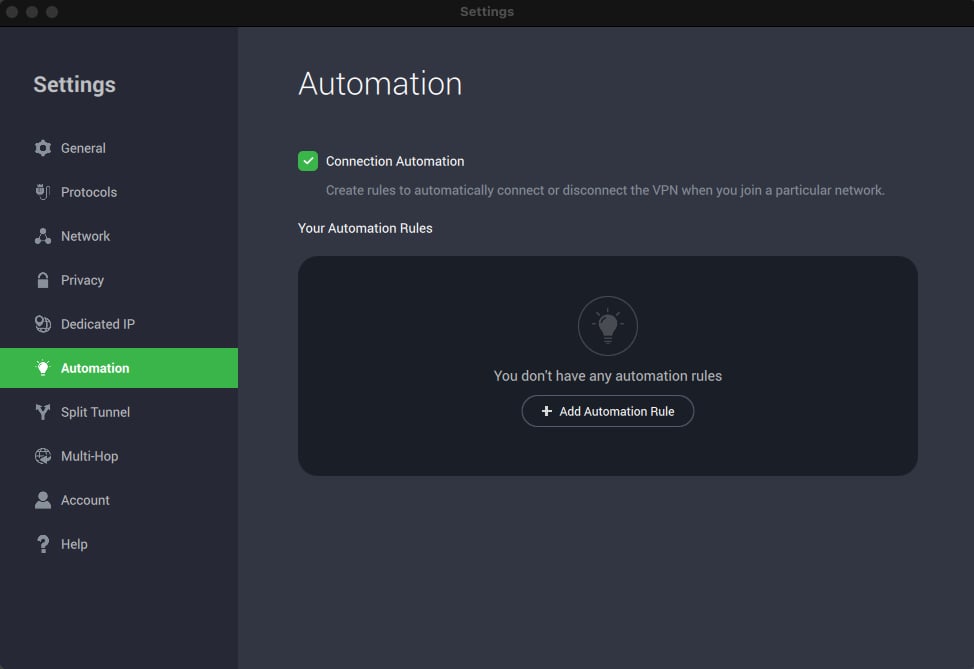
PIA can also obfuscate VPN traffic with SSL encryption, making it appear like regular web traffic to an ISP. Its Automation feature lets users create rules for different networks, such as enabling the VPN on public Wi-Fi and disabling it at home. However, PIA does not confirm how many Australia-based servers it has beyond locations in four cities, and its granular settings may feel confusing for novice VPN users.
Why I chose Private Internet Access
PIA is a highly customizable VPN service for advanced users with specific privacy needs. It has one of the largest server pools in the industry to ensure performance and capacity in every corner of the globe. PIA also supports unlimited simultaneous connections and the use of in-house private DNS servers, making it a great choice for businesses.
For more information, read our full Private Internet Access VPN review.
Figure F
Pricing
- One-month subscription: A$19.79 per month
- One-year subscription: A$5.42 per month
- Three-year subscription: A$1.99 per month
Features
- VPN kill switch: Prevents unprotected browsing when the VPN disconnects unexpectedly.
- Advanced kill switch: Blocks internet access for all apps when you manually disable the VPN.
- VPN split tunneling: Gives trusted applications direct internet access.
- DNS leak protection: With PIA’s DNS servers or your own.
- Port forwarding: Enables error-free P2P file sharing.
- Obfuscation: Encrypts your VPN traffic to make it look like regular web traffic, avoiding ISP scrutiny.
- Automation rules: Automatically connect or disconnect the VPN depending on what type of network you’re connecting to.
- PIA MAC: Provides DNS-level ad, tracker and malware blocking.
Pros
- Highly customizable for advanced VPN users.
- Supports unlimited simultaneous connections.
- Extremely large server pool.
- Competitive one-year and three-year pricing.
Cons
- Interface might be confusing for inexperienced users.
- Unknown number of Australian VPN servers.
Visit Private Internet Access
More cloud security coverage
How do I choose the best VPN for my business?
All the VPNs on this list have no-logs policies, standard features like a kill switch and split tunneling, and at least some Australian servers. Each one also offers some unique features or capabilities that make it well-suited to a particular use case. For example, PIA’s support for unlimited simultaneous connections makes it ideal for larger groups supported by someone with the technical know-how to take advantage of its customizations and automation. On the other hand, NordVPN’s large Australian server pool makes it a better choice for users who need fast, reliable access to Aussie-specific content. You should analyze your requirements and choose the option that meets all your needs without busting your budget.
Review methodology
In addition to evaluating the Australia-specific features offered by each VPN provider, I looked at factors like pricing, core VPN features, user-friendliness, customer support, and expert analysis. I used a combination of comprehensive research, hands-on testing, and expert analysis to determine which products qualify as the best VPNs for Australia. Learn more about TechRepublic’s Review Methodology for VPNs.
Read the full article here