



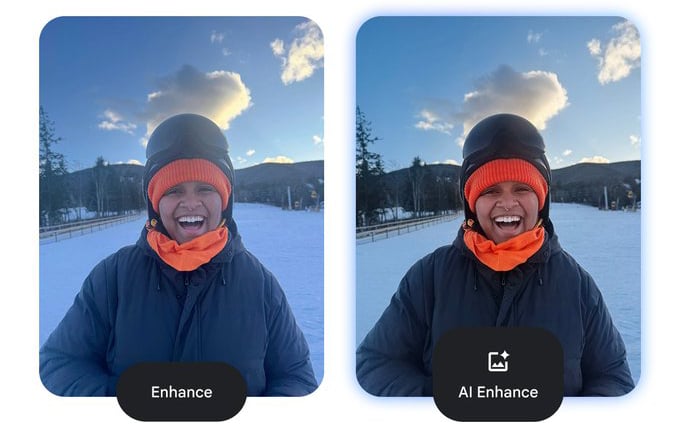

Google has begun rolling out a new “AI Enhance” button inside the Photos editor, designed to simplify how users improve their images. The new AI Enhance button is, for lack of a more technical term, a magic wand for people who find the standard editing suite intimidating.
Previously an exclusive perk for recent Pixel owners, the tool is now available to Android users worldwide. Its function is straightforward: you tap the button, the app pauses briefly to analyze the scene, and it spits out a version of the image with adjusted lighting, contrast, and color balance.
The company confirmed the feature in a post on X, stating, “Did you see the new button in your photo editor? AI Enhance is now available to Android users worldwide!” According to Google, the tool allows users to instantly improve their images by balancing light and color with a single tap.
It is important to note what this button does not do. Unlike some of Google’s more aggressive generative tools found on Pixel devices, this feature does not alter reality. The tool also attempts to subtly crop and straighten images to improve framing, but it does not use generative AI to add new elements, change perspectives, or resize photos beyond standard edits.
Video speed controls: A long time coming
Alongside the photo enhancement tool, Google is also addressing one of its most persistent user complaints: the inability to control video playback speed inside Google Photos.
In an announcement on Google’s community support page, the Photos team confirmed the rollout of video playback speed controls for Android, describing it as “a top request from our community for a long time.”
The controls are straightforward. In any video, tapping the three-dot menu reveals a Playback speed option with five settings: 0.25x, 0.5x, 1x, 1.5x, and 2x. Users tap their preferred speed and confirm with the checkmark button.
The addition brings Google Photos in line with apps like YouTube and VLC, which have offered similar controls for years. The feature gives users the kind of flexibility that was previously only available by exporting to a third-party app.
When will you see it?
The rollout is currently underway, though it appears to be happening in stages. The AI Enhance button is seeing a broader global release right now, while the video playback controls might take a bit longer to reach every device.
It is also worth noting that the results you see might depend on your phone’s hardware. “Output varies by device,” Google Photos noted.
Currently, these updates are focused on the Android ecosystem. Google has not yet confirmed when these specific tools will make their way to iOS or the web version of Photos.
Also read: Your Data Assistant turns Excel and CSV files into charts, summaries, and plain-English insights.
Read the full article here