



Earlier this year, Google expanded its AI-powered search summaries to Gmail, giving users a quicker way to find relevant information in their inbox. Now, the company is bringing AI Overviews to Google Drive as well.
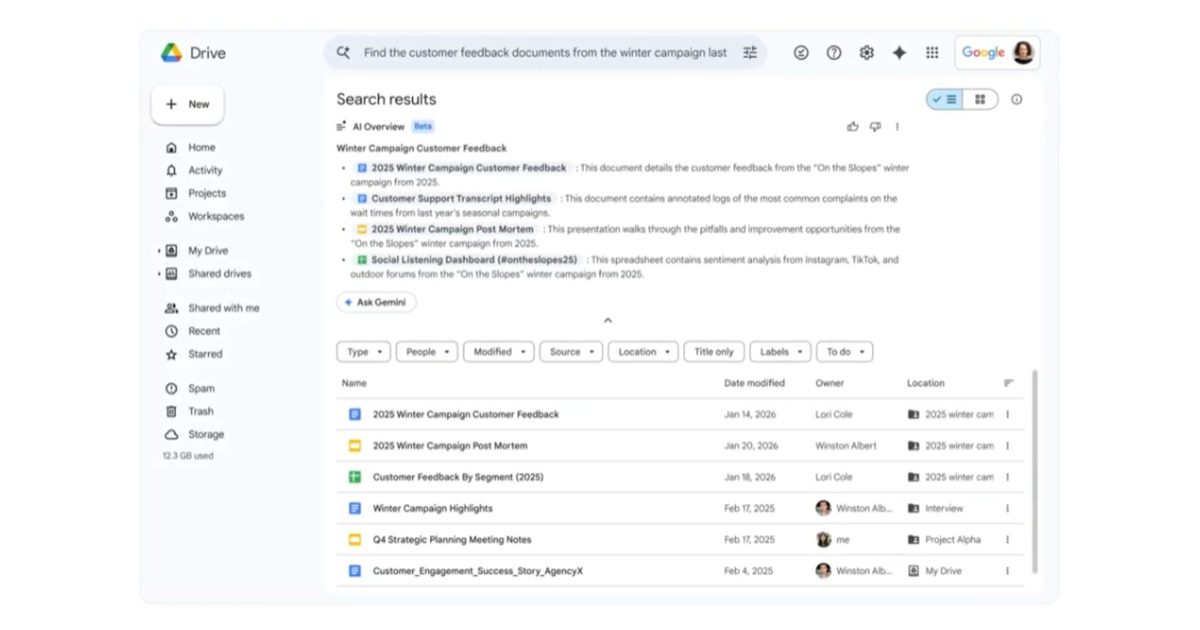
Google says when you search in Google Drive, Gemini will now provide an AI Overview at the top of the results highlighting key details found in related documents. In an example, Google shows how when a user asks Gemini to “pull all of the files I have on sleep research,” it displays all relevant files in the AI Overview with brief descriptions next to each file outlining the included information.
The AI Overview also includes an Ask Gemini button that lets users quickly ask follow-up questions, such as requesting a summary of the files’ contents. The feature can also take into account relevant information from the users’ emails, calendar, and the web, in addition to what’s already in the documents stored in Drive.
A quicker way to find key details in your files
AI Overviews in Google Drive could be particularly useful for those who store large numbers of documents and need to quickly locate key information. Instead of opening multiple files and scanning through pages of text, users can rely on the AI-generated summary to surface the most relevant details right from the search results.
The ability to quickly ask Gemini follow-up questions should make the feature even more useful. Instead of digging through a document for specific details, users can simply ask Gemini for clarification, request a summary, or surface key points directly from a file.
AI Overviews and Ask Gemini in Google Drive are rolling out globally in US English to Google AI Pro and Ultra subscribers, as well as enterprise customers on the Gemini Alpha business plan.
Read the full article here