



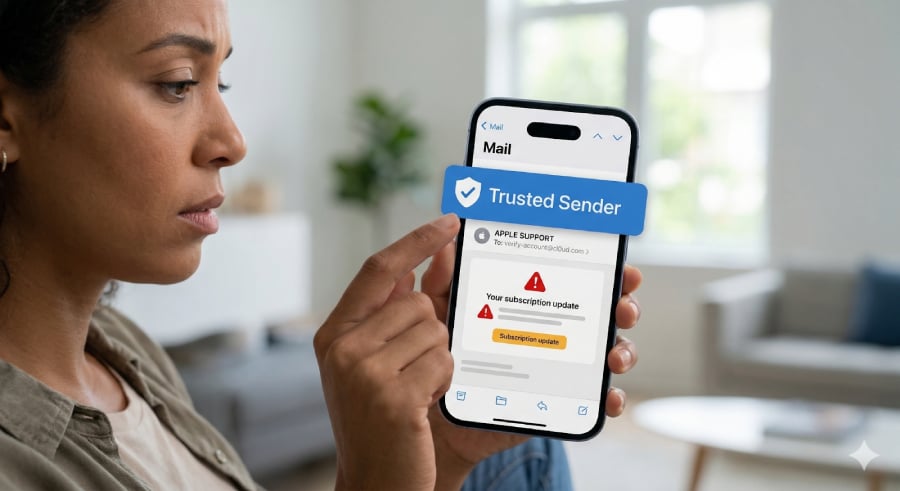

A recently reported phishing scam is raising fresh concerns, though the tactic has actually been around for years. Reports showed that scammers are embedding fake “trusted sender” banners into suspicious emails, potentially misleading users into letting their guard down.
According to Fox News, the issue came to light when a reader shared a screenshot of a questionable email that carried the reassuring message: “This message was sent from a trusted sender.” At first glance, the label makes the email appear safe, even though the content itself shows clear signs of fraud and the banner itself is completely fabricated.
The catch is that Apple Mail does not actually generate these labels. Unlike standard spam warnings or BIMI-verified indicators, Apple Mail and iCloud Mail do not feature a native “trusted sender” banner for familiar contacts.
Instead, scammers are baking these fake banners directly into the HTML or images of the email body to bypass a user’s skepticism. Because the banner is simply part of the email’s content, it can appear on any email client — whether you are using Apple Mail, Gmail, or another provider.
While Fox News initially attributed the banner to an Apple Mail feature, this tactic relies entirely on social engineering. The fake label is designed to look like a system alert, but it does not verify whether the sender is genuine or whether the message has been tampered with.
That gap in user awareness is what scammers are now exploiting.
A familiar trick with a new twist
Phishing emails have long relied on impersonating trusted brands, but this tactic adds another layer of deception by attempting to mimic the interface of the email app itself.
By inserting a graphic or text block at the very top of the message that reads “This message was sent from a trusted sender” (sometimes even adding ridiculous text like “(Not scam)”), cybercriminals create what Fox News describes as “a false sense of safety,” in which users trust the fake visual cues rather than carefully reviewing the message.
Despite the convincing fake label, the phishing email highlighted in the report contained several classic red flags.
It used a generic greeting, such as “Dear user,” instead of addressing the recipient personally. It also referenced a service called “Cloud+ subscription,” which is slightly off from Apple’s real “iCloud+” branding. The message sought to create panic by warning that personal data could be deleted due to a payment issue, a common tactic used to rush victims into clicking links.
As Fox News notes, scammers often rely on urgency so “the victim clicks before thinking.”
The incident highlights a growing challenge in cybersecurity: attackers are no longer just mimicking companies; they are learning how to mimic the systems people rely on to judge trust. When a fake banner disguised as a built-in feature appears to validate an email, it can override a user’s instinct to question suspicious content.
Staying safe
Security experts stress that users should not rely solely on visual cues within the body of email messages. Instead, they should verify account-related messages independently, such as by visiting official websites directly rather than clicking embedded links.
Other protective steps include enabling two-factor authentication, manually reviewing account settings, and monitoring for subtle branding errors or unusual wording.
Related reading: For more on emerging mobile threats, check out how the DarkSword exploit is exposing a dangerous iPhone vulnerability.
Read the full article here