



Apple is stepping in to stop a mistake millions of users make every day: copying and pasting commands they don’t fully understand.
With more than 100 million Mac users worldwide, that simple habit has become a growing attack vector. In response, Apple’s latest macOS update introduces a new safeguard that warns users before they unknowingly run potentially malicious commands in Terminal — a move designed to counter a rising social engineering tactic known as ClickFix.
What attackers are exploiting
Every day, Mac users rely on YouTube tutorials, blogs, support chats, and even AI-generated responses to fix or set up their Macs, which may require pasting commands into Terminal. Because attackers understand that most users looking for fixes just paste commands verbatim, they have begun creating tutorials designed to help users find solutions for setups that require pasting commands.
And because many users see these as help tutorials, they inherently trust them as harmless.
While social-engineered malware typically hides in files or tricks victims into visiting a malicious webpage, ClickFix hides in plain sight — in the command itself.
Once a victim pastes and executes the malicious command, the malware — whatever it is — begins executing, usually with the administrative privileges the victim had when they ran the command. As a result, the attackers save the trouble of exploiting privilege escalation vulnerabilities.
What Apple did
Social engineering attacks like ClickFix win with psychology; Apple simply responded with psychology. Because both advanced and casual users now use the Terminal, Apple has no way to prevent anyone from running commands in the Terminal.
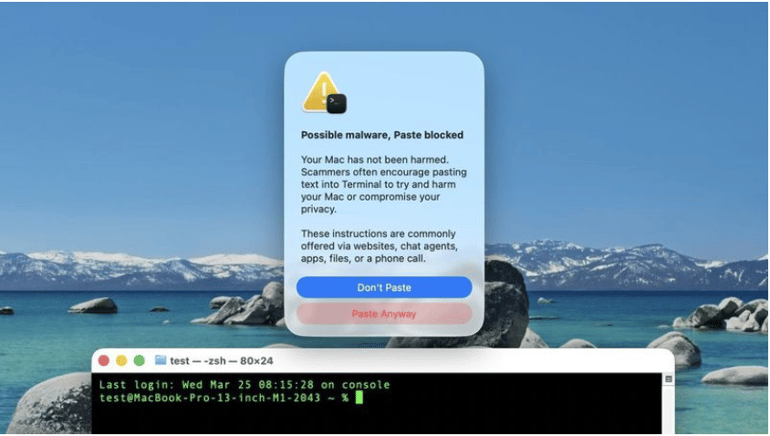
However, they did something impressive using one of the things they are known for — a UI change that warns users before they paste potentially harmful commands into the Terminal. When users see the pop-up warning Apple included in macOS 26.4, their attention is drawn to the potential risks of whatever risky commands they were about to mindlessly paste. Such a slowdown effectively gets them to double-check or to quit pasting that command altogether.
The warning reads:
“Possible malware, Paste blocked
Your Mac has not been harmed. Scammers often encourage pasting text into Terminal to try and harm your Mac or compromise your privacy.
These instructions are commonly offered via websites, chat agents, apps, files, or a phone call.”
Below the warning text are two buttons labeled as “Don’t Paste” and “Paste Anyway.” The button placements reflect a strategic UI effort to make it easier for users to avoid proceeding with the action.
A rise in Apple-targeted cyberattacks
Cybersecurity company Bitdefender reports that the cyberattack landscape is rapidly changing.
In its 2023 macOS Threat Landscape Report, Bitdefender revealed that although Macs are less targeted than Windows, which still dominates the desktop market, they are increasingly being exploited by threat actors. A key report notes that “threats designed to infect Macs typically require victims to manually run an executable,” a pattern similar to ClickFix’s.
While Apple added a barrier to ClickFix, the risk remains, as users might still decide to proceed. This isn’t a case of an actively exploited software vulnerability, so there is no patch, and the command detection may not always flag all potentially harmful commands. Still, there are ways to stay safe.
Since there are no widely known methods that this new implementation uses in flagging commands, and given that it does not always appear, as noted by MacRumors, users are advised to do the following:
- Use official or established sources: Always use platform documentation or check out verified tech channels on YouTube.
- Remember that AI hallucinations still happen: If you must use AI for a step-by-step guide, always have it at the back of your mind that it might reference malicious sources, or generate wrong commands capable of breaking your computer.
- Urgency is always a key red flag: Any website, support chat, or tutorial suggesting urgency in command execution should be treated with high suspicion.
- If unsure, leave it: If you are unfamiliar with how the Mac Terminal works or with a command, it is always best not to use it.
Also read: A recent FBI surveillance system breach shows how quickly high-stakes cyber incidents can escalate when attackers gain access to sensitive internal infrastructure.
Read the full article here