


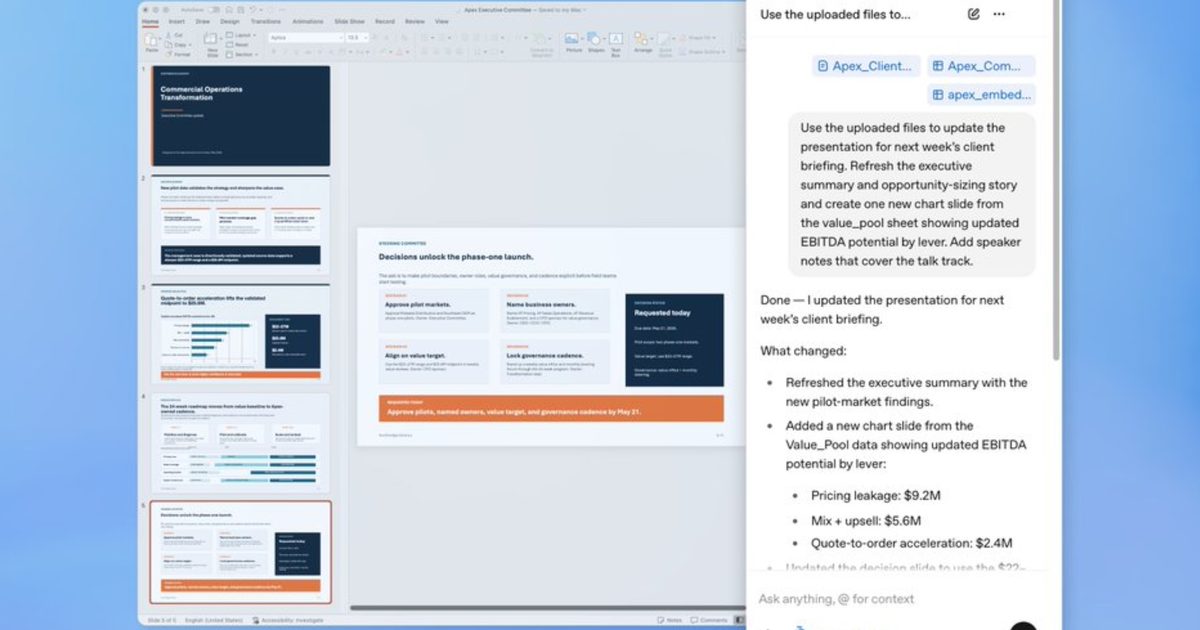

The hardest part of building a presentation isn’t the ideas, it’s the forty-five minutes you spend reformatting bullets and second-guessing slide order. Well, OpenAI has heard you.
ChatGPT for PowerPoint, live in beta, puts the conversational AI assistant directly inside PowerPoint, and it’s available for all ChatGPT users, across all major tiers.
What can it actually do inside PowerPoint?
It lets you build a deck from scratch by simply describing what you need, feeding ChatGPT your notes, documents, spreadsheets, or images as source material, and the AI assistant will come up with an initial structure.
Even if you have slides in progress, you can add or edit them, individually, inside a deck without starting over. If you’re preparing for a serious meeting, you can also ask ChatGPT in PowerPoint to interrogate your deck.
Using its reasoning abilities, ChatGPT can flag story gaps, identify where the logic breaks down, and anticipate the questions your audience or your client may ask.
Is this just Copilot with a different logo?
Not quite, because the key differentiator is connectivity.
ChatGPT for PowerPoint can pull in live data from Gmail, Outlook, and SharePoint. So, instead of requiring manual copy-pasting sessions, your QBR deck or customer briefing can reference information your team has already worked with.
With ChatGPT for PowerPoint, OpenAI is specifically targeting real business workflows, where it can be used for quarterly reviews, board updates, or strategy decks.
The beta is available globally, across Free, Plus, Pro, Business, Enterprise, and education tiers. You can install it directly from Microsoft marketplace or from within PowerPoint.
With ChatGPT now available on PowerPoint, you have a total of three options to take care of your slides: ChatGPT, Claude, and Copilot.
Read the full article here