


The best cash register for your business depends on whether you need a simple electronic cash register (ECR) for basic checkout or a full POS system with integrated payments, inventory tracking, and reporting. For most growing retail and restaurant businesses, modern POS cash registers provide more flexibility and long-term value than traditional standalone registers.
I evaluated the top cash registers for small businesses in 2026 based on hardware pricing, payment processing, offline capabilities, inventory management, ease of use, and business scalability. My picks include affordable electronic cash registers from SAM4S alongside modern POS systems from Square, Clover, and Lightspeed.
My picks for the best cash registers for small businesses in 2025 include affordable electronic cash registers (ECRs) alongside fully integrated POS systems like Square, Clover, and Lightspeed.
In my evaluation, businesses that need integrated card payments, sales analytics, employee management, or multi-location support are usually better served by POS systems than traditional cash registers. However, ECRs still make sense for small stores that want a low-cost register without monthly software fees.
Before buying an ECR, check whether the manufacturer still supports the model. Many electronic cash register manufacturers have reduced production in recent years, making repairs, replacement parts, and technical support harder to find.
Top cash register comparison
The best cash register for a small business should be affordable and have peripheral support, preferably built-in without an added cost. Being able to function and accept payments, even when offline, is an important feature. The table below compares my top recommendation based on costs, peripheral hardware options, and offline capabilities.
Methodology: How I evaluated the best cash registers
To determine the best cash registers for small businesses, I considered nearly 20 electronic cash registers and point-of-sale solutions. I narrowed them down based on pricing, ease of use, and features needed to run day-to-day retail operations.
I considered the availability of peripherals for the cash registers, such as barcode scanners and printers, and checked for offline-mode functionality and backup power sources. I also looked into payment support, especially for digital payments (which are increasingly preferred by consumers).
Lastly, I checked for support availability, integrations, and warranties, as cash registers are crucial for a seamless business operation, and small business owners should be able to easily get support when needed.
Why you can trust my advice
I’ve spent more than seven years researching and evaluating retail and ecommerce software, including POS systems, payment processors, and retail management platforms. Beyond reviewing software, I also have hands-on experience working in retail environments where cash registers and POS systems are used daily. That practical experience gives me a stronger understanding of what businesses actually need from a register system beyond feature lists and marketing claims.
I regularly test and compare POS platforms across different business types, from small retail stores to multi-location and omnichannel operations. I also analyze verified customer feedback from G2, Capterra, and GetApp to validate how these systems perform in real-world use.
Square Register: Best overall cash register for small business; all-in-one retail POS cash register
Square Register is affordable, comes with several low-cost hardware peripheral options, and even gives a full set of sales, payment, inventory, and business management tools for free through its built-in POS software, Square.
Square Register also has excellent user reviews and performed well in our own tests of the software. Upfront spending can challenge small business owners, but interest-free financing options are available. Its all-in-one solution can’t be beat, making it my top choice as the best POS-driven cash register for small businesses.
Why I chose Square Register
I like Square Register’s slick iPad-like POS display. Its well-thought-out minimalist design looks great on counters and even comes with a customer-facing card reader and display, meeting both merchant and customer needs.
Square has been a consistent and popular top choice among small business owners and experts alike for POS, payment processing, and hardware, so it is unsurprising that its primary retail POS kit, Square Register, is a top choice. Not only can you accept EMV, NFC, and traditional magstripe payments, but you can also accept gift card payments and create and send invoices from within Square’s software.
Square Register has an offline mode, so you’ll still be able to accept payments without an internet connection as long as you sync transactions made within 24 hours.
Pricing
- Hardware: $899 ($44 per month for 24 months under financing).
- Optional accessories:
-
- Starts at $129 for a printer-driven cash drawer.
- Starts at $299 for receipt Printers.
- Starts at $34 for receipt printer paper.
- Starts at $119 for a barcode scanner
- Hardware comes with a two-year limited warranty.
Features
- Connectivity: Wi-Fi, Ethernet, Bluetooth, and offline mode are available (offline transactions must be uploaded online within 24 hours).
- Power supply: Power adapter included in kit; no battery included, so it needs to be connected to a power source at all times to operate.
- Payment types accepted: Chip cards (EMV), NFC cards, Apple Pay, Google Pay, Samsung Pay, Afterpay, Cash App Pay (QR code), and magstripe cards.
- Accessories: Cash drawer, receipt printer, bar code scanner, kitchen printer, kitchen countertop display, countertop mount (purchased separately).
- Number of products (PLUs & SKUs, plus departments or categories): Unlimited products; ideal for retail, appointments, and restaurants.
- Display screen size: Square Register is 13.5 inches (337mm); Customer display is 7 inches (178 mm).
- Overall dimensions: Square Register–12.5 x 10 x 5 inches (317.5 x 245 x 127 mm), 3.9 lbs.; Customer display–6.85 x 6.85 x 1.7 inches (174 x 174 x 44mm), 1.2 lbs.
- Local or cloud: Cloud installation, storage, and backup.
Pros and cons
|
|
Square Terminal: Best portable cash register
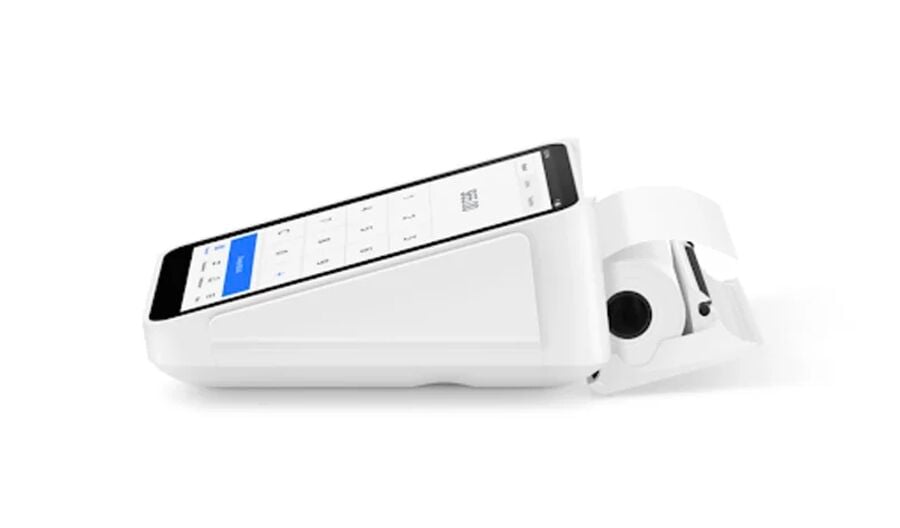
Square’s all-in-one mobile POS terminal, Square Terminal, can work as a standalone, portable business cash register or as a second screen to the Square Register and function as a built-in card reader for tap, dip, and swipe payments. The Square Terminal has a built-in battery designed to last all day. It is compact enough to carry handheld, making it ideal for accepting payments wherever — at table-side, pop-up activations, farmer’s markets, and more.
Why I chose Square Terminal
As part of the hardware exclusively offered by Square, the Square Terminal has built-in industry-specific POS software that can be easily installed at no cost, similar to the Square Register. I like that it is the most affordable POS hardware I feature in this list, making it perfect for small businesses on a budget.
You can accept payments using the hardware easily and expand accessories as needed.
Pricing
- Hardware: $299 ($27 per month for 12 months under financing).
- Optional accessories:
-
- $49 for Hub for Square Terminal
- Starts at $129 for a printer-driven cash drawer
- Starts at $299 for a receipt printer
- Starts at $34 for receipt paper
- Starts at $119 for a barcode scanner
- Hardware comes with a one-year limited warranty and 30-day free returns.
Features
- Connectivity: Wi-Fi, ethernet (requires Hub for Square Terminal), offline mode available (offline transactions must be uploaded online within 24 hours).
- Power supply: Power adapter included in kit with built-in battery designed to last all day.
- Payment types accepted: Chip cards (EMV), NFC cards, Apple Pay, Google Pay, Samsung Pay, Afterpay, Cash App Pay (QR code), Magnetic-stripe cards with free magstripe reader plug-in
- Accessories: USB hub, cash drawer, receipt printer, bar code scanner, touchscreen display, belt clip, countertop mount (purchased separately).
- Number of products (PLUs & SKUs, plus departments or categories): Unlimited products; ideal for retail, appointments, and restaurants.
- Display screen size: 5.5 inches (139.7 mm).
- Overall dimensions: 5.6 x 3.4 x 2.5 inches (142.2 x 86.4 x 63.55 mm); 417 g.
- Local or cloud: Cloud installation, storage, and backup.
Pros and cons
|
|
Lightspeed POS: Best cash register for growing retail operations
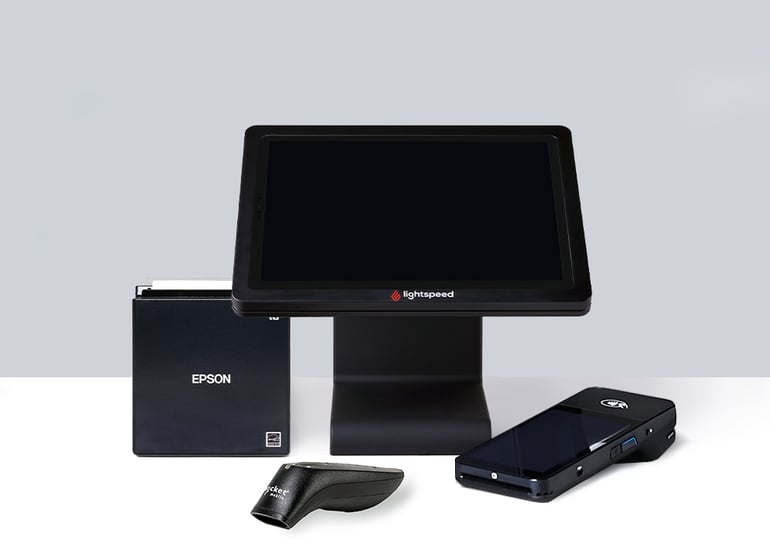
Lightspeed POS is a cloud-based cash register system optimized for multi-location retailers managing complex inventories. It supports matrix-style product variants, bundled items, and automated purchase orders. Lightspeed’s interface also includes detailed analytics and built-in vendor catalogs. It’s tightly integrated with marketing tools and loyalty programs, making it not just a checkout terminal but a comprehensive retail management platform.
Why I chose Lightspeed POS
I chose Lightspeed POS as the best cash register for growing businesses because it offers far more depth than most POS systems in its class. Compared to Square or Clover, Lightspeed gives you advanced inventory tools like matrix variants, supplier catalogs, and automated stock reordering — features I rarely see bundled into a small business register.
It’s also one of the few platforms that scales easily across multiple locations, with granular employee permissions and centralized reporting. If you’re outgrowing basic systems but not ready for enterprise software, Lightspeed strikes that middle ground better than most.
Pricing
- Software subscription: $89-$289 per month (billed monthly), or $89-$239/year with annual billing.
- No hardware included — register hardware is purchased separately.
Features
- Granular matrix inventory management for complex product lines.
- Integrated ecommerce platform and built-in vendor ordering.
- 24/7 customer support and onboarding services.
- Detailed analytics dashboard with customizable reporting.
- Marketing and loyalty features built into the system.
Pros and cons
|
|
Clover Mini: Best compact countertop POS
Clover Mini was specifically designed for businesses with limited counter space. Its compact design, which can either be placed on counters or wall-mounted, is ideal for small retail shops, cafes, and quick-service restaurants.
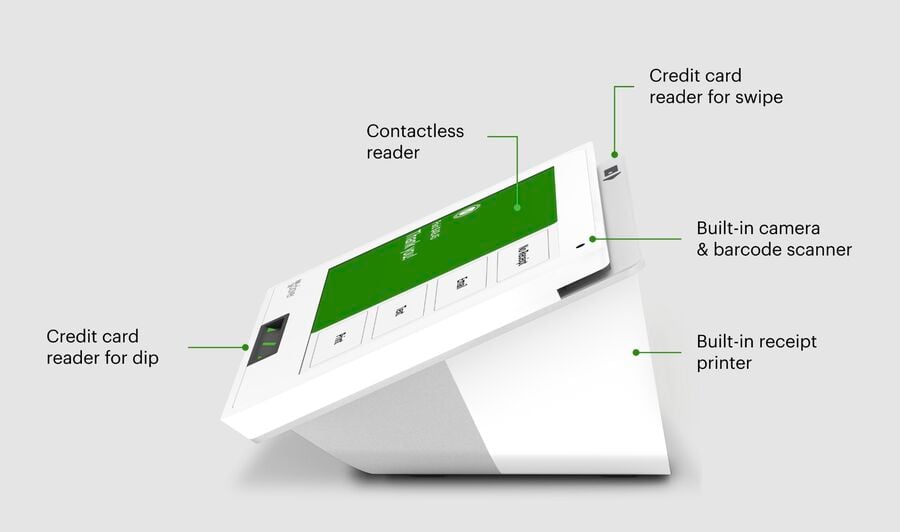
The Clover Mini doesn’t compromise on functionality, either. This compact POS-driven cash register has a built-in card reader, camera scanner, and receipt printer — beating Square Register, which doesn’t have a built-in printer and scanner — and accepts multiple payment options, including EBT, QR codes, and split checks.
Why I chose Clover Mini
Designed to take up less space than a full Clover station but made for ringing up payments in a fixed location, the Clover Mini, true to its name, fulfills the full role of a point-of-sale system. I like that it maximizes functionality with its big display screen and adds even more features like a PIN entry feature, barcode and QR scanning, and other features available to Clover proprietary hardware.
The only downside to Clover hardware is that pricing varies greatly depending on your vendor. The equipment is programmed to the vendor you purchase from, so you cannot reprogram it and take it with you if you switch processors.
However, if you do your research, you can choose a payment processing vendor that aligns with your business needs and purchase Clover hardware from them.
Pricing
- Hardware: $849 or $45 per month for 36 months. Pricing heavily depends on the partner provider you get the hardware from.
- Optional accessories: Swivel stand, PIN shield, kitchen printer, weight scale, barcode scanner, sticky label and thermal printers, cash drawer, and employee login cards (price available upon request).
- Hardware comes with a one-year limited warranty (manufacturer defects only).
Features
- Connectivity: Wi-Fi, ethernet, and LTE connectivity; offline mode available for up to seven days.
- Power supply: Power adapter included in kit; no battery is included for Clover Mini 3, so it needs to be connected to a power source at all times to operate; 2 GB RAM, 16 GB flash storage.
- Payment support: EMV, NFC, and magnetic stripe (MSR) readers; EBT, split checks, and QR codes through built-in camera.
- Accessories: Built-in thermal dot receipt printer; cash drawer is an optional paid add-on.
- Number of products (PLUs & SKUs, plus departments or categories): Up to 15,000 SKUs in-store; limits depend on the plan for e-commerce.
- Display screen size: 8-inch LCD color touchscreen.
- Overall dimensions: 12 x 10 x 6 inches; 2.3 lbs.
- Local or cloud: Cloud installation.
Pros and cons
|
|
Clover Station Duo: Best for high-volume offline transactions
Clover Station Duo is an all-in-one POS system well-suited for busy retail stores or restaurants with a fixed checkout location. It also comes with a stable offline mode that users can toggle on and off right from the POS register.
Businesses that want a comprehensive and integrated front-end and back-end solution will find Clover Station Duo the best option. It accepts various payment methods and has advanced back-office functions for inventory management and employee tracking.
Why I chose Clover Station Duo
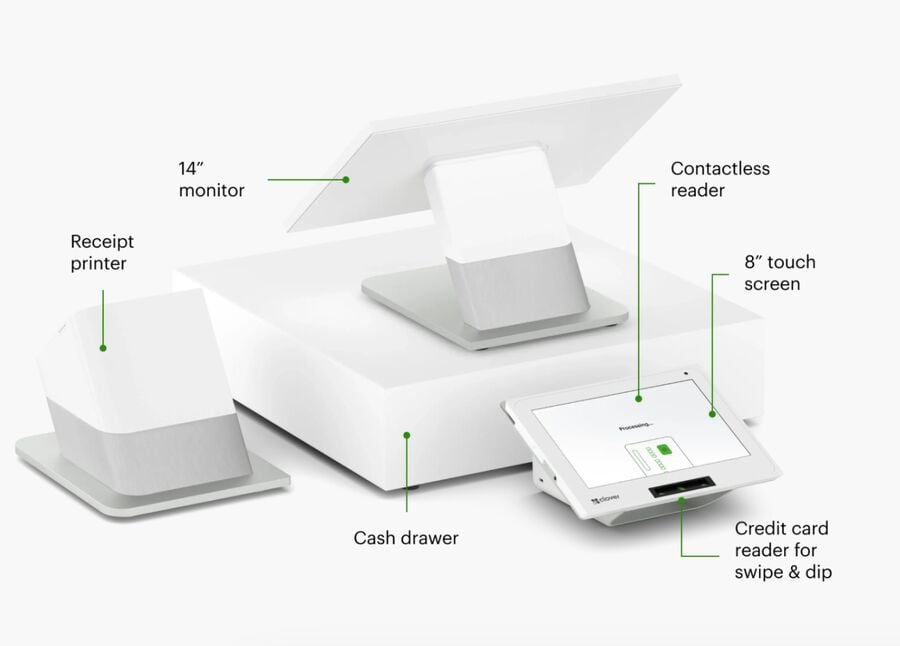
The Clover Station Duo is the most expensive cash register featured in this list. While its starting price is steep, Clover cash registers have built-in software, so you don’t have to purchase them separately. Its display is slightly bigger than Square Register’s, and it even comes with a built-in cash drawer, printer, and scanner, all of which you need to buy separately with Square Register.
If you want a full POS-driven cash register with all the bells and whistles but want the freedom to go with your preferred payment processor, unlike the exclusivity of Square Register with Square, the Clover Station Duo is your best option.
Pricing
- Hardware: $1,899. Pricing heavily depends on the partner provider you get the hardware from.
- Optional accessories: Mini PIN shield, Mini PIN Entry Aid, cash drawer (price available upon request).
- Hardware comes with a one-year limited warranty (manufacturer defects only).
Features
- Connectivity: Wi-Fi, ethernet, and 4G/LTE, offline mode available.
- Power supply: Power adapter with built-in batteries (2) that can serve as backup in case of power interruptions (lasts up to four hours per battery) — printers will not operate on batteries; 2 GB RAM, 16 GB flash storage.
- Payment types accepted: Swipe, tap, and dip payments; QR codes (PayPal and Venmo).
- Accessories: Built-in high-speed thermal dot receipt printer, cash drawer (has a bill tray, coin tray, two keys, and a security cable), and dual 5 mega-pixel cameras with scanning software.
- Number of products (PLUs & SKUs, plus departments or categories): Up to 15,000 SKUs in-store; limits depend on the e-commerce plan.
- Display screen size: Merchant-facing is 14 inches; customer-facing is 8 inches.
- Overall dimensions: 20 x 20 x 20 inches; 8.03 lbs.
- Local or cloud: Cloud installation.
- Accessibility features: Volume control, voice assistant, stylus pen option, headphone connection ability, tactile PIN entry option.
- Virtual keypad for PIN entry.
Pros and cons
|
|
SAM4S ER-925: Best affordable electronic cash register for peripherals
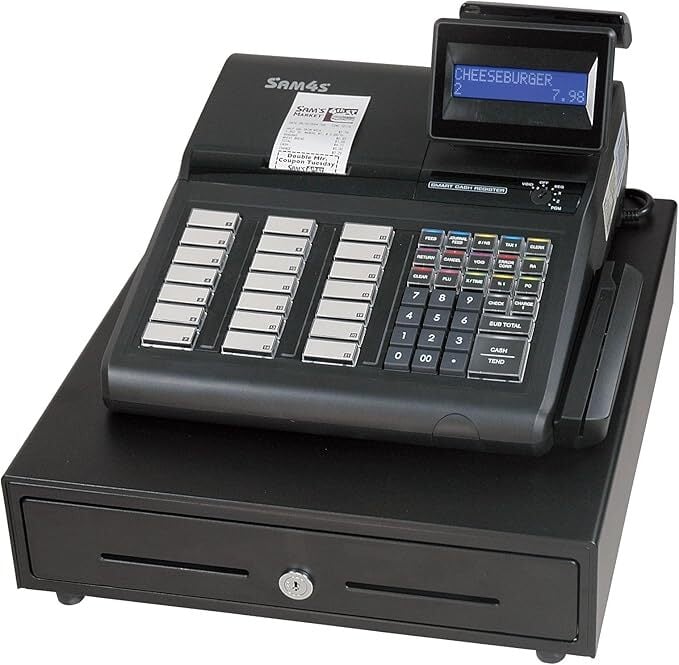
If you prefer a traditional cash register, SAM4S ER-925 is an electronic cash register that comes with a large cash drawer, a 150-key keyboard, an LED screen display for the operator and customer, and a built-in receipt printer. It provides more advanced features than the traditional ECRs I have tried, but still meets the standards of an ECR. It can support up to 10,000 PLUs and 50 employee logins and produce detailed sales, financial, and employee reports.
SAM4S ER-925 comes with multiple ports, so it can easily be connected to plenty of peripheral hardware, such as card readers and barcode scanners.
Why I chose SAM4S ER-925
Aside from the fact that the manufacturer of this ECR still produces the model and provides support, I like that the SAM4S ER-925 has built-in hardware — a receipt printer, cash drawer, and a customer-facing display — which is very handy for small restaurants and retailers.
You can also extend functionality by adding a barcode scanner and support for up to 22,000 price look-up (PLU) codes instead of 3,500. You can also add a scale, which can work for businesses that need to weigh items, such as a small grocery store.
Pricing
The hardware cost varies by vendor and add-on inclusions but typically ranges from $500-$700. A separate merchant account is needed for payment processing. Rates vary per provider.
Features
- Connectivity: USB.
- Power supply: Power adapter; no battery is included, so it must always be connected to a power source to operate.
- Payment types accepted: Credit cards, debit cards, gift cards, and cash.
- Accessories: Barcode scanner, scale, external card reader, external pole display, and Dallas Key port (purchased separately).
- Number of products (PLUs & SKUs, plus departments or categories): Tracks up to 3,500 PLUs (up to 22,000 with barcode scanner).
- Display screen size: Operator–2-line x 16-character alphanumeric backlit LCD; Customer–9-digit LED.
- Overall dimensions: 18 x 15 x 12 inches; 29.4 lbs.
- Local or cloud: Local installation.
- Detailed reports: Financial, employee, PLU by price level, sales by the hour, month, or chosen date.
- Up to 50 employee logins.
- 100 mix-and-match discount options.
Pros and cons
|
|
SAM4S ER‑180U: Cheapest electronic cash register for small businesses
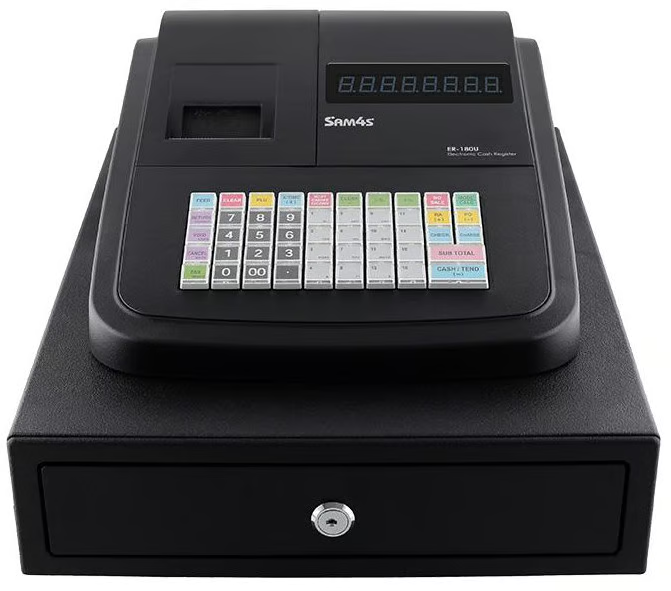
The SAM4S ER‑180U is an ECR that provides basic transaction features like receipt printing and cash drawer support. Priced under $300, it includes standard tax calculation, simple sales recording, and durable build quality. It’s a straightforward register ideal for very small shops or pop-up sellers who want no ongoing fees.
Why I chose SAM4S ER‑180U
I chose the SAM4S ER‑180U because it’s the most cost-effective cash register I could find that still delivers reliable, everyday functionality. Unlike POS systems like Square or Clover, which require ongoing software fees, the ER‑180U is a one-time purchase with no strings attached.
The SAM4S ER-180U doesn’t try to do too much — there’s no touchscreen, no apps, no integrations — but for small shops, pop-ups, or vendors who just need a dependable way to ring up sales and print receipts, that simplicity is exactly the point. Among all the electronic cash registers I reviewed, nothing else matched its combination of price, durability, and practicality.
Pricing
- One-time hardware cost between $185 and $263.
- No monthly software or subscription fees
Features
- No-frills receipt printing and cash drawer operations.
- Built-in tax calculation capabilities.
- Suitable for low-volume, cash-only transactions.
- Durable construction with minimal maintenance needs.
Pros and cons
|
|
How do I choose the best cash register for my business?
The best cash register for your business depends on your budget, payment needs, and whether you need basic checkout tools or a full POS system. In my experience reviewing retail POS systems and electronic cash registers (ECRs), most growing businesses benefit more from POS systems because they include inventory tracking, integrated payments, reporting, and customer management tools that traditional cash registers lack.
When evaluating a cash register for your business, prioritize features that improve checkout speed, payment flexibility, and day-to-day operations.
- Card reader: Modern POS cash registers with built-in or integrated card readers can accept credit cards, debit cards, tap-to-pay transactions, and digital wallets.
- Reporting tools: POS systems provide detailed sales, inventory, and employee reports. Traditional ECRs usually offer only basic sales reporting, though models like the SAM4S ER-925 include more advanced reporting features than most electronic cash registers.
- Inventory management: Cloud-based POS systems can automatically track stock levels, sync inventory in real time, and help prevent stock discrepancies. Most ECRs offer only limited inventory functions.
- Tax settings: Built-in tax calculation tools help businesses apply accurate sales tax rates and simplify checkout compliance.
- Peripheral support: Many businesses also need compatible hardware, such as:
- Cash drawers for handling cash payments
- Receipt printers for printed customer receipts
- Barcode scanners for faster checkout and inventory accuracy
If you only need basic checkout functionality without monthly software fees, an electronic cash register may be enough. But if you plan to grow your business, sell across multiple channels, or manage larger inventories, a POS cash register is usually the better long-term investment.
Read also: POS System vs Cash Register: Key Differences Explained
Frequently asked questions (FAQs)
What’s the difference between a POS system and a traditional cash register?
A POS system combines hardware and software to handle payments, inventory tracking, sales reporting, employee management, and customer data. Traditional electronic cash registers (ECRs) mainly process transactions, store cash, and print receipts. Most growing businesses benefit more from POS systems because they support card payments, ecommerce integrations, and advanced reporting.
What should I look for when buying a cash register?
When buying a cash register, look for built-in payment processing, receipt printing, inventory management tools, barcode scanner support, and offline functionality. You should also consider ease of use, software fees, warranty coverage, and whether the system can scale with your business as it grows.
Can I use a cash register without the Internet?
Yes. Many electronic cash registers, including the SAM4S ER-180U, work entirely offline because they do not rely on cloud software. Some POS systems, such as Square and Clover, also offer offline payment modes that allow businesses to continue processing transactions during internet outages and sync data once the connection returns.
Do modern cash registers accept credit cards?
Most modern POS cash registers include integrated card readers or support external payment terminals for credit cards, debit cards, and contactless payments. Traditional ECRs usually require a separate card terminal because they do not include built-in payment processing.
What’s the cheapest way to get started with a POS cash register?
The Square Terminal is one of the most affordable ways to start using a POS cash register because it combines payment processing, receipt printing, and POS software in a single device. Square also offers a free basic POS plan, making it a low-cost option for small businesses.
What’s the best budget cash register for retail?
The SAM4S ER-180U is one of the best low-cost electronic cash registers for businesses that only need basic checkout functionality. For retailers that also want card payments and inventory tracking, the Square Terminal offers better long-term value at an affordable price point.
What can I use instead of a cash register?
A POS system is the most common alternative to a traditional cash register. POS systems can process payments, track inventory, manage employees, and generate detailed sales reports. Many also include built-in hardware such as receipt printers, barcode scanners, and cash drawers.
Read the full article here