



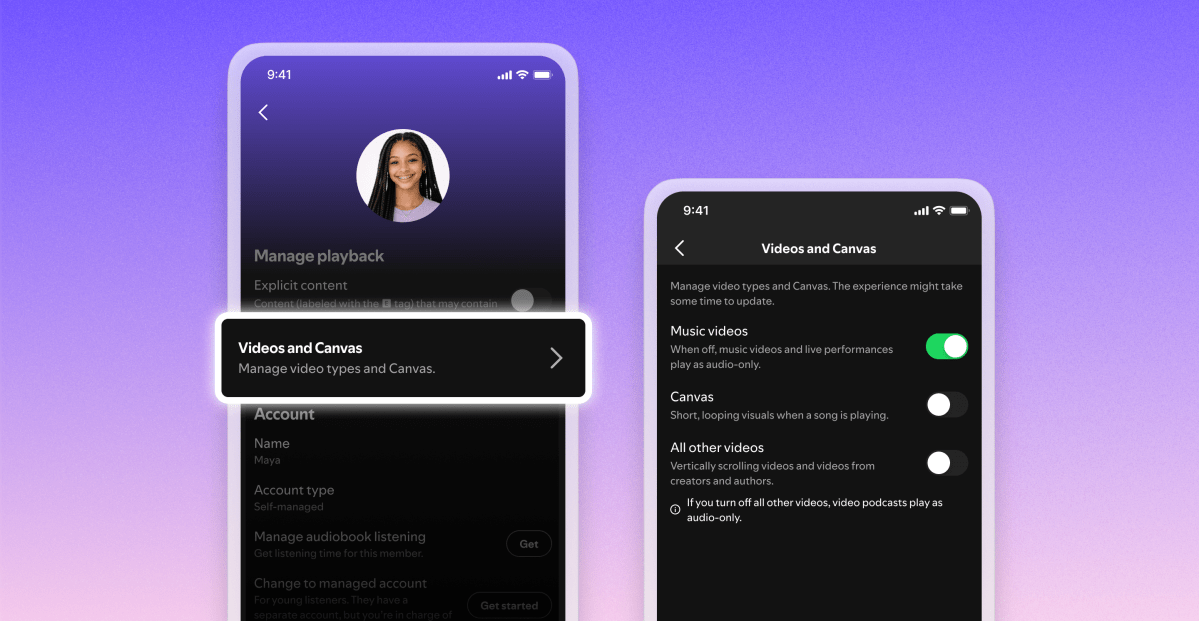

Spotify is adding new toggles to stop any and all video from playing inside the app, for both music and podcasts. The controls are rolling out worldwide, work across all platforms and devices, and can be used by managers of Family Plans to limit video content for every member on the subscription.
The new controls haven’t arrived on my UK account or devices yet, but will appear under the “Content and display” settings on a phone, or the “Display” section on desktop. The existing toggle to disable Canvas clips — the short, looping, autoplay videos that Spotify added to the app in 2019 — is joined by a new toggle that disables access to music videos, and another to disable all other videos, including podcasts and vertical video.
If you manage a Family Plan, you’ll have access to these controls for each individual member of the plan, similar to existing controls for managed accounts. Once video controls are disabled at the plan level, those users then won’t have the option to switch to the video versions of songs or podcasts.
Read the full article here