

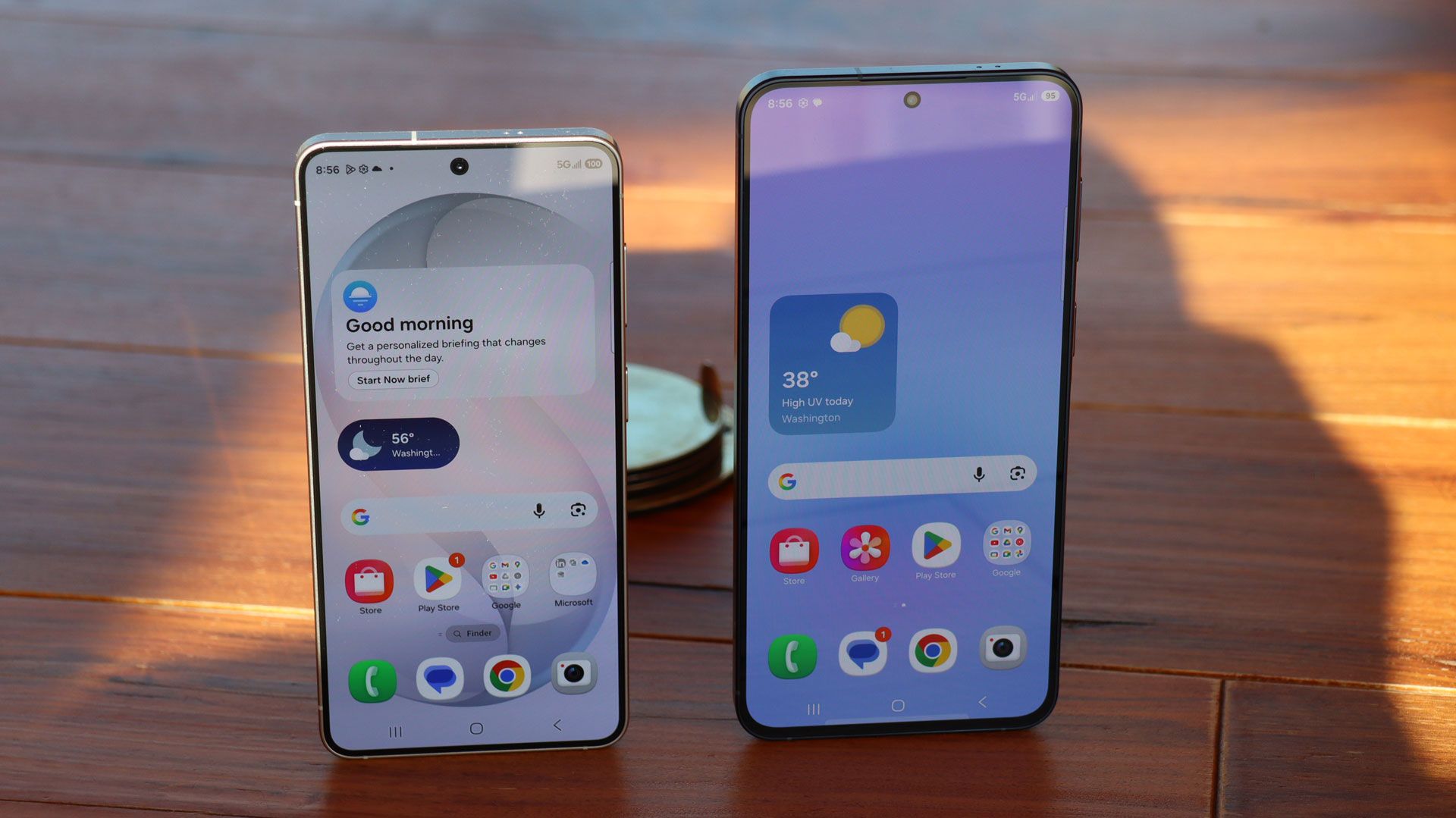

All hail the rise of the affordable smartphone. $1,000 flagships are so yesterday. Today, it’s all about sub-$600 and even sub-$500 pocketable handsets that somehow manage to match their pricier cousins on looks and AI capabilities while mostly hiding the hardware shortcomings that most might not notice anyway.
This fact was made clear to me when I anecdotally compared the attractive new Samsung Galaxy A57 with its more expensive (and smaller) counterpart, the Samsung Galaxy S26. I’ve now seen these phones in person and can say with conviction that, at a glance, they’re both attractive devices.
Article continues below
Usually, though, that lovely exterior has some failings in durability and protection, but now the A series has IP68 support and Gorilla Glass Victus+ on the front and back. And at 179g, it’s only 12g heavier than the smaller Galaxy S26 (but 11g lighter than the similarly sized S26+).
I know: a smart-looking phone is not enough, even if it does start at just $549 / £529 (we’re awaiting Australia pricing). You need a good screen, decent cameras, good performance, and more than a little AI. The thing is, the A57 apparently has that.
| Row 0 – Cell 0 |
Galaxy A57 |
Galaxy S26 |
|
Price |
$549 / £529 |
$899.99 / £879 / AU$1,549 |
|
Display |
6.7-inch Super AMOLED, 120Hz |
6.3-inch FHD+ Dynamic AMOLED 2X, 60-120Hz |
|
Dimensions |
6.9mm, 190g |
6.9mm thick, 167g |
|
CPU |
Exynos 1680 |
Qualcomm Snapdragon 8 Elite Gen 5 / Exynos 2600 |
|
Storage |
128GB (US) / 256 GB (UK) / 512GB (UK) |
256GB / 512 GB |
|
Memory |
8GB / 12GB (UK) |
12GB |
|
Cameras |
50MP main, 12MP ultra-wide, 5MP Macro |
50MP main, 12MP ultra-wide, 10MP telephoto (3x zoom) |
|
Battery |
5,000mAh |
4,300mAh |
Now, on paper, the A57 pales in comparison to the Galaxy S26, which has a bright (up to 2,600 nits) AMOLED screen that can shift from 60Hz up to 120Hz. It has three high-quality cameras on the back: a 50MP wide, 12MP ultra-wide, and 10MP 3x optical zoom. And powering all of this is the impressive Qualcomm Snapdragon 8 Elite Gen 5 for Galaxy (or Exynos 2600 in Europe), a beast of a mobile CPU that brings graphics and imaging power, and deep wells of on-board AI processing.
The A57 pulls back on much of that. The screen is a zippy 120Hz, but it’s also stuck there, which might impact the longevity of the 5,000mAh battery. The screen gets bright, but 1,900 nits falls short of the S26 benchmark.
Then there are the cameras. There appear to be three lenses on the back, but none is a telephoto. Instead, you have a 50MP wide, a 12MP ultra-wide, and a 5MP macro (both phones have front-facing 12MP selfie cameras).
The A57 only has an Exynos chip. Now, I admit to being biased against these chips, which are not Qualcomm-, Google Tensor-, or Apple Silicon-grade. But Samsung told me that, versus the last gen (Exynos 1580), the Exynos 1680 is 10% and 7% faster, respectively, on the CPU and GPU front, and a whopping 42% faster in the NPU space (more on why that matters in a bit). It’s only backed by 8GB of RAM, compared to the S267’s 12GB, though again, I’m not sure you’ll notice (interestingly, a 12GB RAM option is available in the UK).
While I don’t yet have performance numbers, it is worth noting that the A57 has the same size vapor chamber (which manages heat coming off the CPU) as the S26+. Why would you need such a chamber if the chip weren’t cooking at least a little bit?
What’s important to note here is that this Exynos chip supports virtually the same level of image processing you’d find on the S26. Sure, there are fewer lenses, but, as I compareD the view from each lens on both the S26 and A57, I could see that the latter was up to handling challenging lighting conditions and making me look pretty good in a selfie.
As a prosumer photographer, I would miss the S26’s 3x optical zoom camera. Mind you, the 2X image crop zoom I get on the A57 doesn’t look half bad. As for the macro on the A57, to be honest, it doesn’t, in my early assessment, look like it really compares to the macro capabilities on the S26.
Tons of AI here, too
Samsung’s S26 lineup has so much AI, it’s like they’re all wearing giant, feathered intelligence hats; you scarcely know where to look. You could choose Bixby for phone system information or ask it a general question and let Perplexity take the wheel. Or maybe you choose Galaxy AI to edit your photos or create new imagery from sketches. If those aren’t your preference, you can switch to the powerful Google Gemini for help with the world you see in front of you, deep answers, and an impressive Circle to Search on images to “Find the Look.”
The wild thing is that all this is basically replicated on the Galaxy A57 (you only miss out on power-hungry generative tools like Drawing Assist). You get Auto Trim, Object Eraser, AI Select, and even Best Face, which, as the name implies, lets you apply the best face to your portrait photos.
I had a little time to try this out on myself and a Samsung rep. You need to turn on Motion Photos (basically letting the phone record a second-or-so of video with each image) to access the feature. We did so and then took my picture while I made a few silly faces.
In the gallery, we swiped up on the photo to reveal the Best Face control and then selected it to let the Galaxy AI get to work. It found a few of my best looks, and I tapped each one to replace my mug with another one.
This didn’t take long and works just as smoothly as it does on the S26.
Let’s be clear: I haven’t spent hours with the Samsung Galaxy A57. Instead, I did a quick assessment of its features and general capabilities versus the Galaxy S26. In that brief time, I came to the conclusion that I would probably like this phone, and if someone came to me trying to decide between the S26 and the A57, I’d first ask them about their budget. If the $899.99 S26 was stretching it, I could comfortably point them to the A57 and say, “You won’t regret it.”
We’ll be running a full review of the Galaxy A57 in the coming weeks, so stay tuned to TechRadar for our full verdict. In the meantime, check out our Samsung Galaxy A57 hands-on for more first impressions.
Follow TechRadar on Google News and add us as a preferred source to get our expert news, reviews, and opinion in your feeds. Make sure to click the Follow button!
And of course, you can also follow TechRadar on YouTube and TikTok for news, reviews, unboxings in video form, and get regular updates from us on WhatsApp too.
Read the full article here