


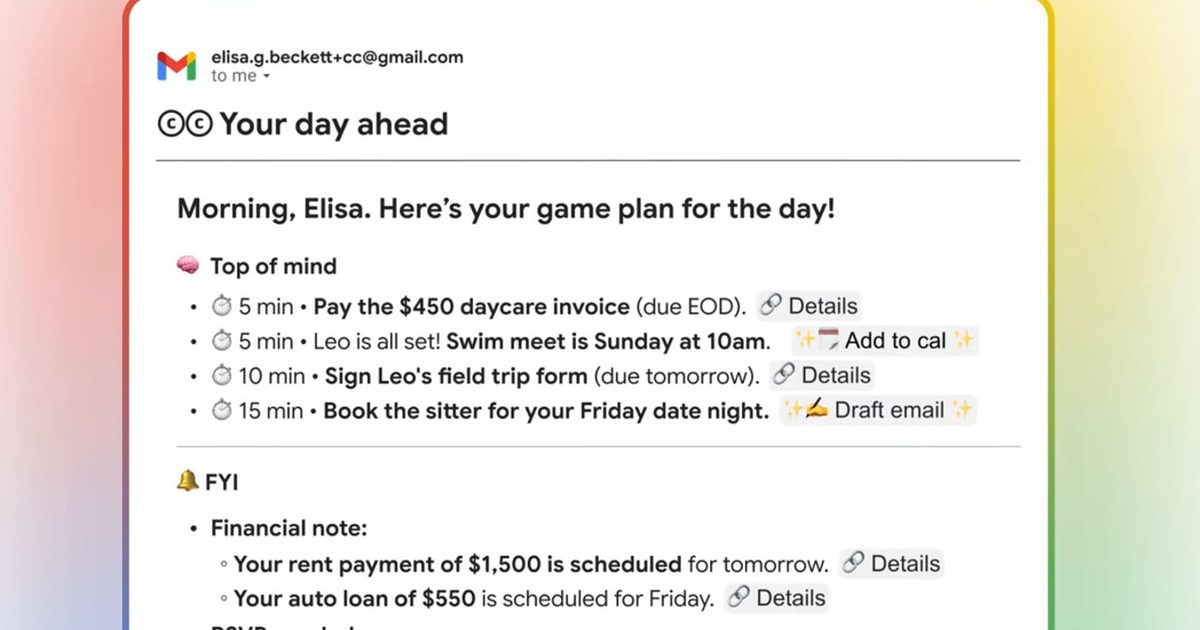

Google Labs just introduced CC, an experimental AI productivity agent built with Gemini that sends a Google CC daily briefing to your inbox every morning. The idea is to replace your usual tab-hopping with one “Your Day Ahead” email that spells out what’s on deck and what to do next.
If you like the habit of checking a daily summary like Now Brief on Galaxy phones, CC is Google’s take, but with a different home base. Instead of living as something you check on your phone, Google is putting the briefing in email and letting you reply to it for follow-up help.
Google says CC connects to Gmail, Google Calendar, Google Drive, and the wider web to build an understanding of your day.
What CC puts in your inbox
The “Your Day Ahead” message is designed to synthesize your schedule, key tasks, and updates into one clear summary. Google’s examples are practical, think reminders like paying a bill or preparing for an appointment, surfaced alongside the context you’d otherwise hunt down across apps.
CC is also meant to speed up the next click. Google says it can prepare email drafts and generate calendar links when needed, so the briefing can hand you an action path instead of just a recap.
You can email CC anytime
CC isn’t limited to the morning email. Google says you can steer it by replying to the briefing or emailing CC directly with custom requests, which is where the “agent” framing starts to matter.
Over time, Google says you can teach CC things about yourself and ask it to remember ideas and to-dos. The promise is simple: you keep working in your inbox, and CC becomes a running thread for organization and follow-through.
How to join the waitlist
This is an early Google Labs experiment, and access is gated. Google says early access is available today for eligible consumer account users 18+ in the US and Canada, starting with Google AI Ultra and other paid subscribers, with a waitlist sign-up on its website.
Before you jump in, note what Google hasn’t specified here: pricing for AI Ultra, which paid tiers qualify, and the exact controls around permissions and memory across Gmail, Calendar, Drive, and the wider web. If the concept clicks for you, the practical next step is joining the waitlist, then reviewing your account permissions as it rolls out.
Read the full article here